Welcome to Lecture Four of AI-Driven Animation and Video Generation. Today we move from understanding an image generator to making deliberate choices across an artwork or a film. We will follow five survey papers. Surveys are useful because they organize many individual methods into a map of the field. Our purpose is to read that map and connect it to creative work. Throughout the lecture, ask two questions. What information does a method need? And what decision does it help an artist make? The figures come from the papers, while the studio example we develop together is a classroom exercise.
Here is our route. We begin with video models and the problem of generating a sequence that holds together through time. We then consider visual art, where the intended experience determines which controls matter. The filmmaking survey shows how creators combine these tools in actual production workflows. Visual computing connects images and video to objects, scenes, and movement data. Finally, the creative-industries review places generation within a wider production process. You do not need to memorize every model name. By the end, you should be able to choose an appropriate kind of input, explain a likely limitation, and describe how you would judge the result.
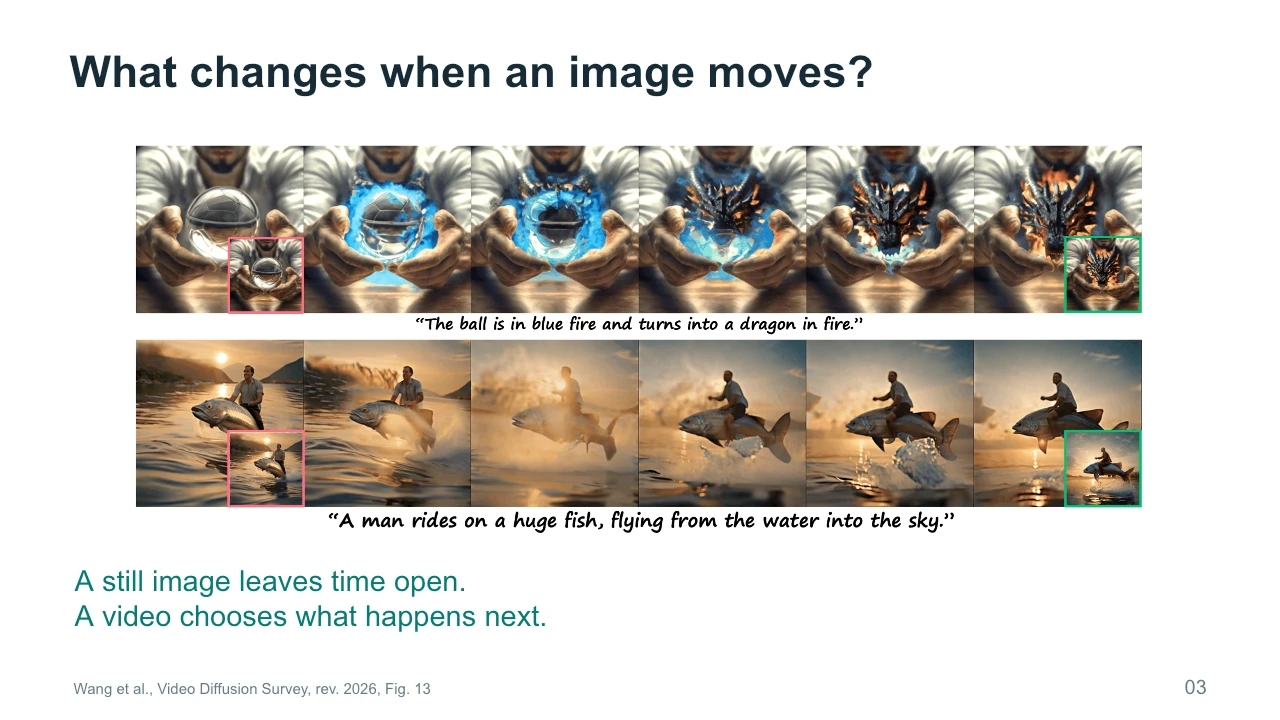
What changes when an image starts to move? A still image suggests possibilities, but it leaves the next moment open. A video commits to a sequence of events. If a character raises a hand, that hand needs to belong to the same person as it moves. If the camera passes a chair, the chair should remain in a plausible position. These requirements involve appearance, movement, and spatial relationships. They also involve meaning. Holding on an empty room for ten seconds creates a different experience from showing it for one second. Time therefore adds both technical demands and artistic choices. A sequence can fail in either respect.
We will use a simple studio scene throughout the lecture. The room is empty. A painting begins to move. Then someone returns. This is an invented teaching example, so there is no correct finished version to reproduce. You might imagine a frightening scene, a quiet memory, or a playful animation. Start by picturing what should stay stable. Perhaps the room layout and painting frame remain fixed while only the painted surface changes. Then consider what the returning person should notice. These decisions will help us compare methods. A tool becomes useful when we can say which part of this scene it should control.
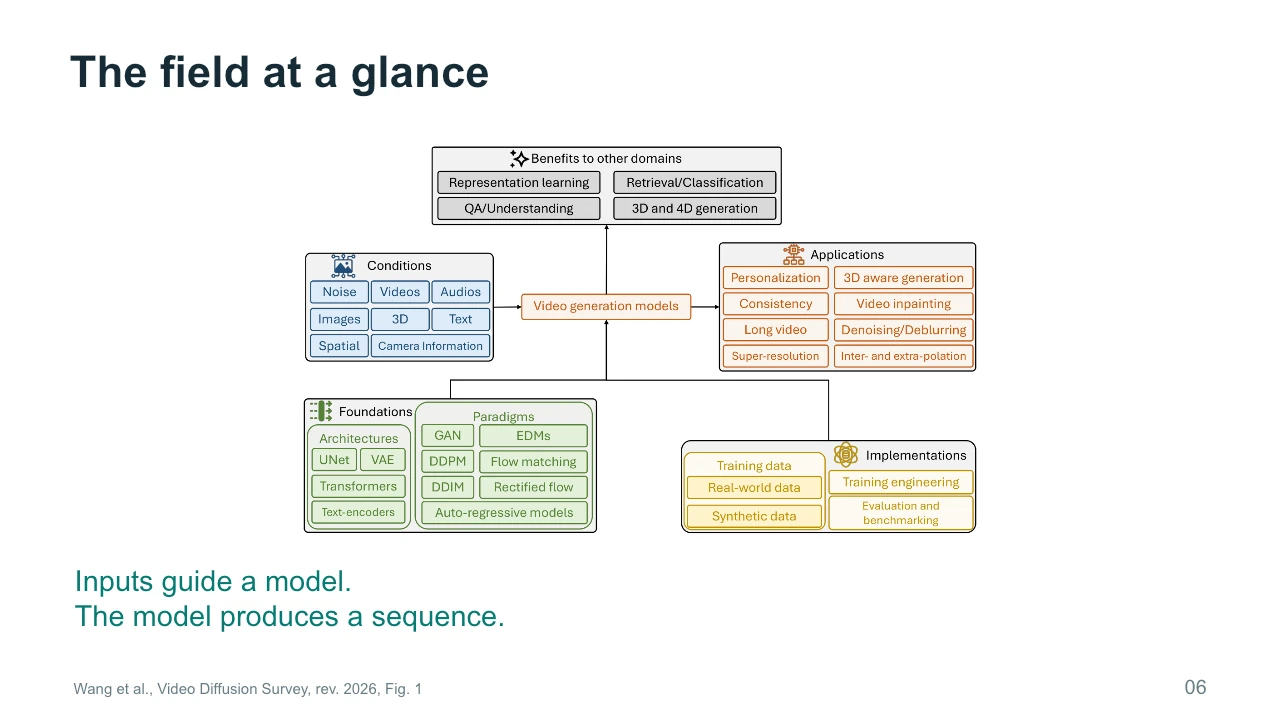
Our opening reading is Wang and colleagues' Survey of Video Diffusion Models, first posted in 2025 and revised in February 2026. It covers foundations, implementations, and applications. We will follow its progression from the generation mechanism to inputs, control, editing, and connections with three-dimensional scenes. A survey figure often contains several methods at once. Read such a figure as a set of relationships, rather than as one model you must implement. Also pay attention to dates. A survey can contain important earlier examples alongside newer research. Its publication or revision date does not make every comparison a current ranking of available systems.
At a high level, video generation connects inputs to a model and then to a sequence. The inputs might include a sentence, an image, a source video, sound, or camera information. Each input supplies a different kind of constraint. A sentence can describe a mood or action, but it usually leaves many visible details unspecified. An image supplies more exact information about appearance. A source video can supply a performance or a movement pattern. When reading the overview, look for what enters the model and what comes out. This simple habit makes a complicated architecture easier to understand and helps you recognize what a demonstration actually controls.
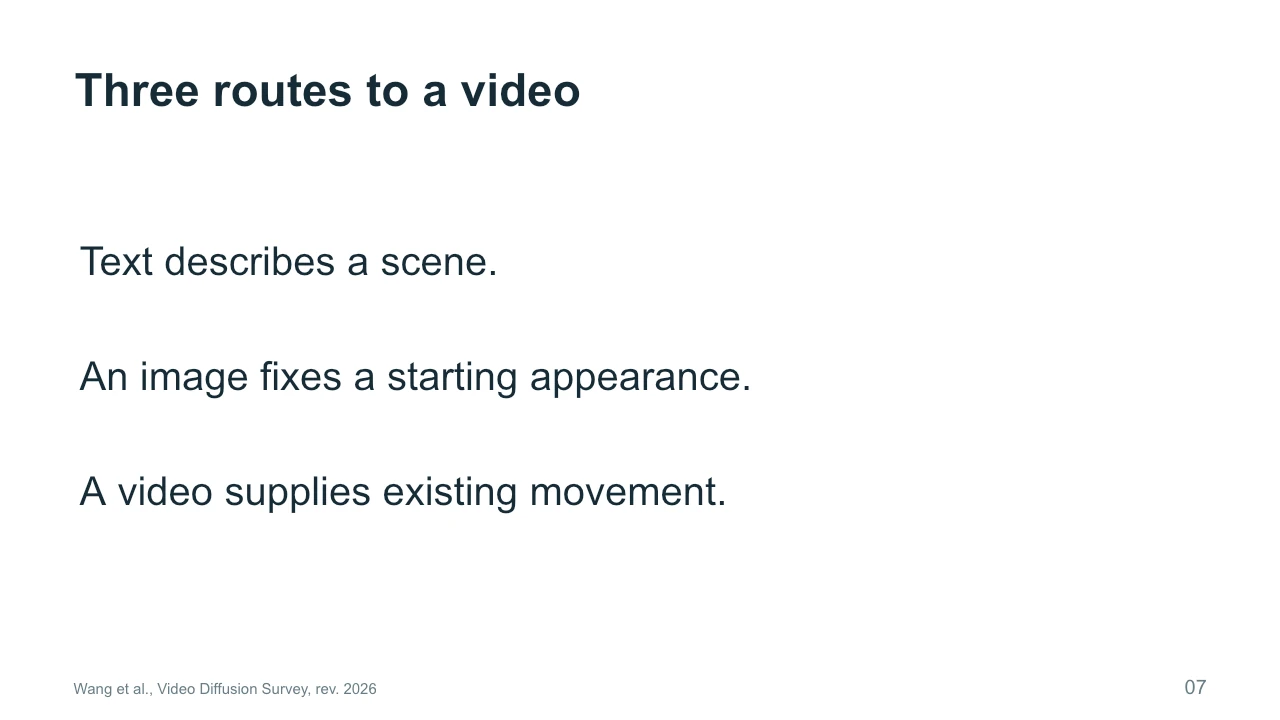
Consider three routes to the studio scene. With text-to-video, we describe the room and the moving painting, and the model invents much of their appearance. With image-to-video, we first choose a picture of the room, then ask for movement from that starting appearance. With video-to-video, we begin with an existing sequence and change selected properties, such as its visual style. None of these routes automatically solves every production problem. An initial image does not guarantee stable identity later in the shot. A source video does not guarantee exact motion preservation. Choose the route according to the information you already have and the properties you need to retain.
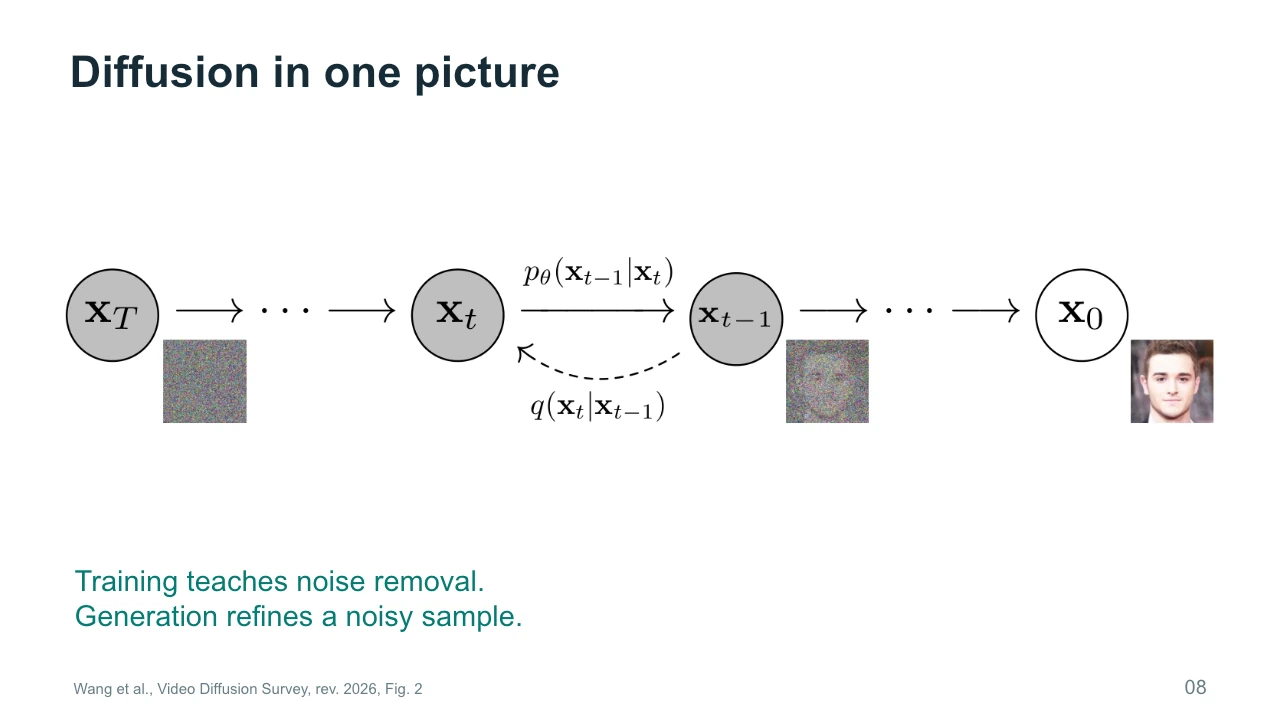
Diffusion is easiest to understand by separating training from generation. During training, a system encounters examples with added noise and learns how to predict information needed to remove that noise. During generation, it starts with a noisy sample and repeatedly refines it using the learned model. The diagram shows a succession of states, rather than a film of a face changing over time. The prompt or another condition influences the refinement. The model does not learn a new set of weights every time you generate an image. It uses what training has already established. This distinction helps explain why changing a prompt differs from adapting the model.
Video diffusion has two different meanings of time. Frame time is the time inside the represented event: a person enters, walks across the studio, and looks at the painting. Denoising time is the sequence of computational refinement steps that produces the sample. A denoising step is not an extra frame in the finished video. Depending on the architecture, one step may update information for many frames together. Confusing these two timelines makes diagrams difficult to read. Whenever you see a time index, ask whether it identifies a moment in the scene or a stage in noise removal. The answer tells you what relationship the model is trying to represent.
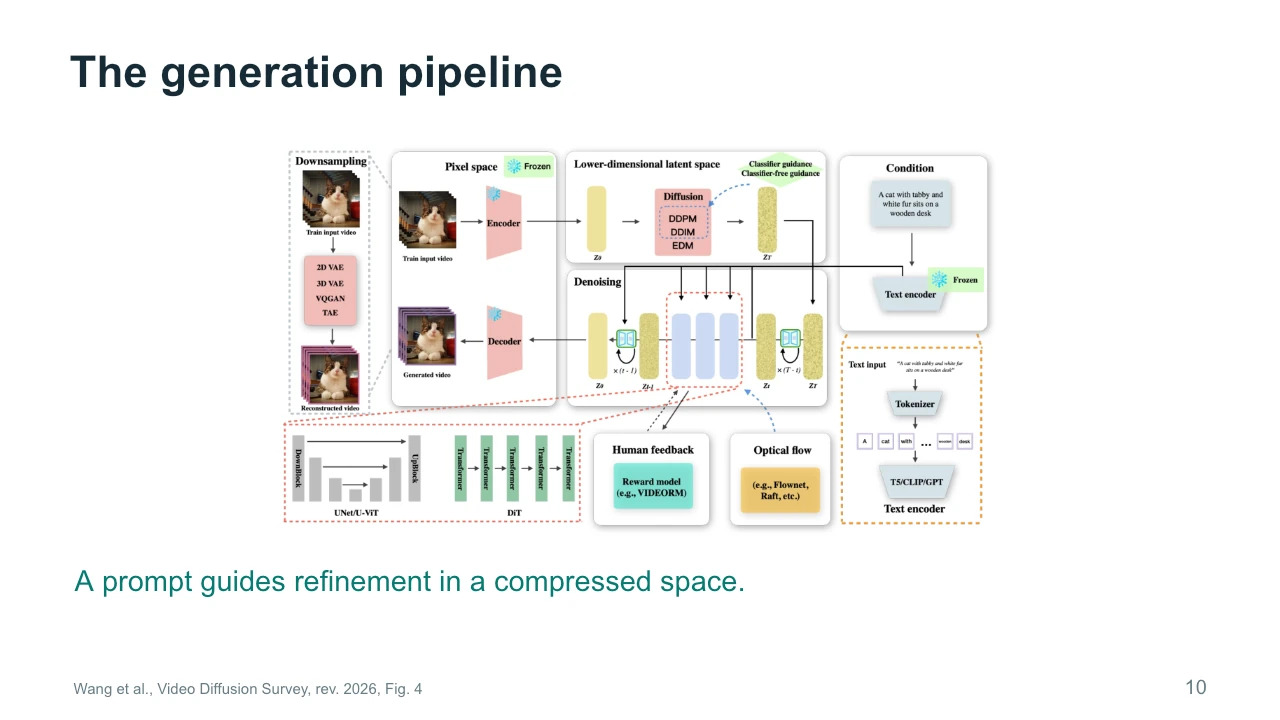
The generation pipeline often works in a compressed space. First, a text encoder converts the prompt into a representation that the model can use. The generative network then refines a noisy representation under that condition. A decoder converts the result into visible frames. This division reduces the amount of information processed by the most expensive part of the system. It also means that the final image depends on several components. A problem with fine texture may involve compression or decoding as well as generation. For our studio scene, the prompt supplies an instruction, while the latent representation carries the evolving visual content during refinement.
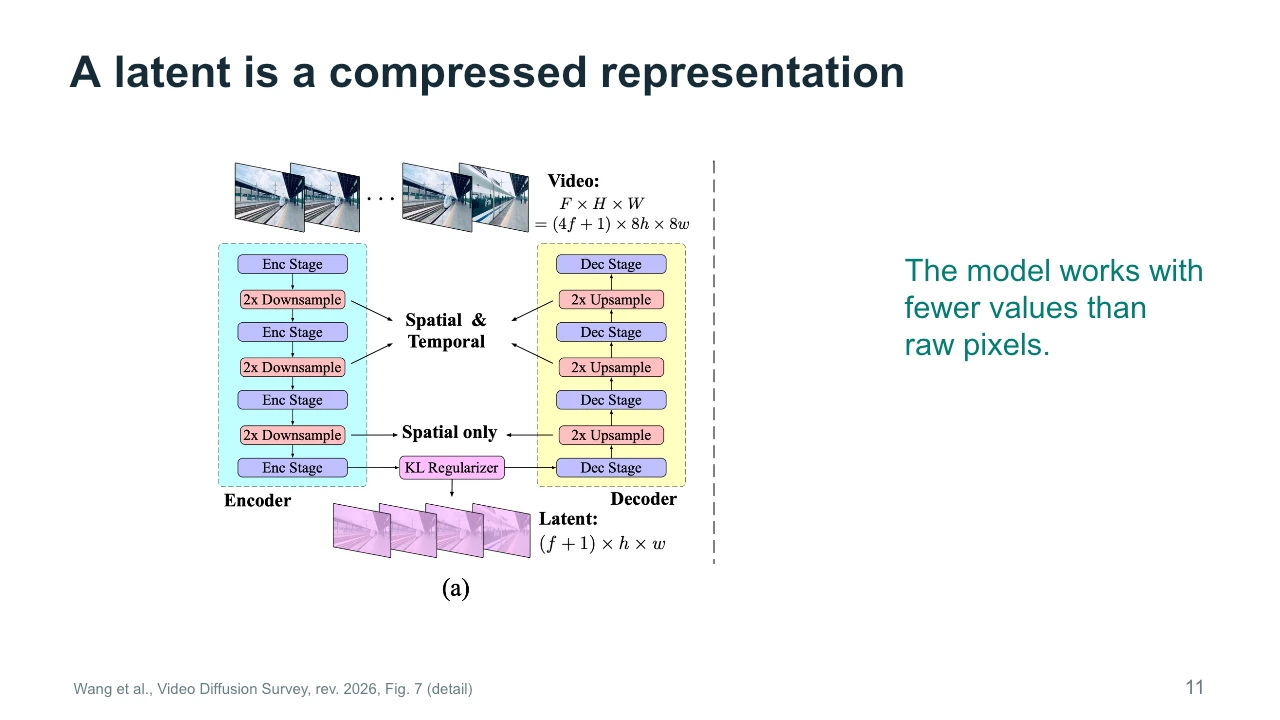
A latent is a compressed representation of the data. Imagine describing the essential structure of a room with fewer values than you would need to list every colored pixel in every frame. The encoder maps the original material into that representation, and the decoder maps it back. The figure shows compression across space and, in some stages, across time. Compression makes a large video more manageable, but it can also discard detail. A latent is not a miniature image that we can always interpret directly. It is a learned representation. Keep the practical tradeoff in mind: less computation can come with limits on small details and reconstruction fidelity.
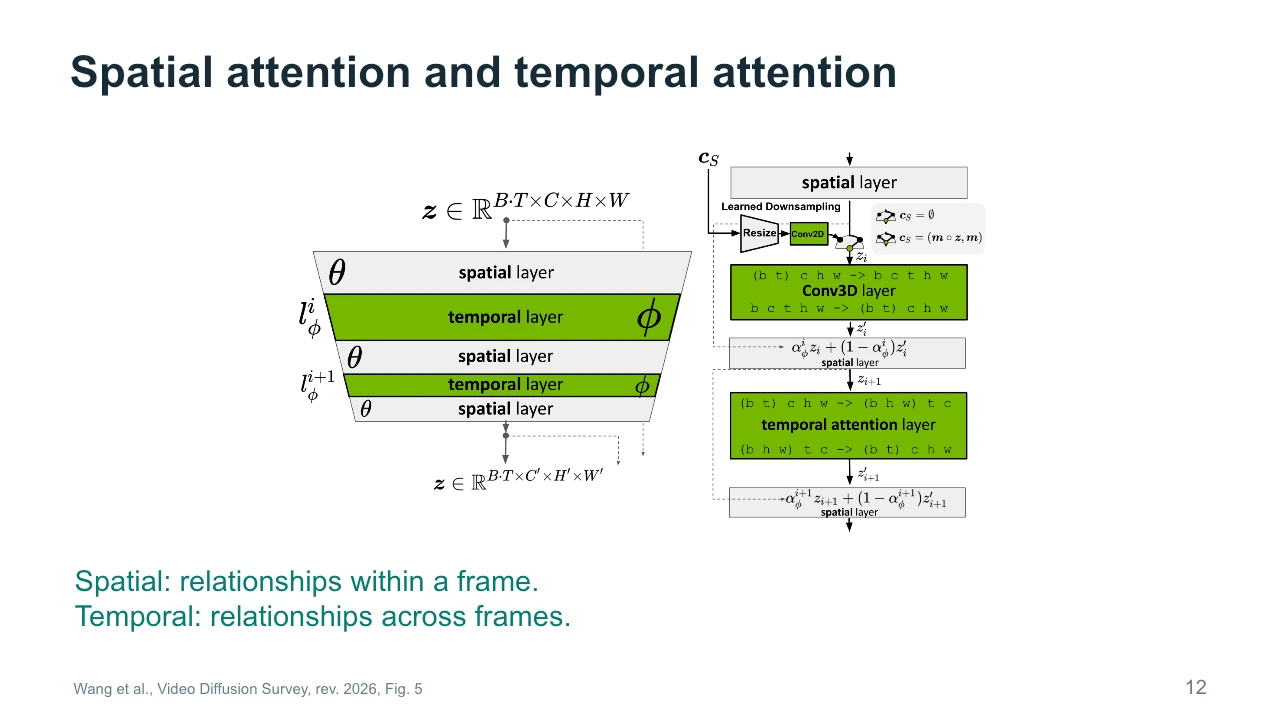
Spatial relationships occur within a frame. They include the position of a person relative to a door, or the relationship between a hand and the object it holds. Temporal relationships connect different frames. They help a model relate the hand now to the hand a moment later. The diagram separates spatial and temporal processing to make those roles visible. Attention is one way to connect relevant features, but it does not guarantee correct understanding of the scene. For the studio example, spatial processing helps organize the room at a particular instant. Temporal processing helps the painting and furniture maintain meaningful relationships as the sequence develops.
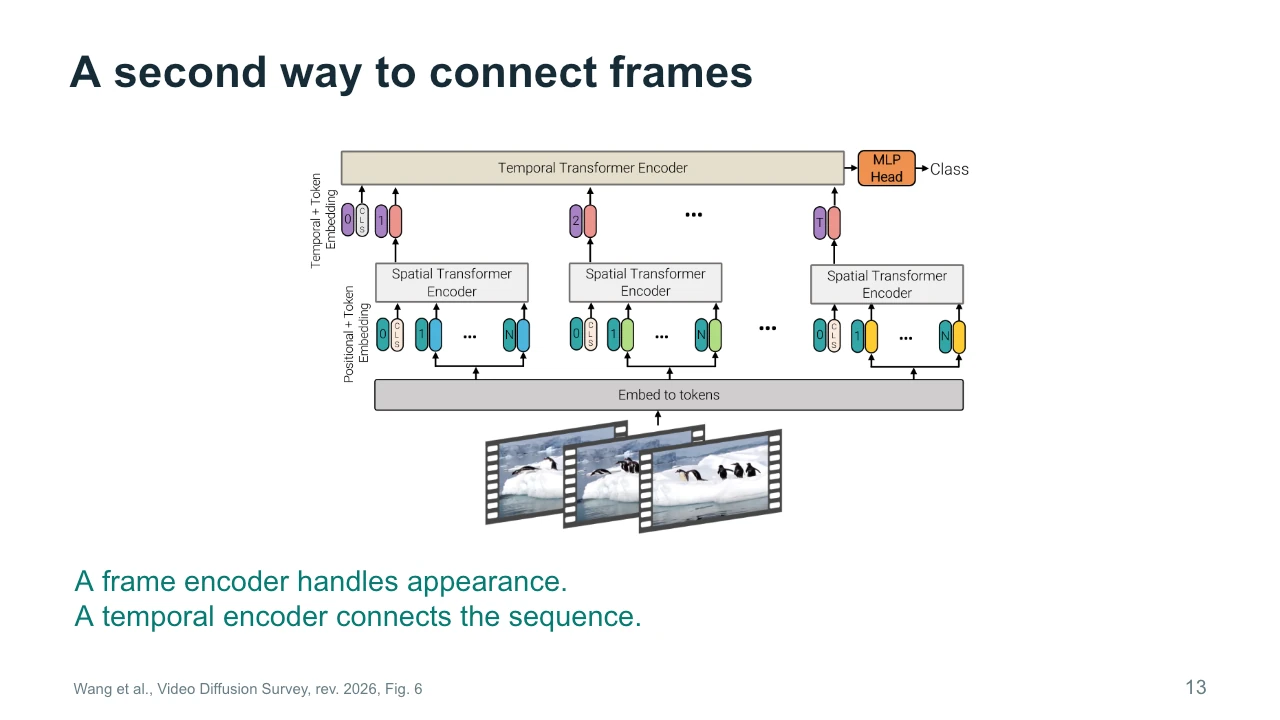
This figure illustrates another way to connect frames: encode information within each frame, then connect those representations across the sequence. The pictured architecture is a video-understanding example with a classification output, rather than a complete video generator. We are using it to understand an architectural idea. The lower part handles appearance within individual frames. The upper part combines information through time. Separating these roles can make processing easier to organize. When you encounter a research diagram, check the output label before assuming its task. Similar building blocks can appear in recognition and generation systems, even though their training objectives and outputs differ substantially.
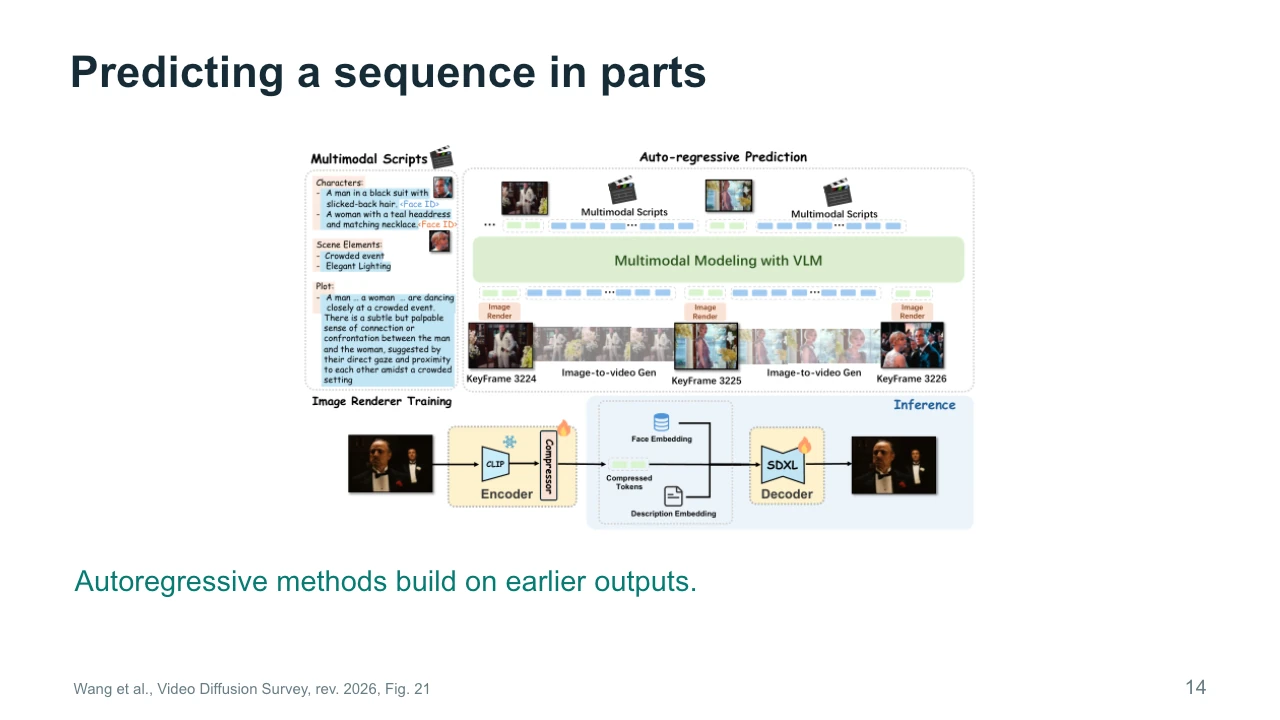
Some approaches build a sequence in parts, using earlier outputs to guide what comes next. This is the basic idea of autoregressive prediction. The diagram includes script information, keyframes, and a rendering process. You can think of the earlier material as context for the next decision. This can help extend a sequence, but errors in the context may also carry forward. If a character's coat changes in one generated part, later parts may preserve the new coat instead of the original one. For filmmaking, that makes checkpoints valuable. Inspect important keyframes and transitions before treating a longer generated sequence as a finished shot.
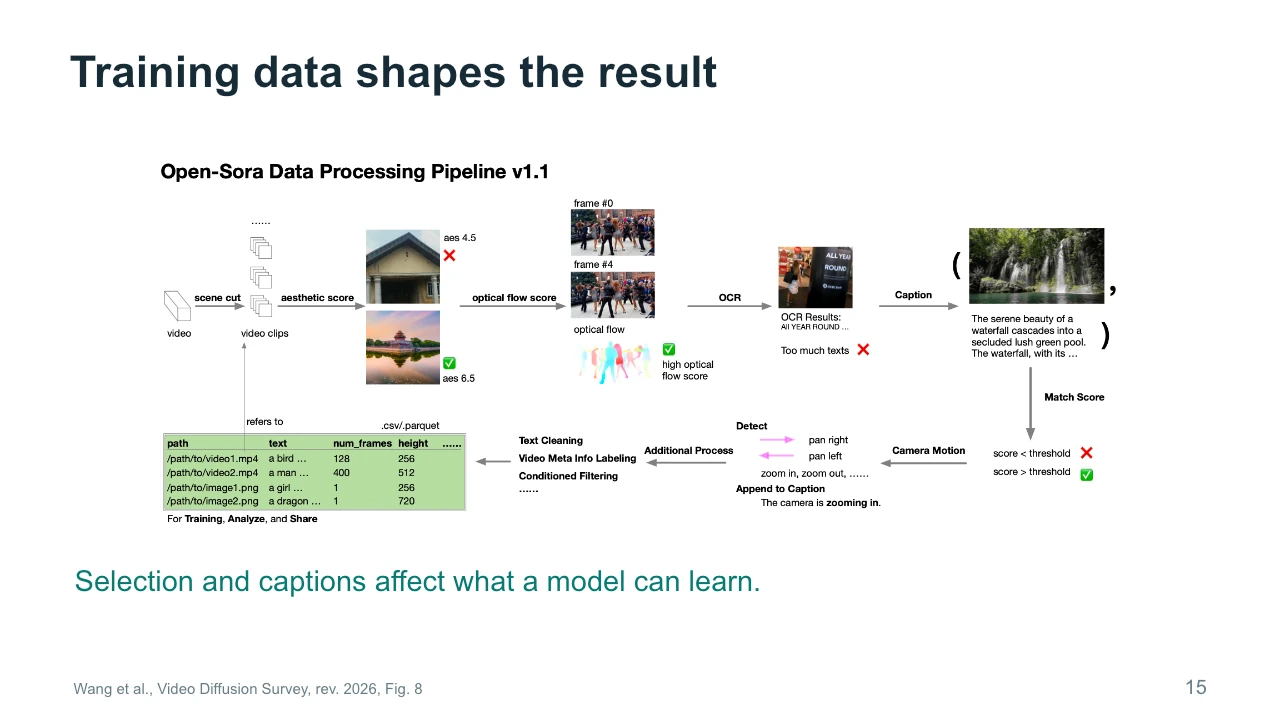
Training data shapes the kinds of results a model can produce. The figure shows a pipeline that selects clips, filters them, and attaches descriptions. Each stage changes what reaches training. A caption can describe an object, an action, or a camera movement. If the caption misses an important event, the model receives a weaker connection between language and that event. Filtering can remove unusable clips, but it also reflects decisions about what counts as desirable material. An artist should therefore avoid treating model behavior as a neutral view of all possible images. It reflects the material, labels, and objectives used to train the system.
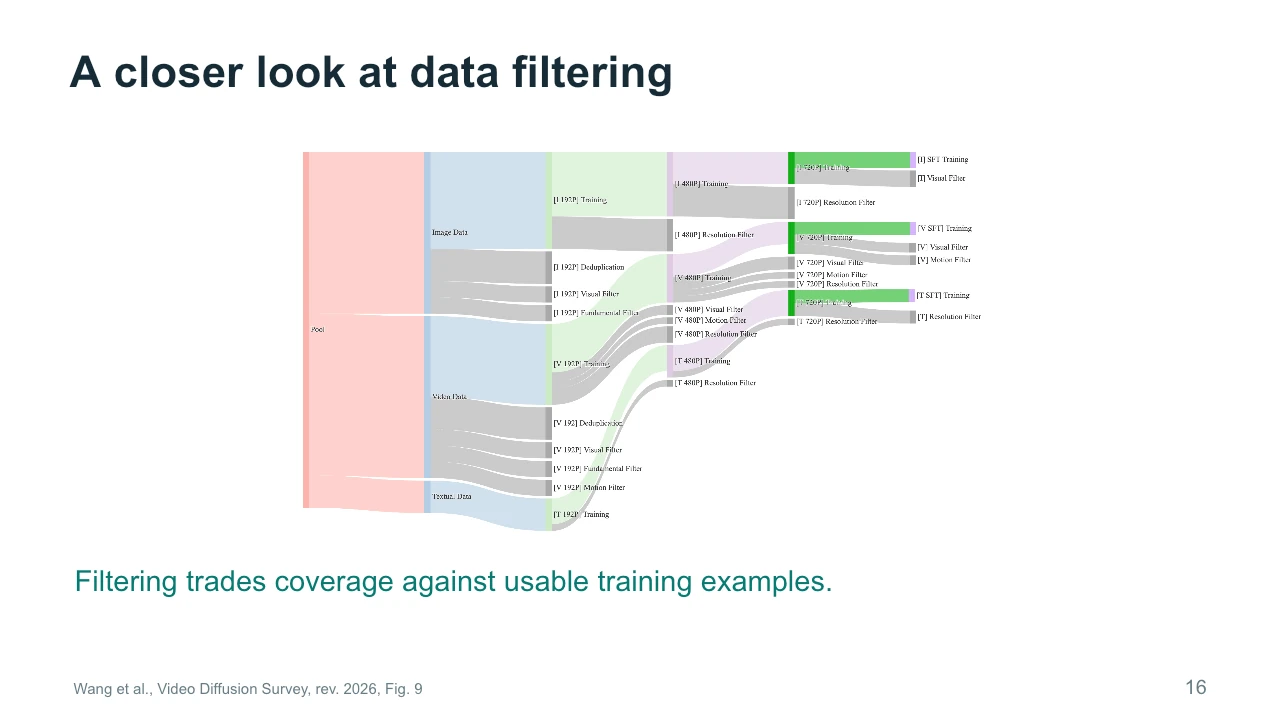
The branching diagram makes filtering visible. A broad pool of material becomes smaller groups suited to particular training stages. Some examples may have adequate resolution but little movement. Others may have useful movement but poor captions or visual quality. The important point is that filtering trades coverage against usable examples. Removing difficult material may improve average training quality while leaving gaps in certain actions or styles. This matters when your project depends on an unusual visual language. If a model struggles with that language, repeatedly rewriting the prompt may not address the underlying limitation. The required examples or relationships may be poorly represented in training.
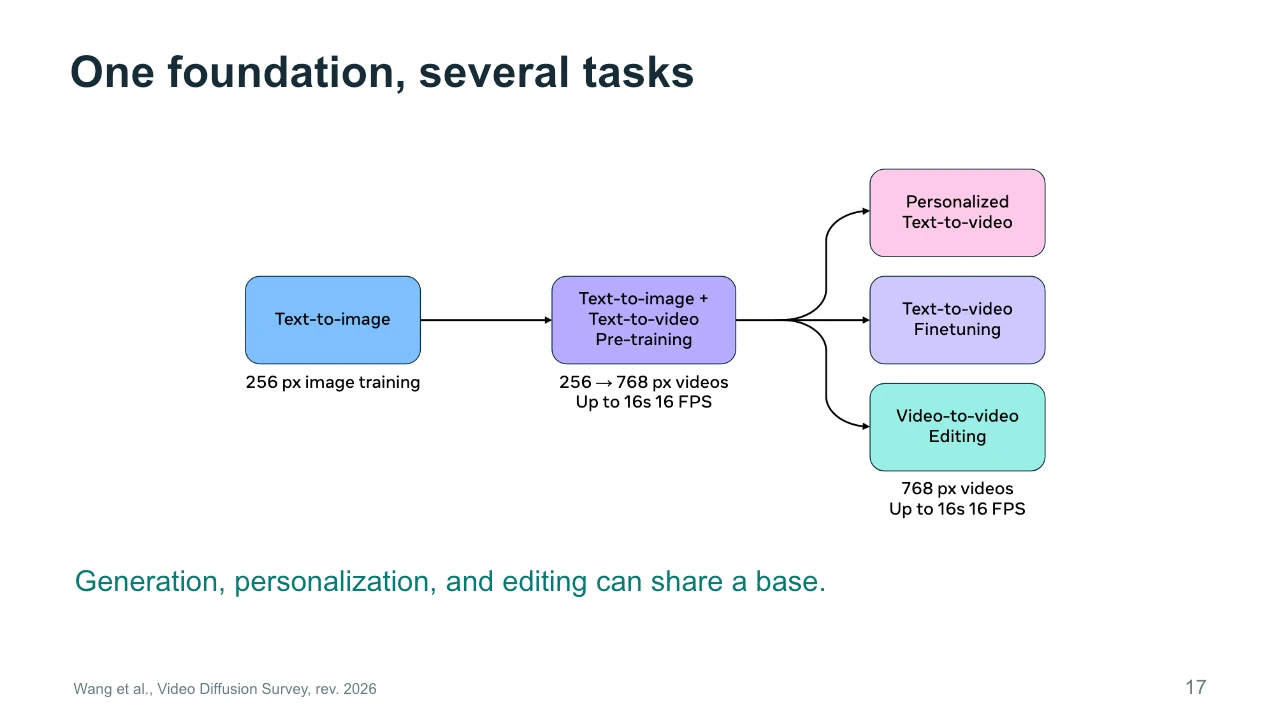
A single foundation can support several tasks. The figure moves from image training toward video training and then toward specialized applications such as personalization or editing. Shared foundations let researchers reuse learned visual knowledge instead of starting from nothing for every task. However, task support still depends on the model and the way it is adapted. Generating a new character and preserving a particular existing character are different requirements. For our studio scene, a general model might create an attractive room, while a specialized workflow might better preserve the same painting across shots. Shared origins do not make those capabilities interchangeable in practice.
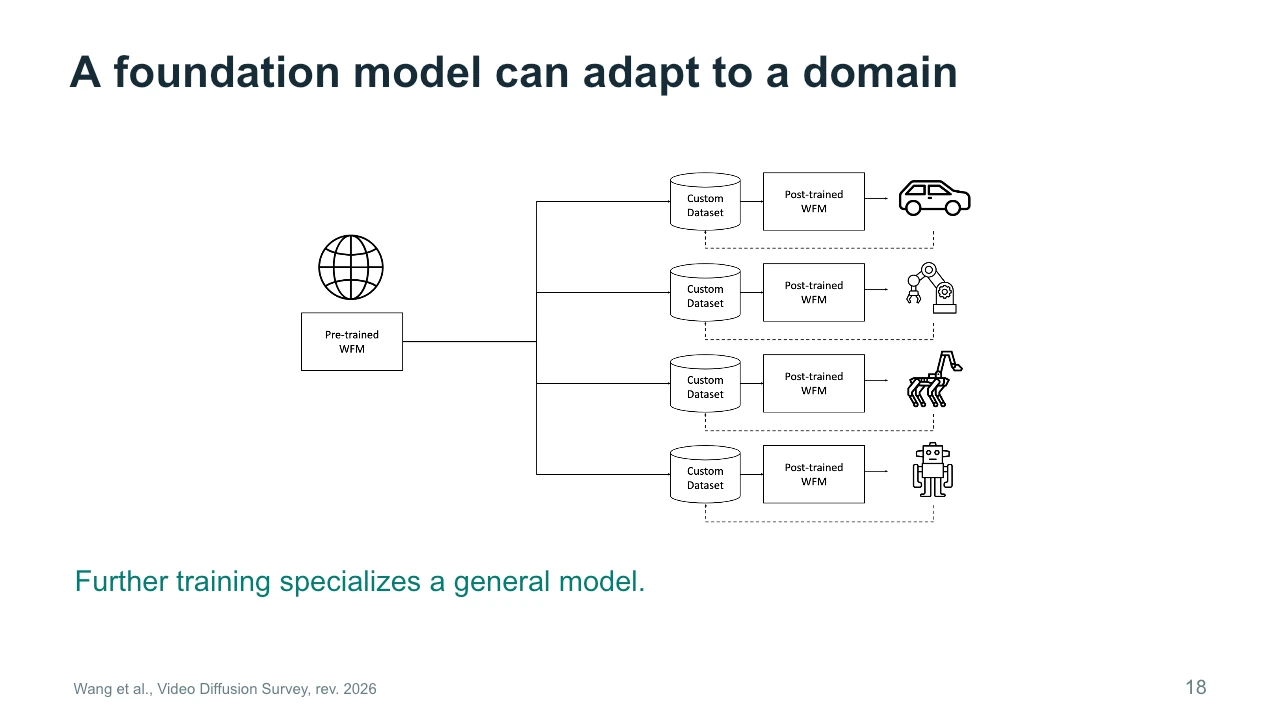
This diagram from the Cosmos discussion shows a pretrained foundation model branching into domain-specific adaptations. The custom datasets concern physical settings such as vehicles and robots. Follow the diagram from the common base toward the separate applications. Further training helps specialize the model to the material and tasks of a domain. Adapting a model to an artistic style is a related idea, but this particular figure does not report an art experiment. The general lesson is that specialization requires suitable evidence. A small, carefully chosen dataset may teach a useful pattern, while an inconsistent collection may introduce unwanted associations or reduce the usefulness of the adaptation.
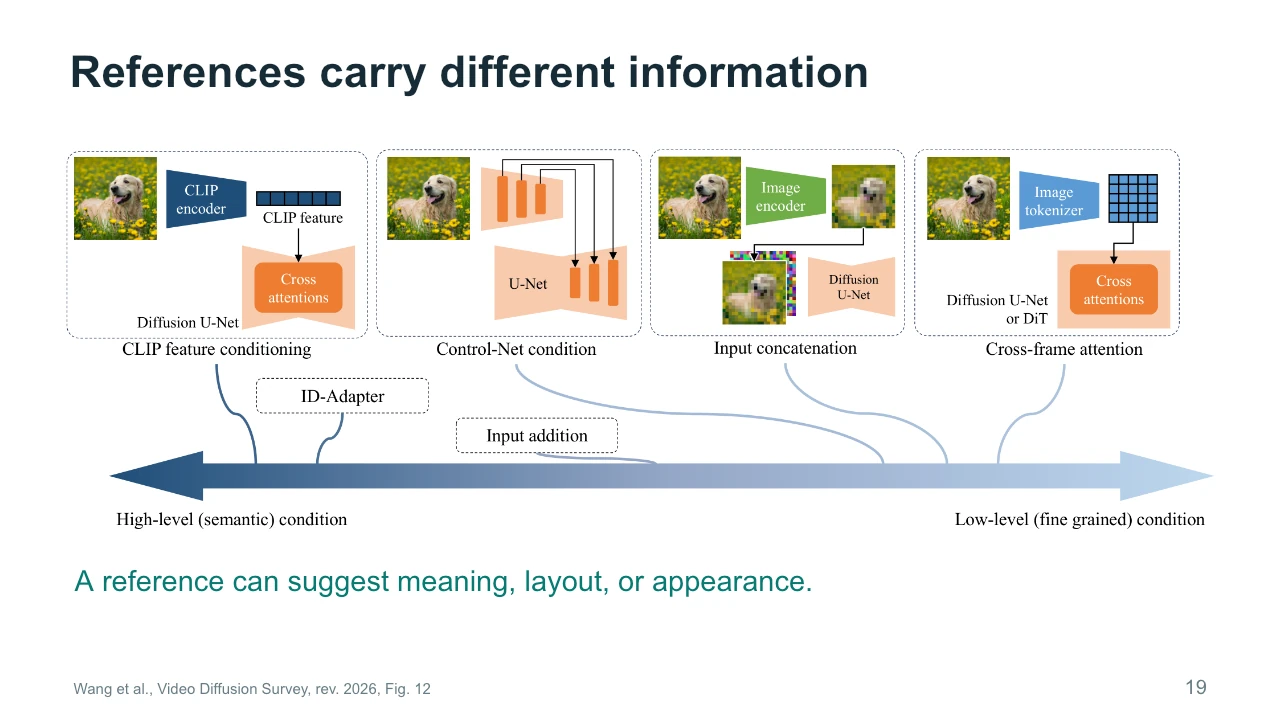
A reference image can communicate several kinds of information. It may suggest broad meaning, such as a dog in a garden. It may specify appearance, such as the exact markings of one dog. Or it may constrain structure, such as the location and outline of the subject. Different conditioning methods preserve these properties to different degrees. The figure organizes several ways to introduce image information. You do not need to memorize every connection. Instead, ask what you want the reference to contribute. For the studio scene, a mood image and a precise room-layout reference serve different purposes, even if both enter the workflow as pictures.
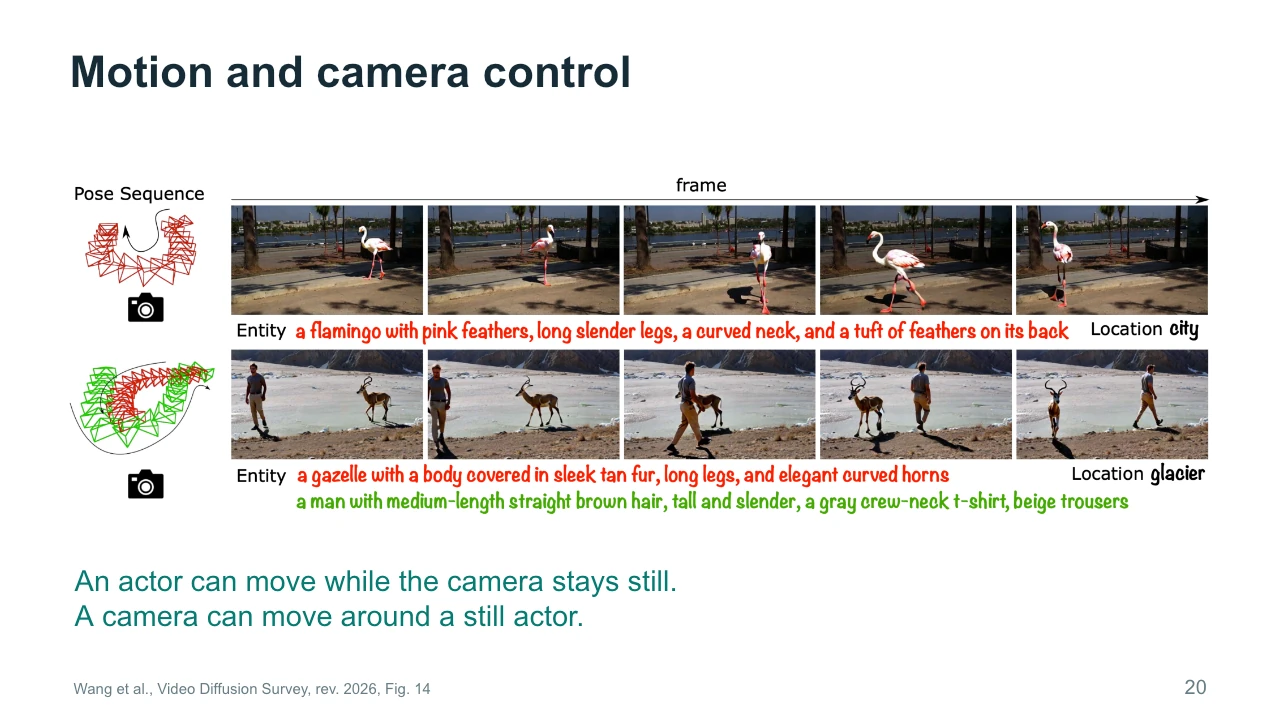
Object motion and camera motion are distinct. A person can cross the studio while the camera remains still. The camera can also move around a person who does not move. In the resulting images, both situations produce changing pixel positions. A system therefore needs useful constraints if we want to control them separately. The figure combines scene descriptions with camera information. When planning a shot, specify the intended camera behavior independently from the action. Then inspect whether the output respects both. A visually energetic result may still fail if the camera moves when the scene requires a stable viewpoint, or if the subject freezes during the intended action.
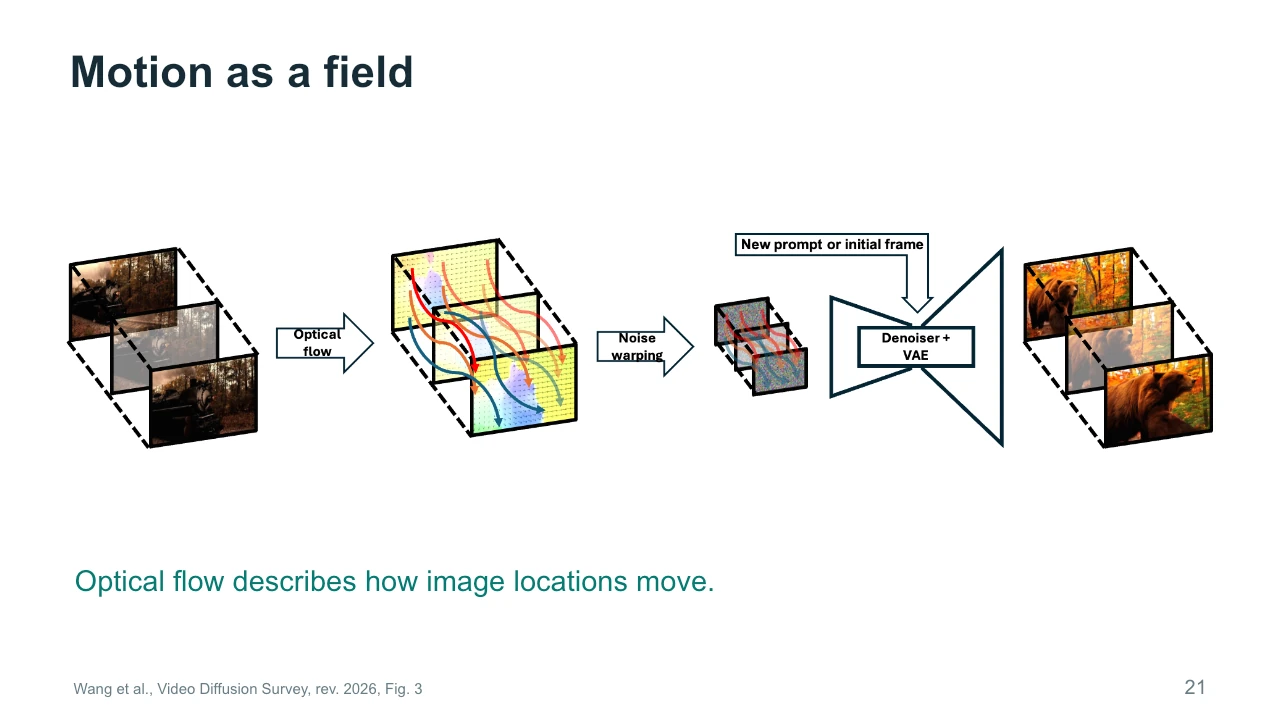
Optical flow describes how locations in one image correspond to locations in another. The colored paths in the figure represent a movement field. Such information can help transfer movement or guide the evolution of a generated sequence. Optical flow describes apparent image movement, so it can reflect both object motion and camera motion. It is not a complete reconstruction of the physical world. Occlusion creates additional difficulty because something visible in one frame may disappear behind another object. For creative work, a movement field can offer more specific guidance than a sentence such as move naturally. Its reliability still depends on the source and the scene.
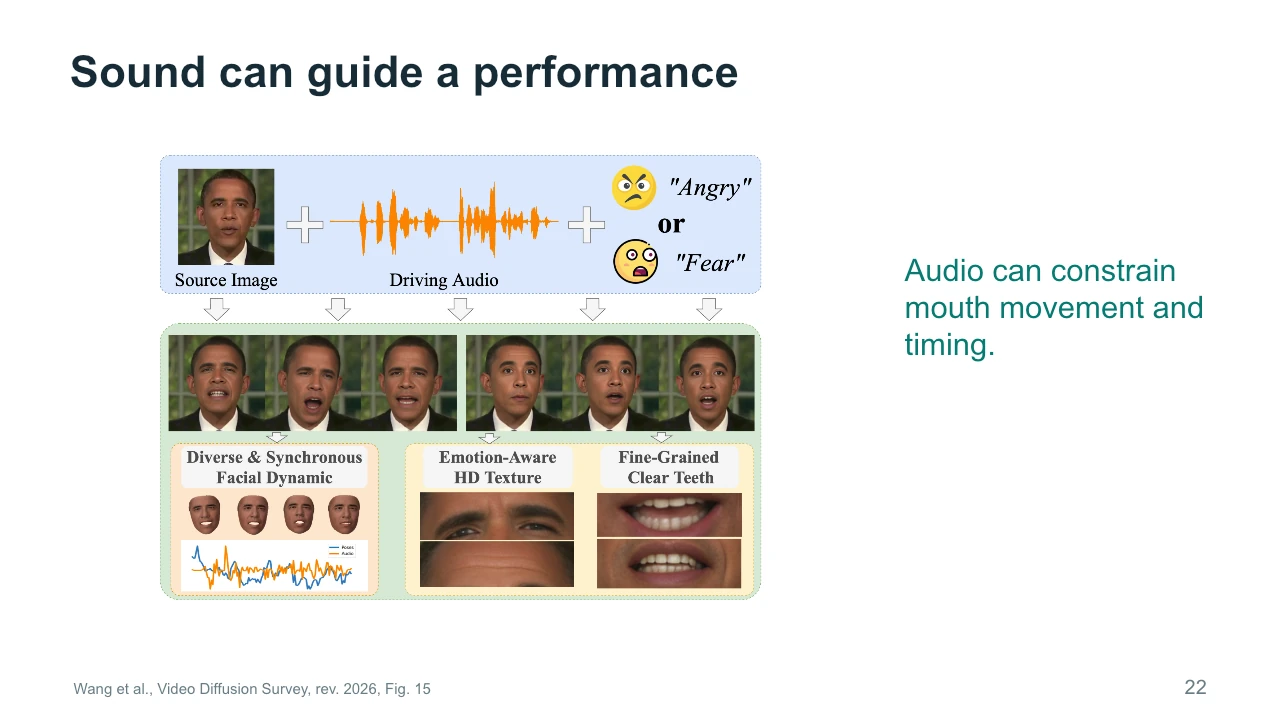
Sound can guide a visual performance. In this example, a source image and audio help determine a speaking face, with additional information related to expression. Audio supplies timing that a still image cannot provide. A voice has pauses, stressed syllables, and changing rhythm. Mouth movement should relate to those events if the result is meant to depict speaking. A convincing portrait alone does not establish accurate lip synchronization or a coherent performance. Watch transitions and listen at the same time. In a film workflow, this is also a reminder to plan sound early when it controls the timing of the visible action.
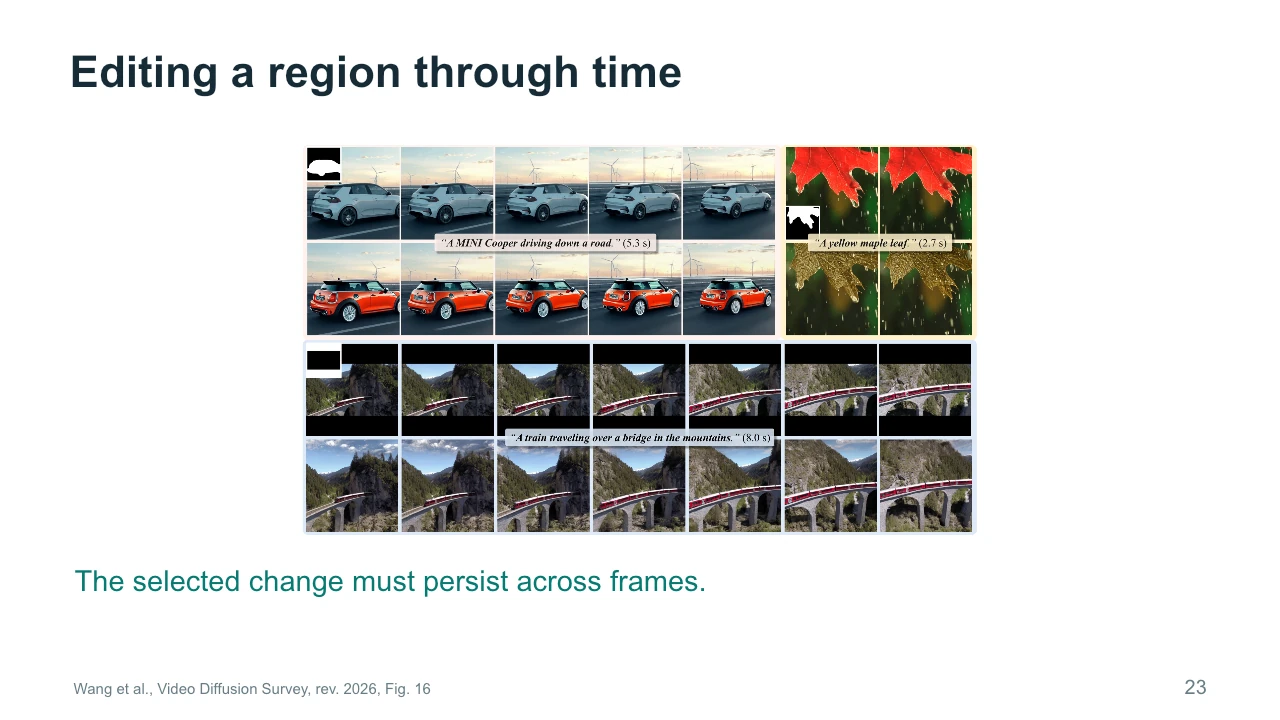
Editing a video region adds a temporal requirement to a familiar image-editing task. If we change the color of a car, that change should remain attached to the car across the sequence. The background should also behave consistently. The examples show local changes and reconstruction of selected areas. A mask identifies a region, but the region may move, change shape, or become partly hidden. This makes a single successful frame insufficient evidence. For the studio exercise, imagine changing only the painting while preserving the wall and frame. Inspect the boundary as the camera moves, because that is where small inconsistencies often become noticeable.
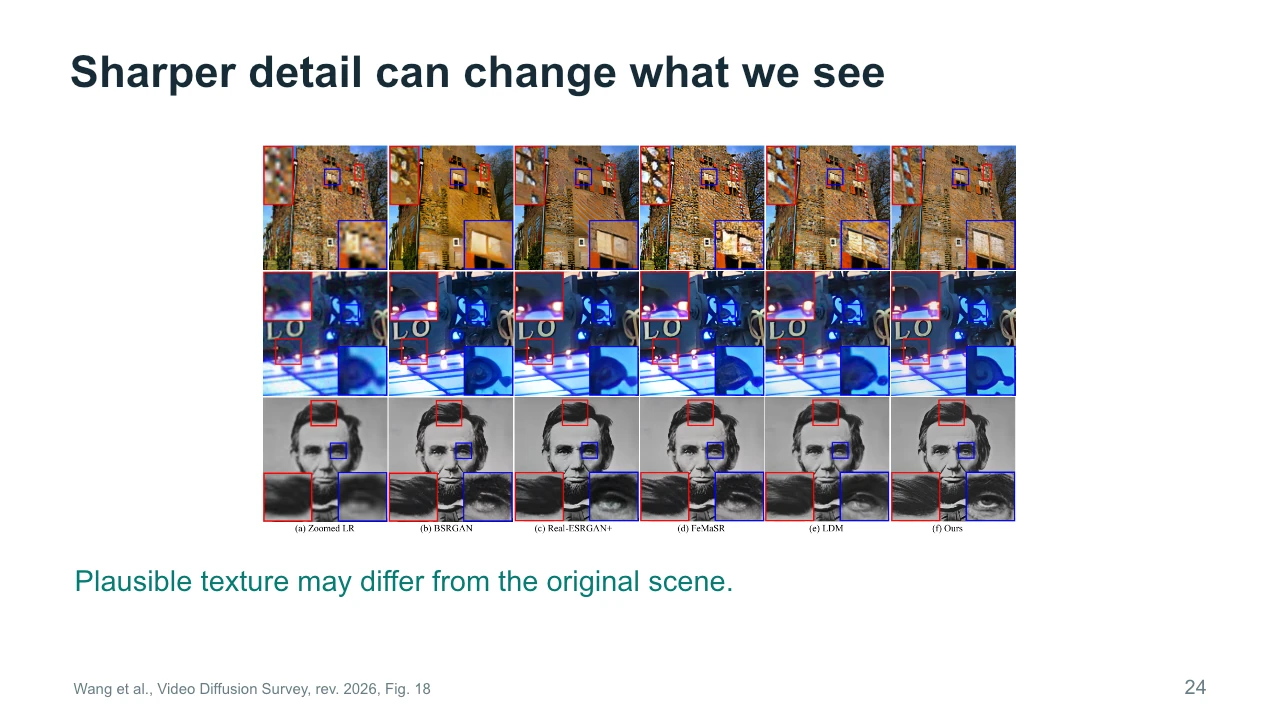
Super-resolution methods can make details look sharper. These examples compare restoration methods on still images, even though the figure appears in a video survey. Read the columns as methods, not successive moments in time. Compare the brick texture and the facial details. A generated texture can be plausible without matching the original high-resolution scene. That difference matters if your aim is faithful restoration. It may matter differently if you are designing a new artwork. For video, an additional question remains: do the added details stay stable across frames? These still comparisons alone cannot answer that question. Sharpness and temporal consistency require separate inspection.
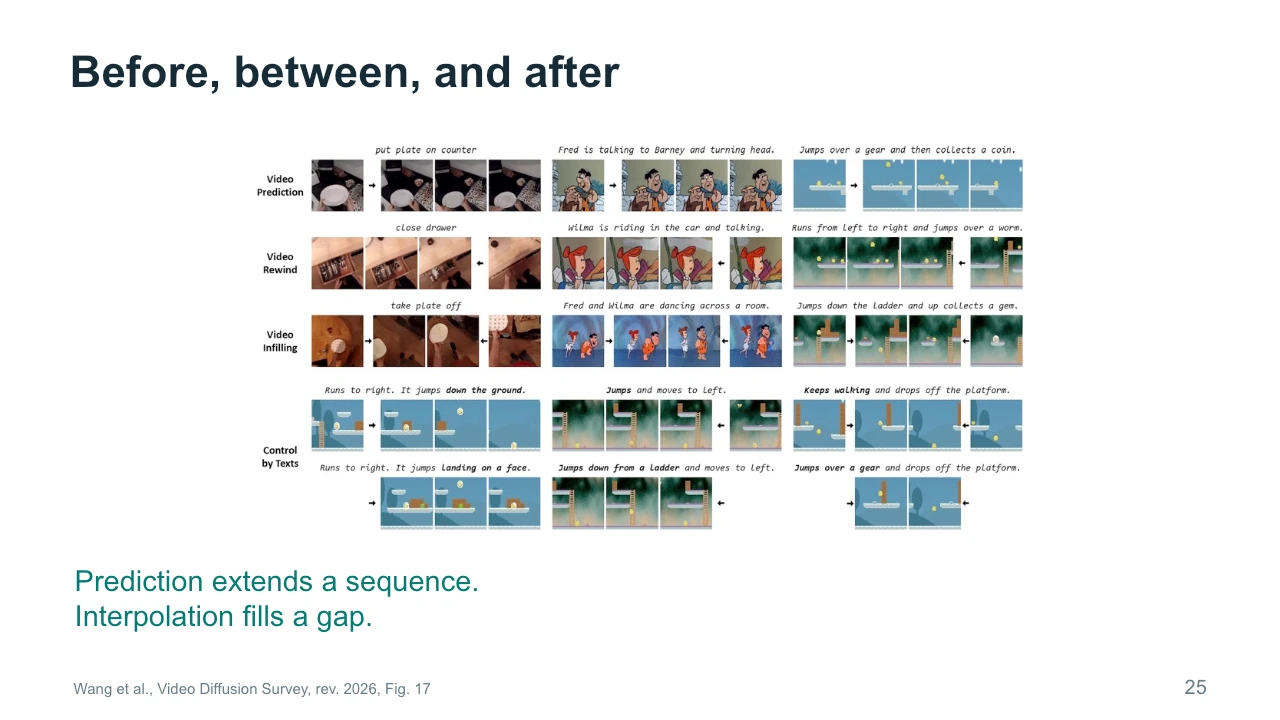
Prediction and interpolation answer different questions. Prediction extends a sequence beyond what we already observe. Interpolation fills a gap between known moments. The examples also include generating earlier content, which asks what might have happened before the available sequence. These outputs are plausible constructions, rather than recovered facts about an unseen event. For our studio film, interpolation might help connect two chosen keyframes, while prediction might extend a shot after the painting starts moving. Both methods can produce unexpected intermediate actions. Check the whole path between important moments, because getting the beginning and ending right does not guarantee that the transition serves the scene.
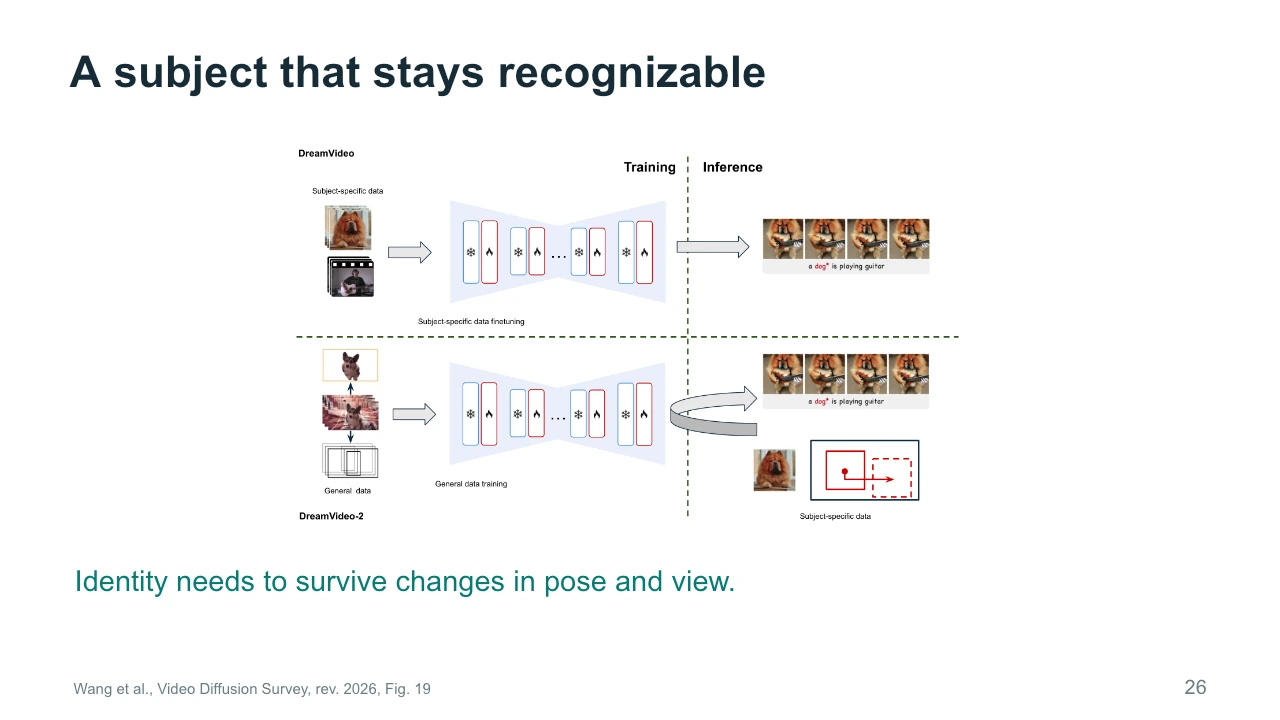
A recognizable subject needs to survive changes in pose, lighting, and viewpoint. The figure compares approaches that use subject-specific information during adaptation or inference. The technical details differ, but the creative requirement is easy to state. We want to recognize the same subject when the camera angle changes. A general description such as a small brown dog leaves many identifying features unspecified. References can provide those details more directly. For a film, evaluate identity across the shots you actually need, rather than only in a favorable close-up. A method may preserve a face from the front while struggling with a profile or an unusual expression.
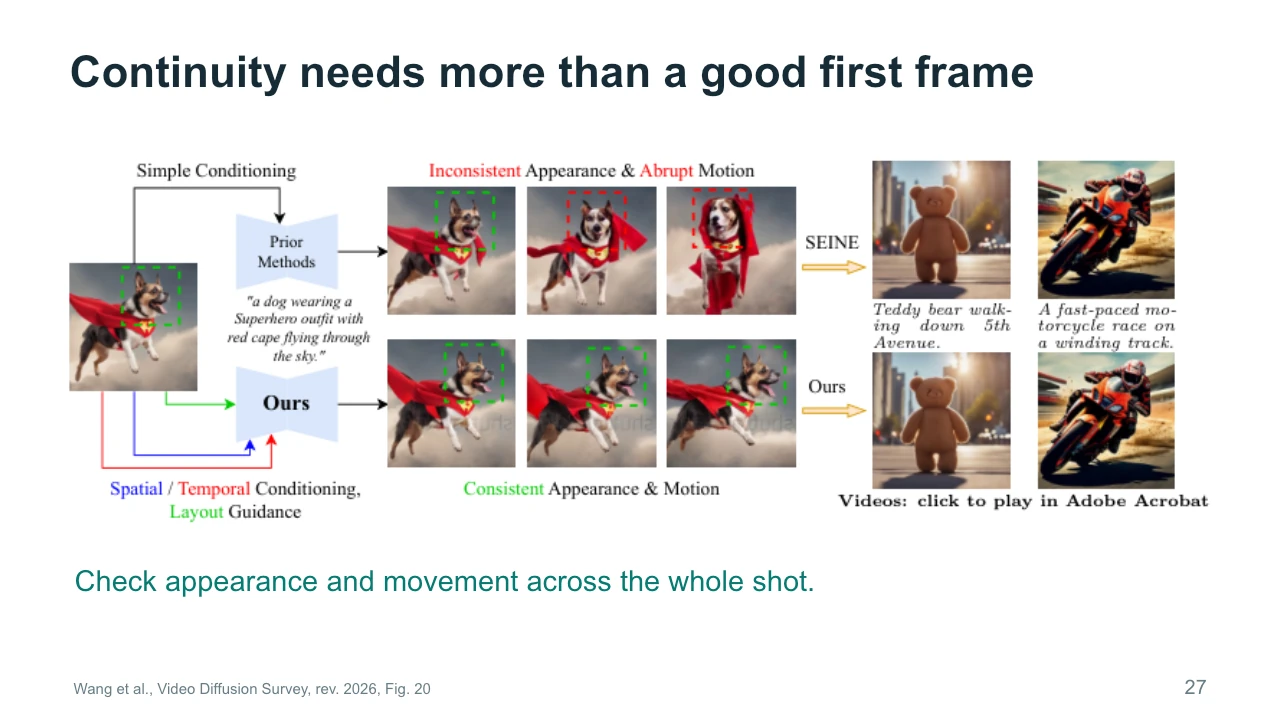
A good first frame is only the beginning of continuity. Look at appearance and movement throughout the shot. Does the subject keep its recognizable features? Does its motion develop smoothly and plausibly for the intended style? The figure presents examples intended to illustrate more consistent conditioning. Treat them as selected demonstrations, not proof that every output will remain stable. Also separate a deliberate transformation from an accidental drift. If our painting is meant to change, specify what may change and what must remain stable. The picture inside the frame might transform while the frame itself keeps the same shape and position.
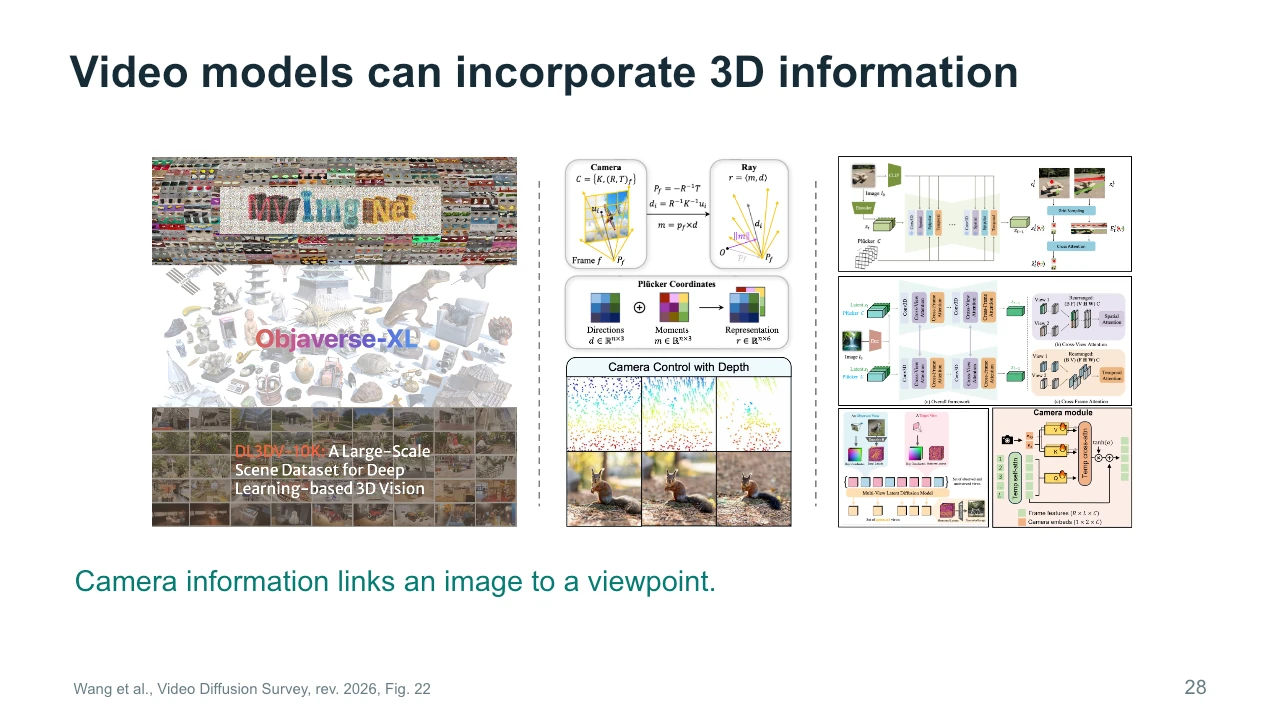
Video models can incorporate explicit three-dimensional information. The figure groups examples involving training datasets, camera representations, and architectural changes. The middle column connects a camera to rays through image locations. You can understand a ray as a direction from which the camera observes the scene. This provides more specific spatial information than a verbal instruction alone. The right column shows ways models incorporate such information. We are interested in the principle: viewpoint information can help connect images of the same scene. It still does not guarantee perfect geometry. Unseen surfaces and difficult camera paths remain important places to look for mistakes.
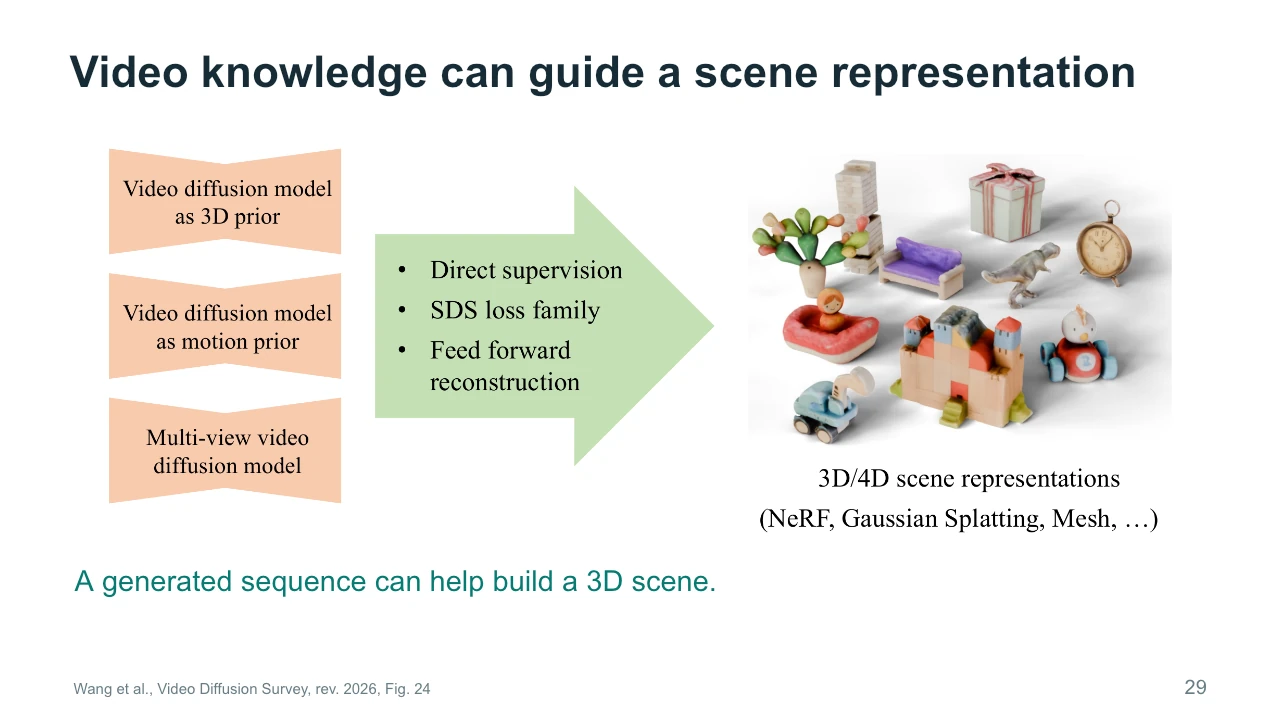
A video model can also provide knowledge for constructing a scene representation. The left side of the diagram identifies sources of visual or motion information. The middle describes ways to transfer that information. The right shows representations such as meshes, neural fields, and Gaussian splats. A video is a set of images over time. A scene representation aims to support rendering under chosen viewpoints, and sometimes at chosen moments. Moving from one to the other requires reconstruction or optimization. This matters to artists because a reusable scene can support later camera decisions, while a finished video usually commits you to the views already present in its frames.
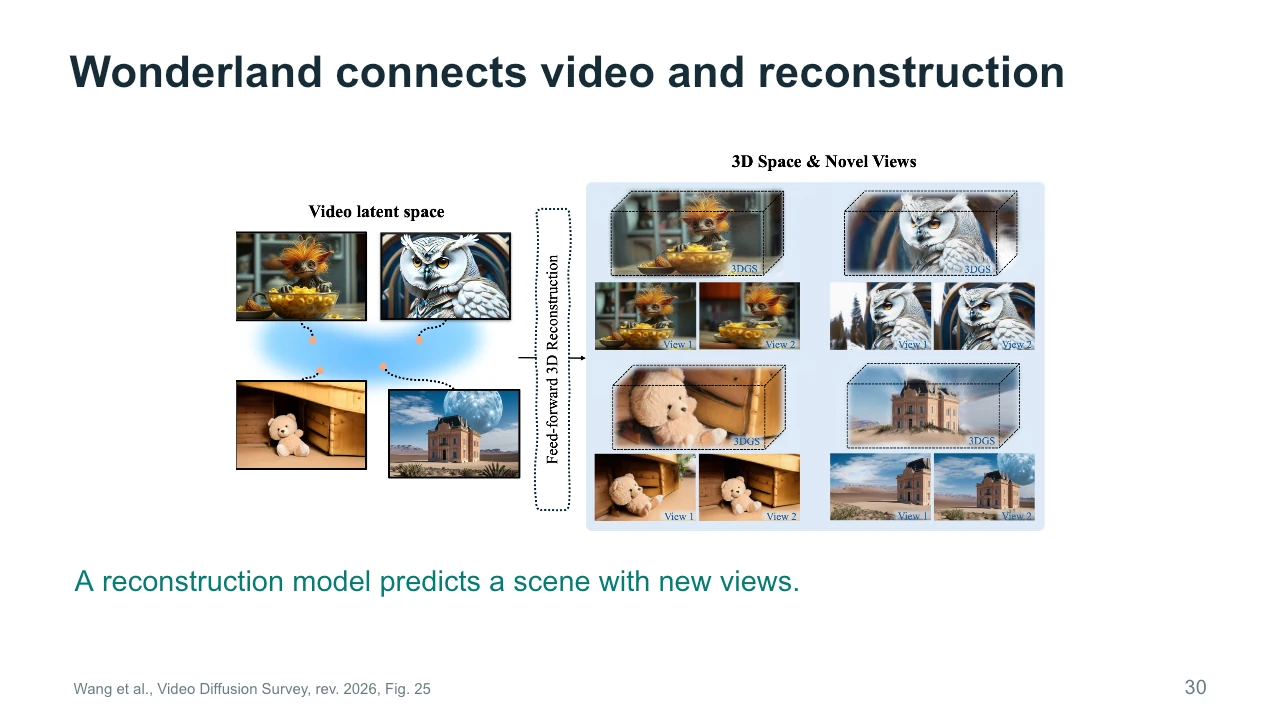
Wonderland illustrates a connection between video representations and scene reconstruction. Follow the diagram from the latent space on the left to the three-dimensional outputs on the right. The small paired views help show the purpose of reconstruction: we can render related views of a scene rather than simply display one image. The examples use Gaussian splats as a scene representation. We will revisit that idea later. For now, ask what additional freedom this creates for a filmmaker. You may gain some camera flexibility, but selected views do not demonstrate unrestricted movement or complete hidden geometry. Test the camera path your project actually requires.
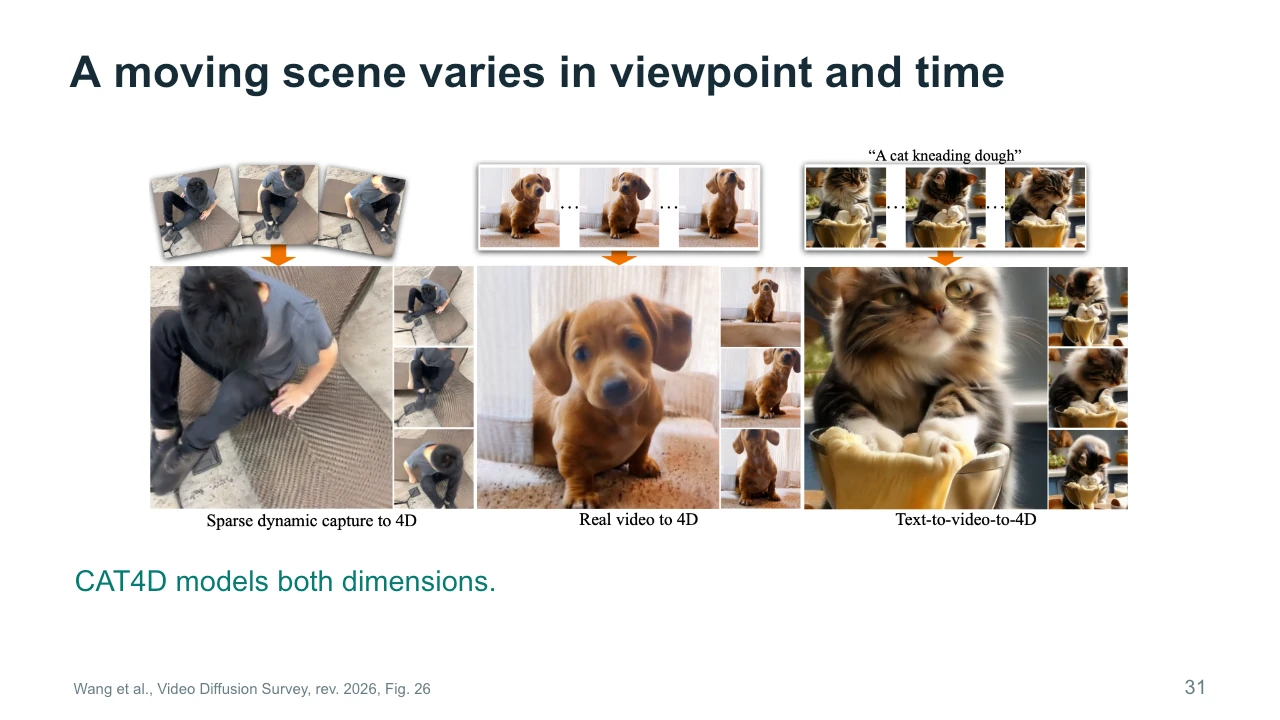
A dynamic scene changes in two ways: the viewpoint can change, and the action can advance through time. CAT4D addresses this combination. The examples include captured and generated source material connected to dynamic scene reconstruction. Imagine freezing a dancer at one moment and walking around them. Now imagine keeping the camera still while the dancer continues. These are different operations. A model that represents both needs to infer appearances across viewpoint and time. Much of that material may never have been observed directly. For creative work, this offers flexibility, but it also means that the quality of inferred regions and motions needs deliberate evaluation.
Let us pause and apply the video survey to our studio. What fixes the appearance of the room? An initial image or a scene representation might help. What controls the movement? A motion reference, audio signal, camera instruction, or other condition might supply useful information. What still needs inspection? The painting boundary, the person's identity, and the continuity of the room are possible answers. Choose one requirement and explain why a particular input helps. Then identify a failure that the input cannot rule out. This exercise is more useful than naming a fashionable model, because it connects the method to evidence you can actually inspect.
Our next reading is Diffusion-Based Visual Art Creation by Wang, Chen, and Wang, published in ACM Computing Surveys in 2025. This paper shifts the emphasis from generating sequences to understanding artistic tasks and intentions. We will consider how technical choices relate to the kind of artwork someone wants to make. A system may generate a polished image while giving the artist too little control over its meaning or structure. Conversely, an imperfect result may become useful material for further work. Keep the studio example in mind. We now ask what the changing painting should express, and how that intention changes the way we judge its output.
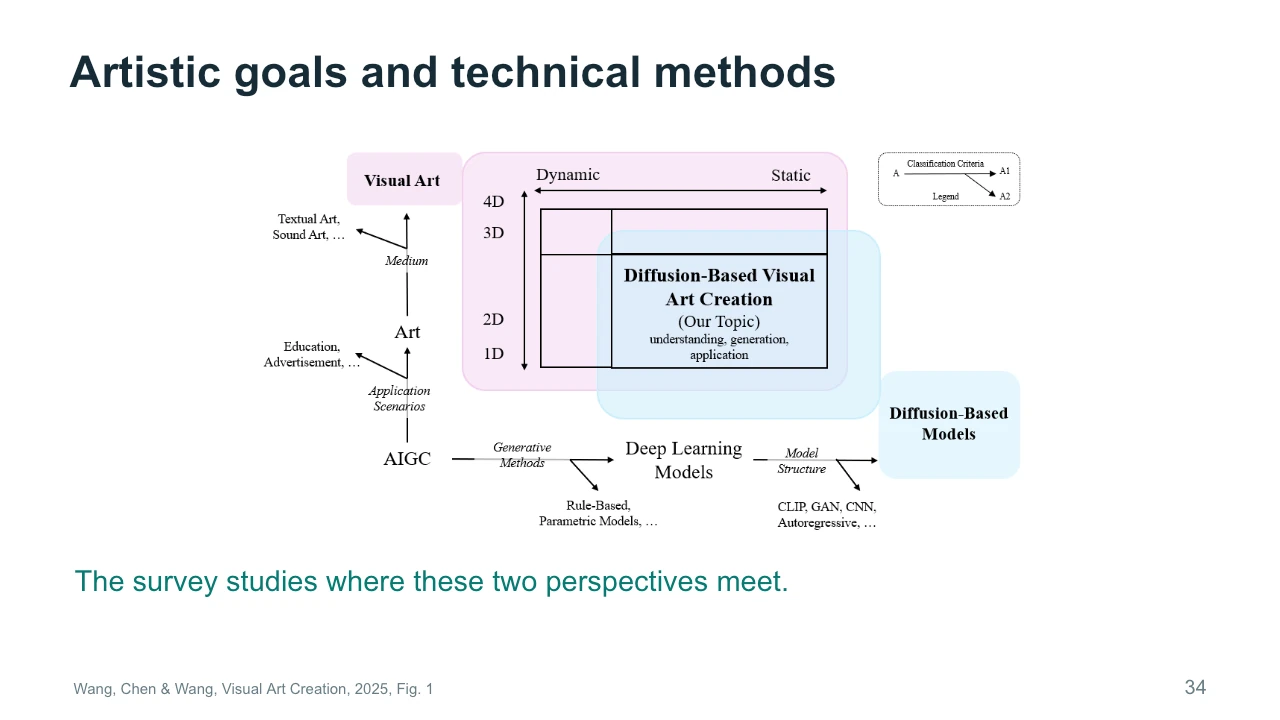
The figure places diffusion-based visual art at the intersection of several categories. Art can use different media, serve different purposes, and exist as static or changing material. Technical methods also vary in what they represent and how they generate it. The survey studies where these perspectives meet. This is useful because a technical task label rarely describes the whole artistic problem. Text-to-image tells us something about inputs and outputs, but little about why the image matters. For our studio, an illustration, an installation, and a film might use related generated imagery while requiring different forms of control and different ways of evaluating the audience experience.
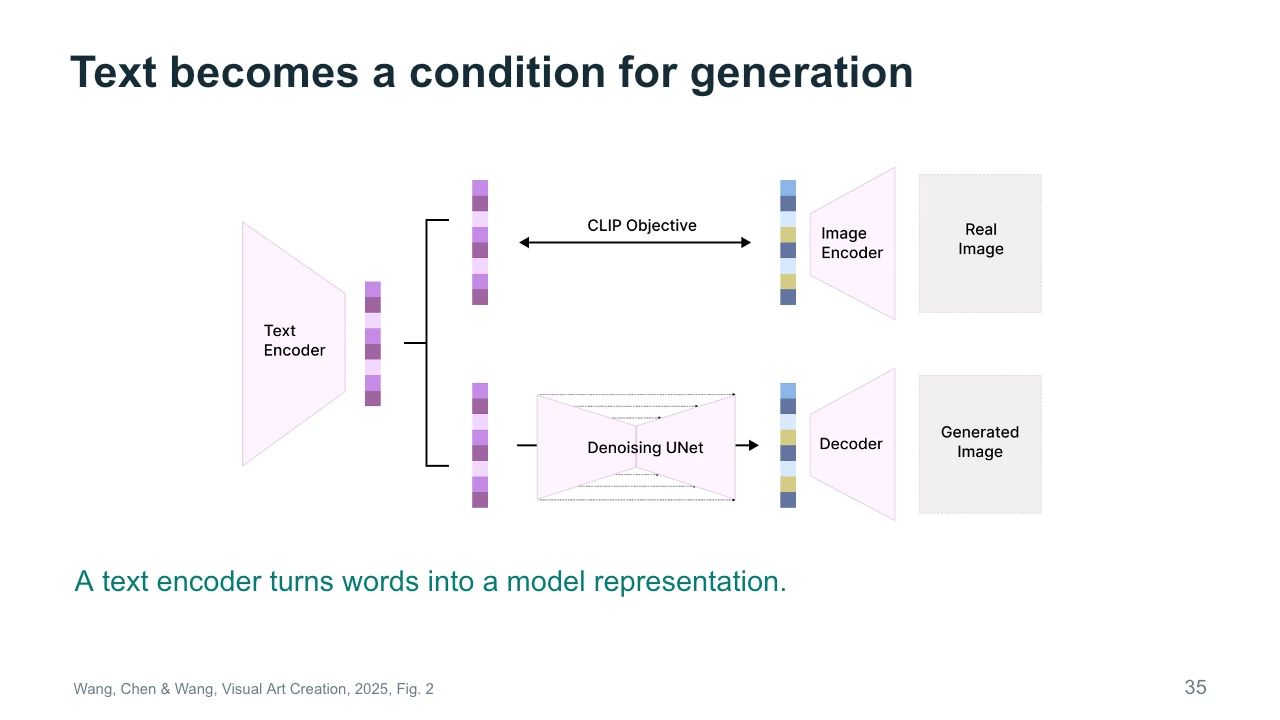
Text becomes usable conditioning through an encoder. The diagram shows a conceptual connection between text representations, image representations, and a denoising network. CLIP is associated with learning relationships between image and text representations. In a diffusion workflow, text information can then influence the refinement of visual content. This simplified figure combines ideas and should not be treated as the exact architecture of every generator. The important point is that a sentence becomes a numerical representation, rather than a complete set of drawing instructions. A phrase such as uneasy memory therefore leaves many visible decisions open. References and editing can help make those decisions more specific.
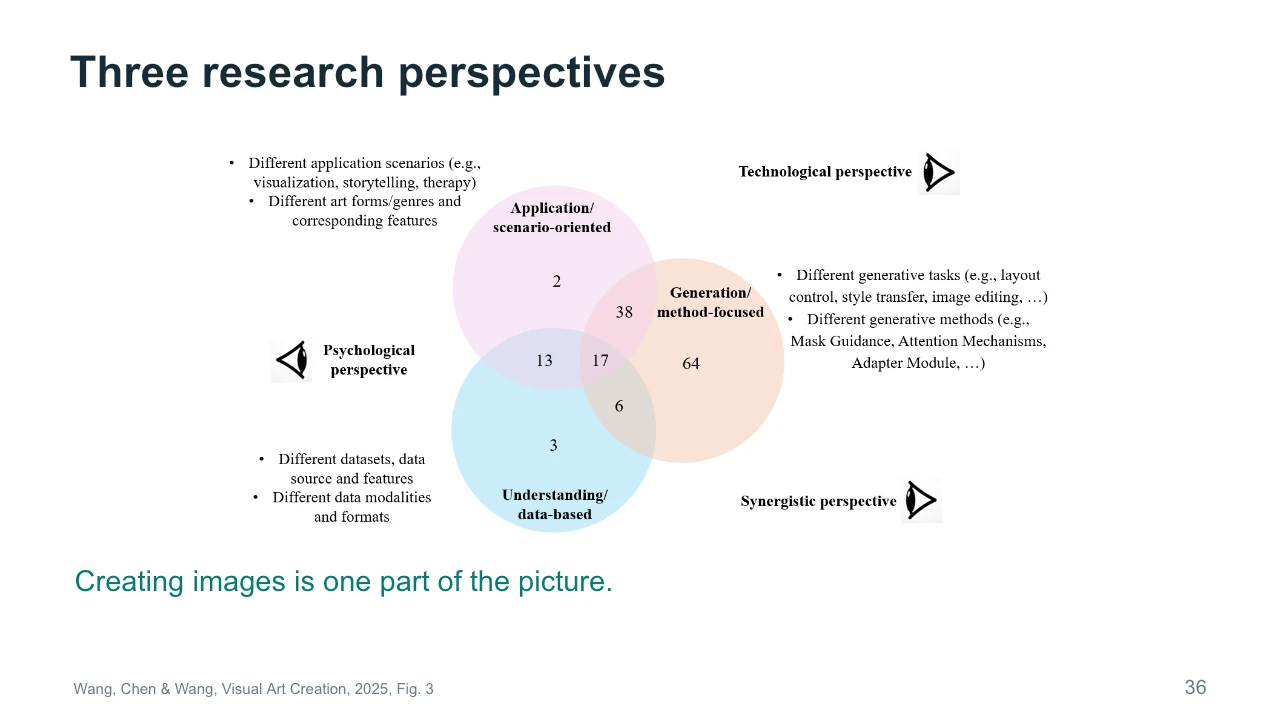
The survey identifies three research perspectives: applications, generation methods, and understanding or data. The overlapping circles show that a paper may belong to more than one perspective. Work on an artistic application can also introduce a generation method or study how people interpret images. The numbers describe the authors' selected research corpus, not all possible work in the field. When reading a paper, identify which question it primarily answers. Does it introduce a tool, study an audience, or analyze material? This helps you avoid expecting a technical benchmark to answer an artistic question that the researchers did not set out to investigate.
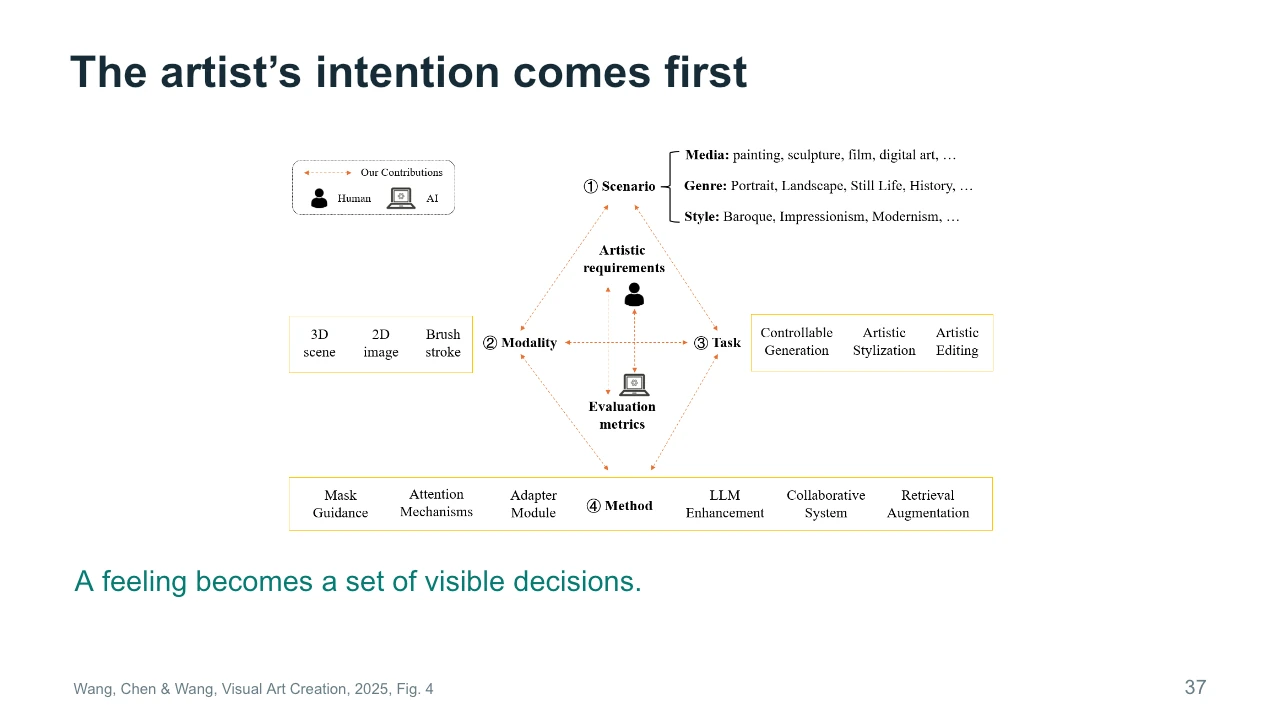
An artistic intention becomes useful when we connect it to visible decisions. The survey's framework links scenario, modality, task, and method to artistic requirements and evaluation. Suppose our intention is an uneasy memory. We could use delayed movement, missing details, or a familiar room with one altered object. Each choice suggests different controls. A general request to make the scene more artistic does not tell us what to change or how to judge success. Start with the intended experience, identify a visible decision, and choose a method that gives you some control over it. The framework is a way to organize that reasoning.
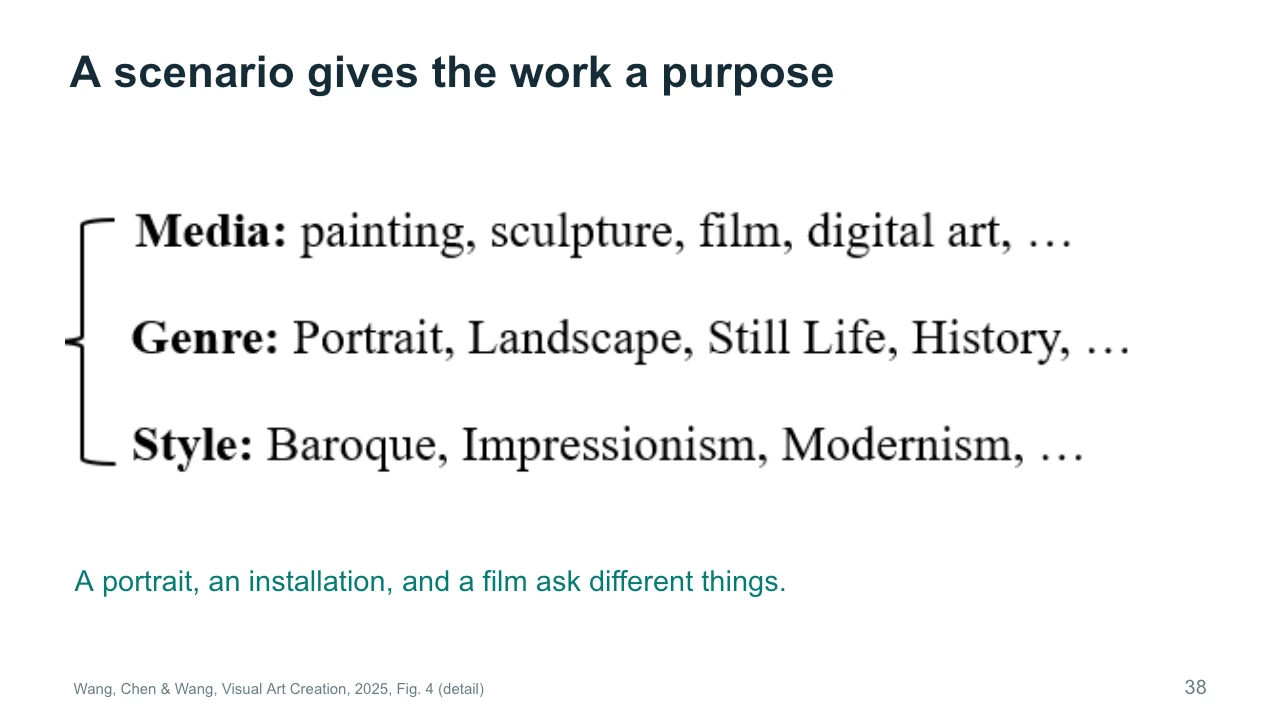
A scenario gives the work a purpose. The enlarged figure distinguishes medium, genre, and style. A portrait concentrates attention differently from a landscape. A film unfolds over time, while an installation may respond to where a visitor stands or how long they remain. These distinctions affect both production and evaluation. The same generated image might be a finished print, a storyboard reference, or one frame in an animation. For the studio example, decide whether the audience watches a fixed sequence or discovers changes while moving through a space. That choice changes the kinds of continuity and control the work needs.
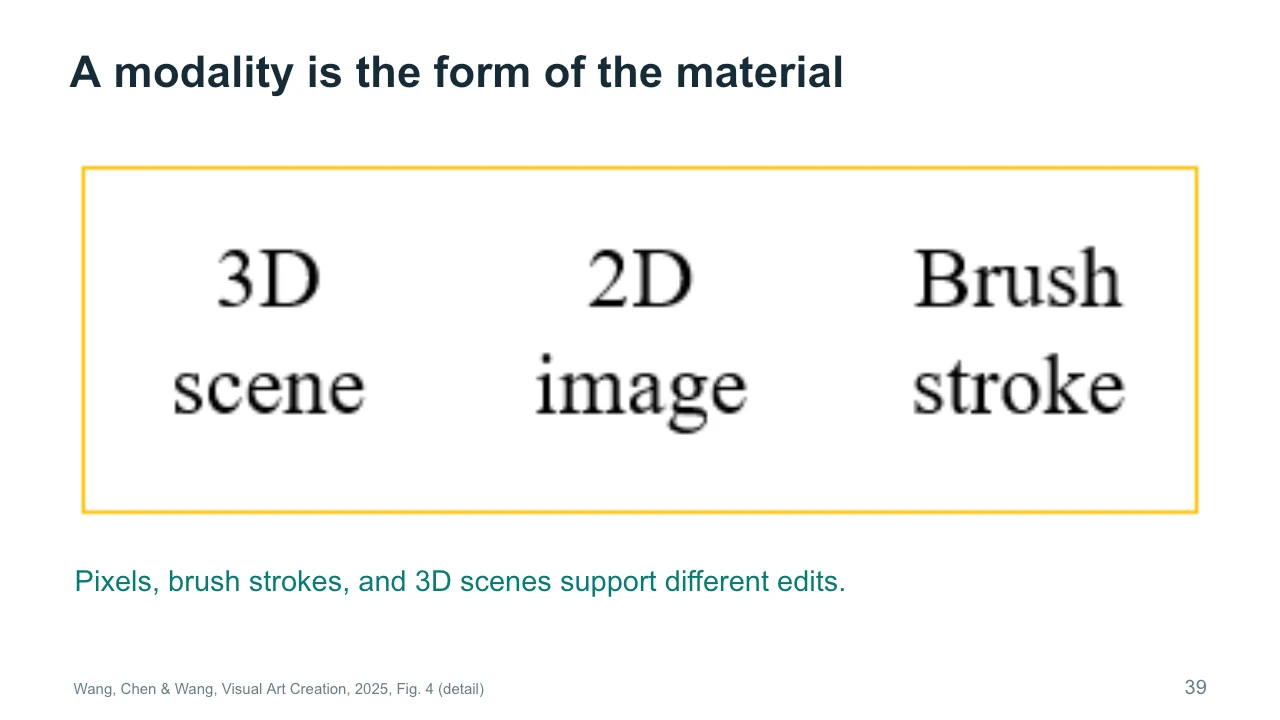
A modality is the form of the material you work with. The figure names a three-dimensional scene, a two-dimensional image, and a brush stroke. These forms support different kinds of intervention. Editing pixels gives direct access to an image surface. Working with a scene may give access to camera position and spatial relationships. A stroke representation may preserve information about how a mark is constructed. None is universally best. Ask what you want to revise later. If you need to move the camera around the studio, a single finished image may be restrictive. If you need a fixed composition, its simplicity may be helpful.
Four useful creative tasks are generating content, controlling a result, changing style, and editing selected content. These tasks often occur together, but distinguishing them helps diagnose a workflow. If the room is missing, you need content generation. If the room exists but the door is in the wrong place, you need control or editing. If the composition is suitable but the material should resemble charcoal, you may need stylization. Describe the problem before choosing the tool. Repeating full generation for every small correction can discard successful decisions that you would rather preserve. A local intervention may be a better fit for the actual need.
A mask specifies a region where an edit may occur. The surrounding image provides context for making the change fit. In our studio, we might mask the inside of the painting while leaving its frame and the wall outside the selected region. This makes the request more precise than asking for a different painting in an entirely new room. However, a mask is not a guarantee that every unselected detail will remain identical. The behavior depends on the method and settings. Inspect the edge of the edit, the lighting, and nearby textures. A successful local change should also make sense within the larger composition.
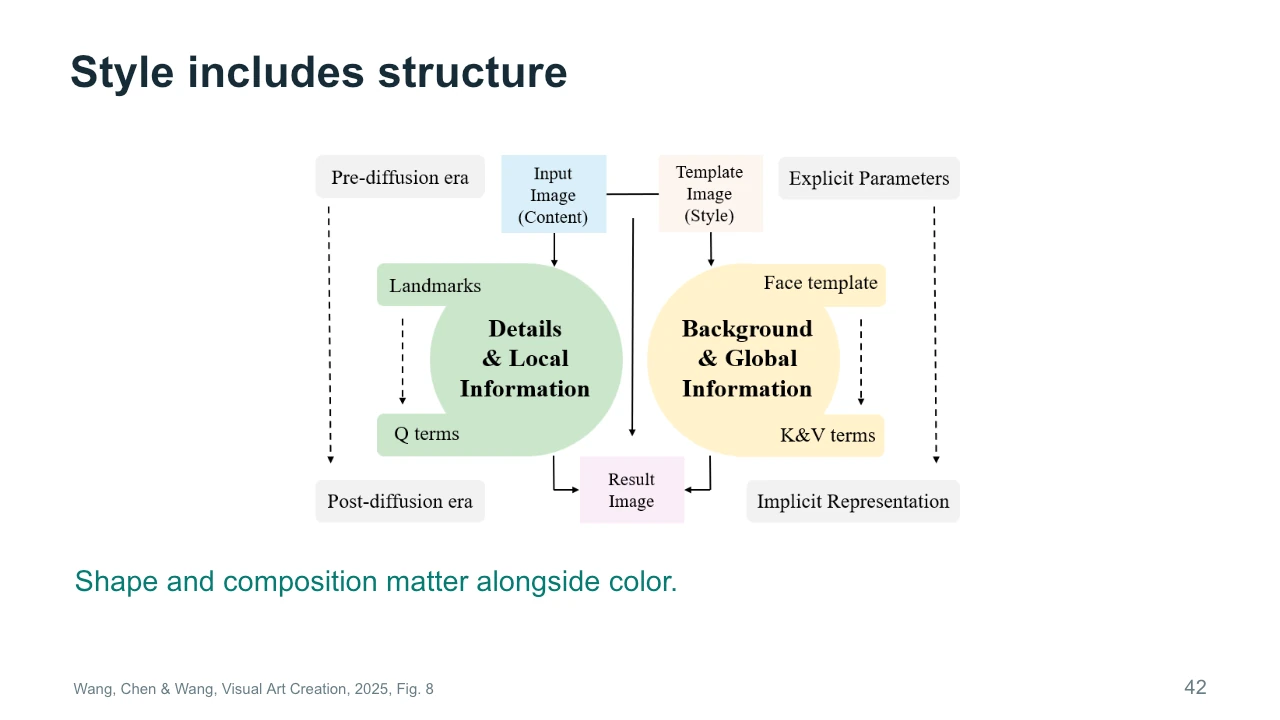
Style includes more than color or surface texture. The diagram connects local details with global information and shows how different parts of a method can influence a result. Think about the difference between a face painted with loose brushwork and a face whose proportions have also changed. Both may appear stylistic, but they alter different relationships. Composition, shape, and rhythm can be part of the visual language. When you request a style transfer, identify which of those properties may change. Otherwise, a method might produce the intended texture while removing a structural feature that was important to the identity or meaning of the original.
Let us separate content and style as a practical exercise. Imagine that a character must remain recognizable while the image changes from photographic to painted. Which features should stay stable? You might choose the silhouette, facial proportions, or pose. Which features may vary? Brushwork and palette are possible answers. This separation is useful, but it is not universal. Some styles depend on changing proportions or spatial relationships. Explain your own boundary rather than assuming the software will infer it. For the studio painting, decide whether its subject remains recognizable during the transformation, or whether losing recognition is part of the intended experience.
A technical score answers a particular question. It may estimate prompt alignment, visual similarity, or some aspect of perceptual quality. It cannot automatically establish whether an artwork succeeds. A deliberately ambiguous image might receive a weaker score for literal prompt matching while producing the intended experience. That does not make technical evaluation useless. It means we need to state what each measure is supposed to assess. For the studio, you might separately evaluate whether the room remains stable and whether the change in the painting feels unsettling. One concerns a visible constraint. The other concerns interpretation, which may require viewers and discussion rather than a single automated number.
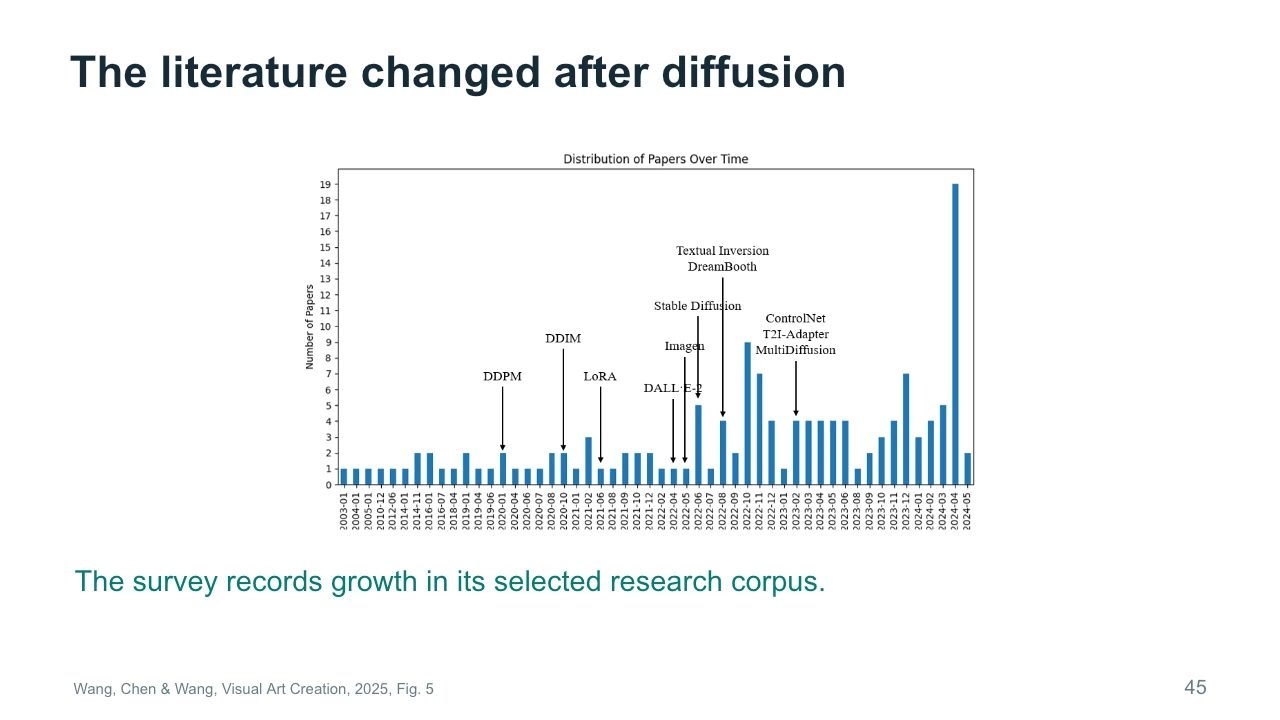
This chart records changes in the survey's selected literature over time. The labels connect the distribution to influential developments such as diffusion models and methods for adaptation or control. Read it as a historical view of the corpus the authors assembled. It is not a complete census of AI-art research, and its final dates do not extend to today. The useful question is how new methods changed the kinds of tasks researchers could attempt. Greater access to generation can shift attention toward control, editing, and applications. To understand the strength of that claim, we would still need to examine the actual papers and selection process.
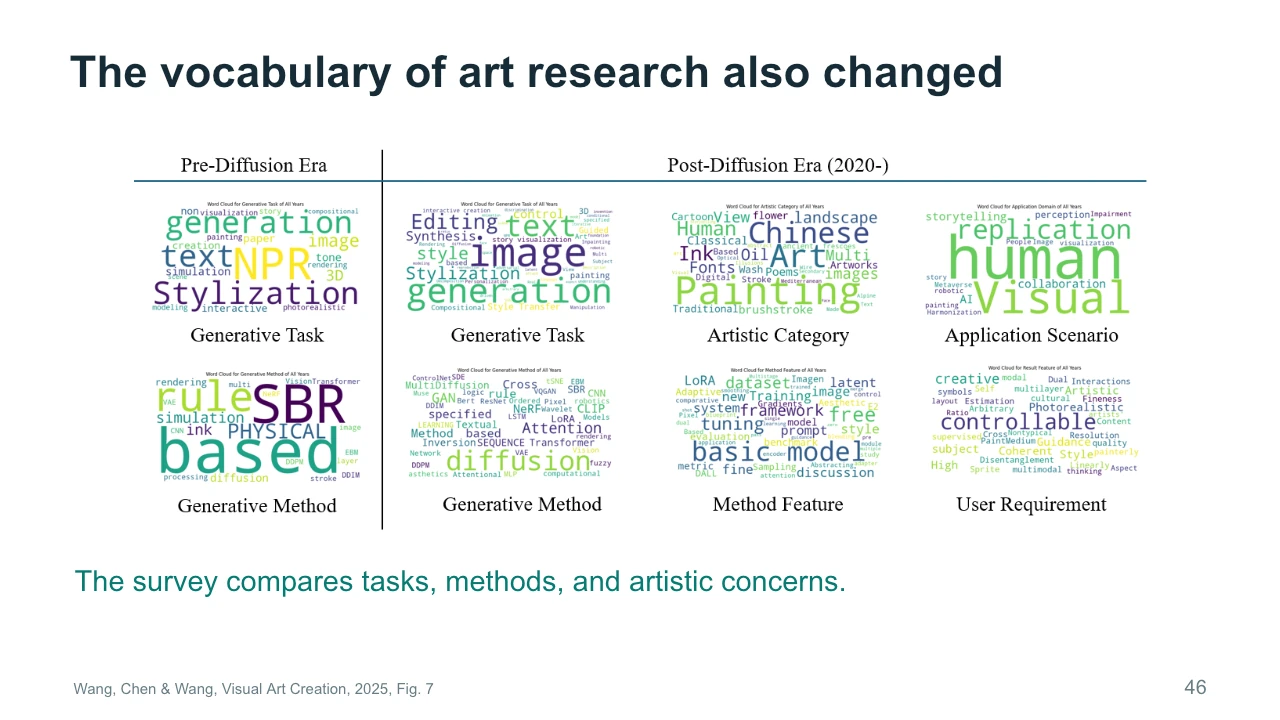
The word clouds offer another view of the authors' research collection. Larger words indicate prominence within the coded material, rather than artistic importance or current popularity. Compare task terms such as generation and editing with method terms such as diffusion. Then look at the artistic categories and user requirements. These are different kinds of vocabulary, and mixing them can make a project description vague. If you say your project uses diffusion, you have named a method. If you say it explores fragmented memory through changing portraits, you have begun to describe an artistic purpose. A clear proposal explains the connection between those two descriptions.
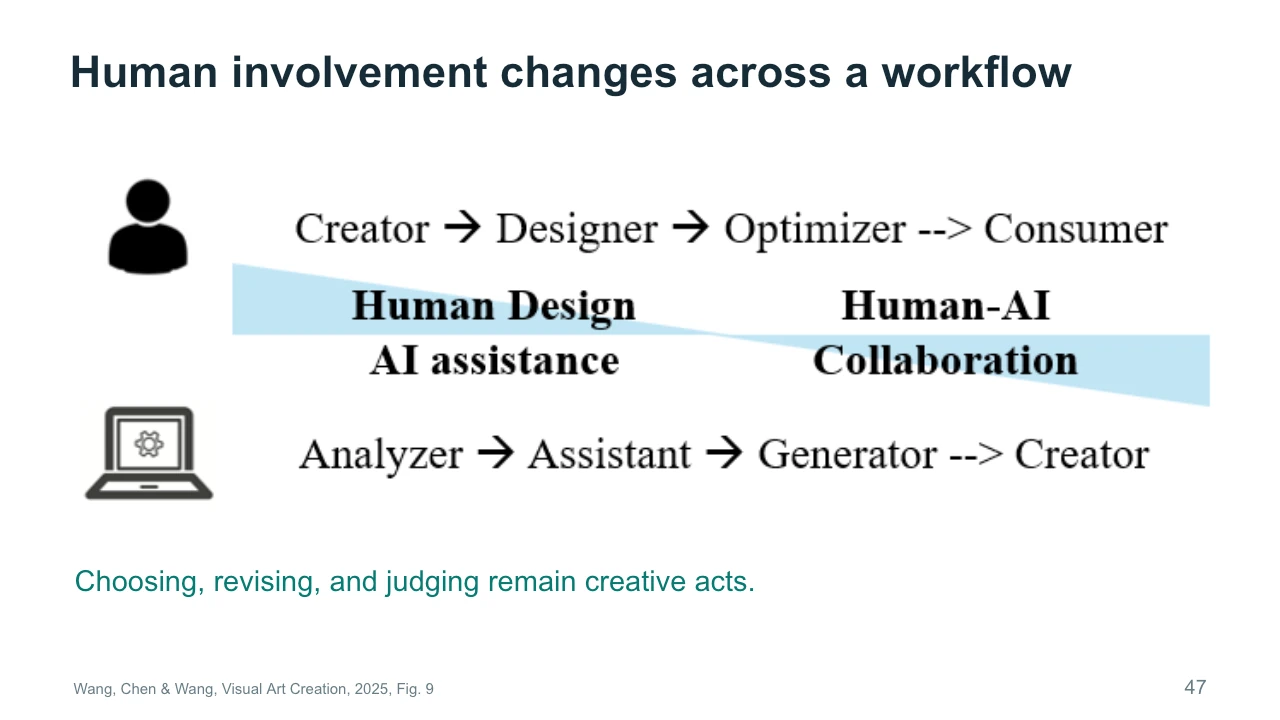
Human involvement changes across a workflow. The figure presents possible roles for people and AI, from assistance and analysis toward more extensive generation. Treat this as a conceptual perspective, not an inevitable sequence in which one role replaces another. Choosing references, rejecting outputs, setting constraints, and deciding when to stop are all meaningful parts of creative work. Their importance may increase when generating more candidates becomes easy. For your own project, identify a decision that you would keep under direct human control. Then explain what evidence you would want from a tool before accepting its contribution to that decision.
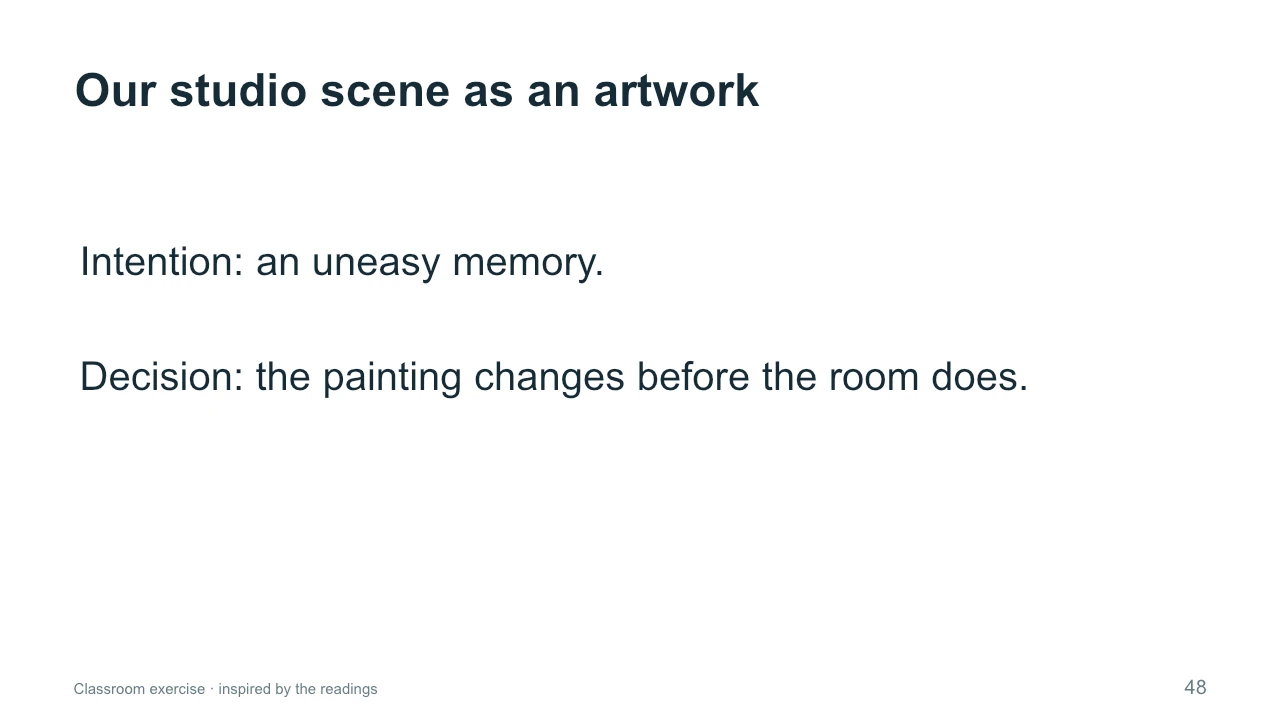
Return to the studio as an artwork. Our intention is an uneasy memory, and our chosen intervention is that the painting changes before the room does. The order directs attention. At first, the viewer may wonder whether they noticed anything. Later, a second change can confirm that something is wrong. A different version might use abrupt movement and loud sound to create surprise instead. Both could use similar generation tools while producing different experiences. Describe the intended effect in terms that can guide production. We need to know where the change begins, how quickly it develops, and which stable details help the audience notice it.
Choose one artistic intention and one visible intervention. For example, you might want the studio to feel welcoming, and decide that light gradually enters through the window. Or you might want it to feel unfamiliar, and change the scale of an object between shots. Explain how an audience could read the intervention. Then propose a way to judge whether it works, perhaps by showing two versions to classmates and asking what changed their interpretation. Pause the recording if you want time to work through an example. The aim is to connect a controllable property to an intended experience, rather than simply to request a more impressive output.
Once art becomes a sequence, decisions have to survive across shots and moments. A visual style may need to remain recognizable. A character may need to carry identity from a close-up into a wider view. The sequence also creates relationships through ordering, duration, and sound. Some art videos deliberately disrupt continuity, so consistency is not an absolute artistic rule. What matters is whether a change supports the work. We now move from the visual-art framework to filmmaking cases. As you look at each case, identify the intended effect, the tools that support it, and the human choices that connect the outputs into a finished experience.
The filmmaking survey by Zhang and colleagues appeared in the 2025 CVPR workshop on Computer Vision for the Creative Industries. It combines observations from an AI film hackathon with case studies and feedback from artists. This gives us a useful view of how people combine methods in practice. It also sets limits on the evidence. Hackathon participants are a selected group, and the tools reflect the period studied. We should not treat their behavior as a complete picture of the film industry. Focus on what the cases reveal about workflow: where generation helps, where creators intervene, and why a film still needs decisions beyond individual shots.
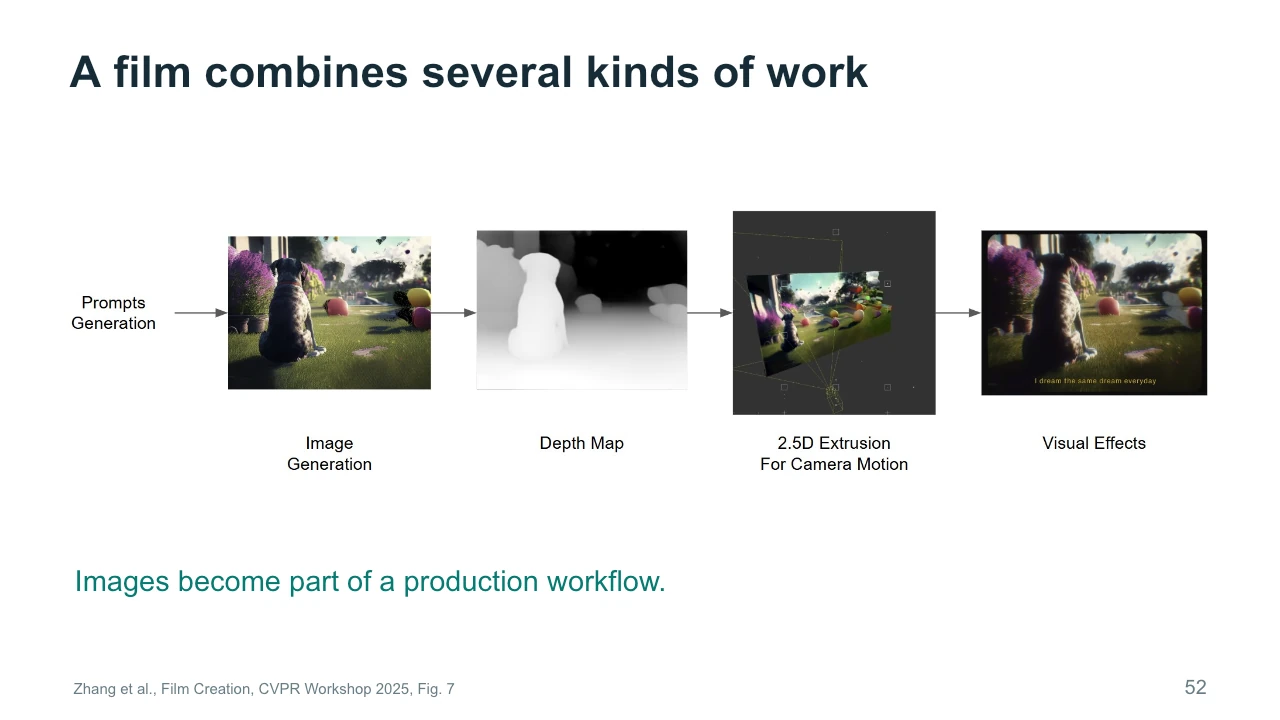
This workflow comes from DOG: Dream of Galaxy. Follow the sequence from an image toward a depth map, a shallow spatial construction, and visual effects. The generated image is one contribution to the production process. Later stages create movement and shape the final presentation. This is a useful correction to the idea that making an AI film means asking one model for a finished movie. A creator may combine generation with familiar tools for composition, camera work, and editing. When evaluating a workflow, identify the contribution of each stage. Otherwise, you may attribute an effect to the generator that actually comes from later production work.
《DOG: Dream of Galaxy》的流程从图像走向深度图、浅层空间结构和视觉特效。生成图像只是其中一步,后续制作创造运动并塑造最终呈现。因此,AI电影不等于向一个模型索要完整影片。分析流程时,要辨认每个阶段的贡献,避免把后期合成或运镜产生的效果误归给生成器。
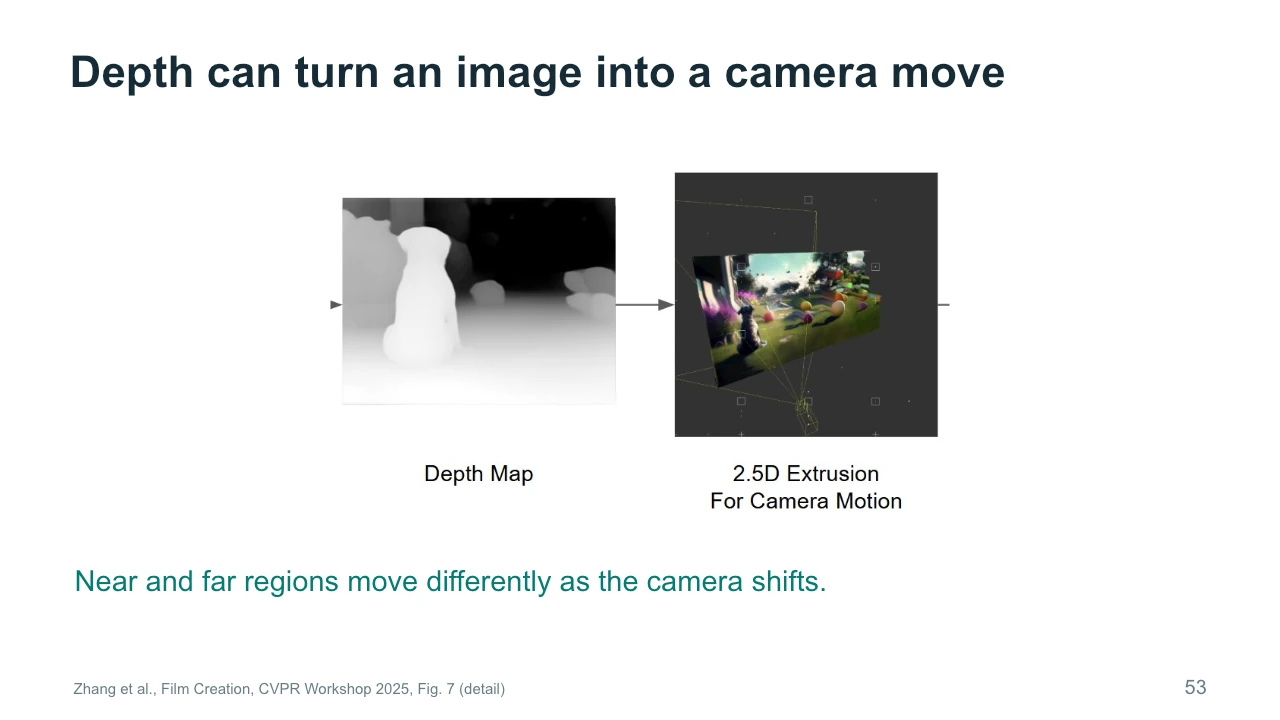
Depth helps distinguish near and far regions in an image. If those regions are lifted into a shallow spatial arrangement, moving a virtual camera can create different amounts of apparent motion across the picture. This is one reason depth can make a still image feel more spatial. However, the original image does not show what is behind each object. A large camera movement may expose gaps or stretched regions. The figure's two-and-a-half-dimensional construction is therefore useful within a range of views. For the studio scene, a small camera drift might work well, while a complete orbit around furniture would demand much more information.
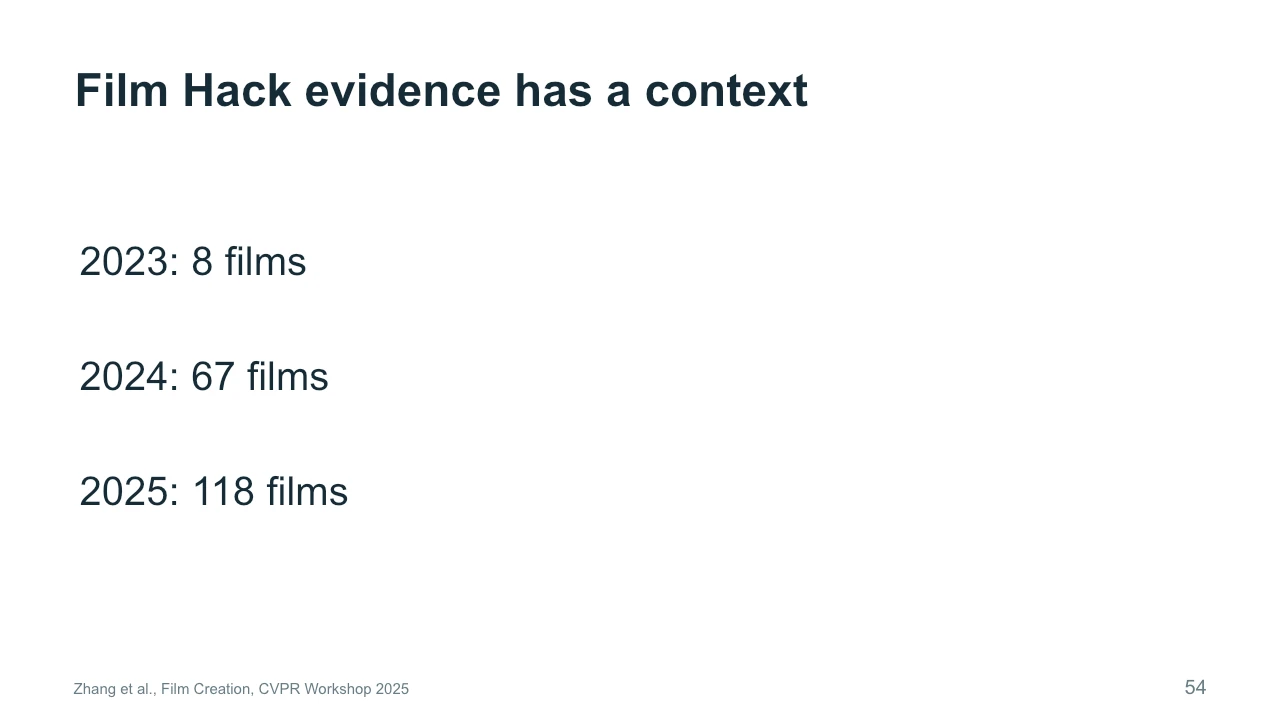
The survey's Film Hack samples contain eight films from 2023, sixty-seven from 2024, and one hundred eighteen from 2025. These numbers provide context for the observations that follow. The sample size changed, and the participants chose an event devoted to AI filmmaking. Adoption rates in this group therefore cannot directly estimate adoption across the whole industry. The earliest group is especially small. A useful reading habit is to ask who supplied the evidence and how they were selected. This does not dismiss the survey. It helps us use it appropriately, as a detailed account of a particular creative setting rather than a universal industry census.
Film Hack样本包括2023年的8部、2024年的67部和2025年的118部影片。样本量发生变化,参与者又主动选择AI电影活动,所以采用比例不能直接推算整个电影产业,尤其最早一组很小。询问证据来自谁、如何选取,并不是否定研究,而是把它用作特定创作环境的详细记录,而非普遍产业普查。
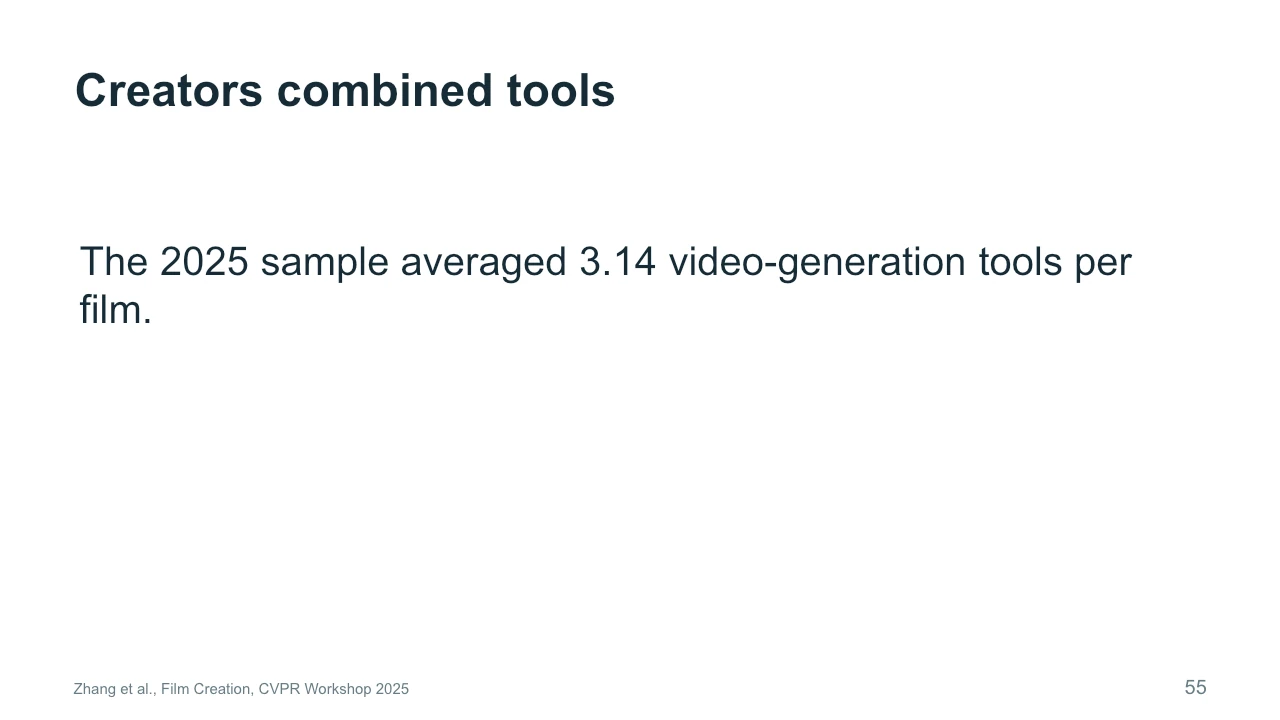
The 2025 sample used an average of 3.14 video-generation tools per film. This describes the sample, rather than recommending that every film use three tools. Creators may combine tools because different stages have different requirements. One method may produce a useful starting look, another may preserve a performance, and an editing application may assemble the results. Additional tools also introduce coordination work and opportunities for mismatch. For your project, add a tool when you can identify the problem it solves. A workflow with fewer tools can be effective if it provides the controls you need and lets you preserve decisions that already work.
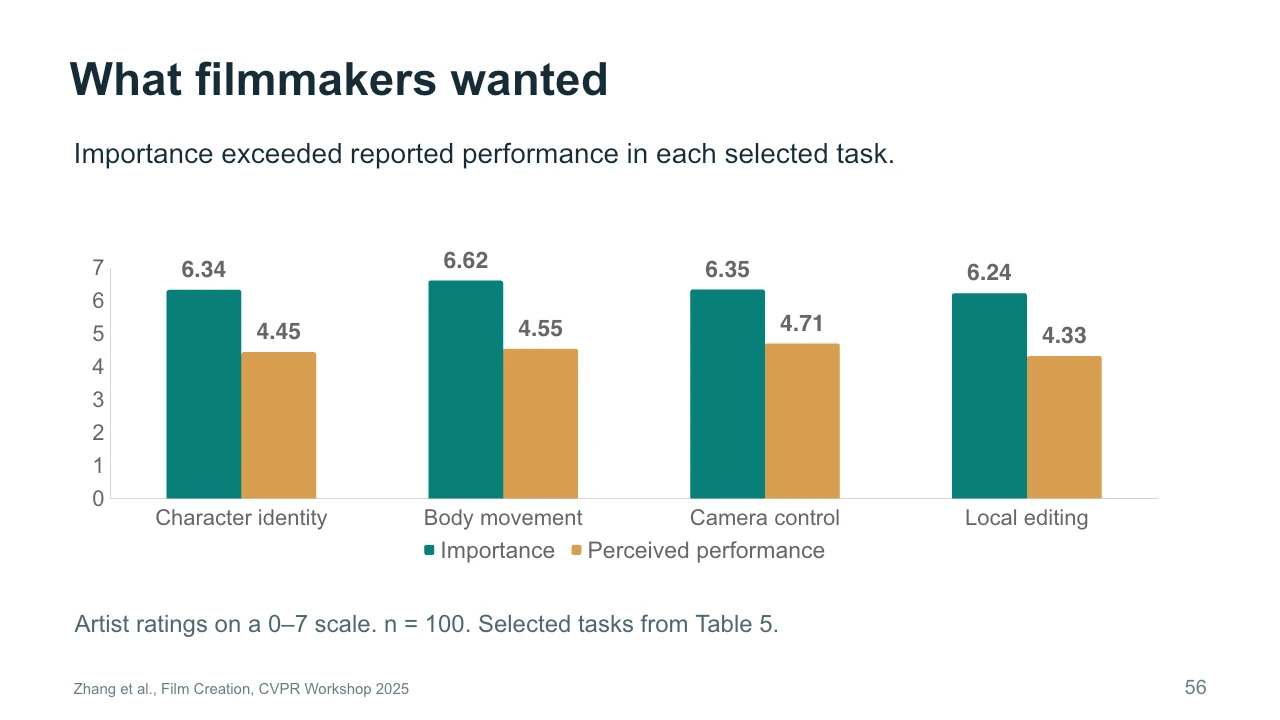
The chart compares importance with perceived performance for four selected tasks. The green bars represent how important artists considered the task. The gold bars represent their assessment of current performance during the survey period. Character identity, body movement, camera control, and local editing all show a gap. These are ratings from one hundred respondents on a zero-to-seven scale, not objective model benchmark scores. The result suggests that attractive generation alone did not satisfy all production needs. Notice how the tasks concern control over specific properties. For an artist, being able to repeat or revise a decision can matter as much as obtaining an impressive first output.
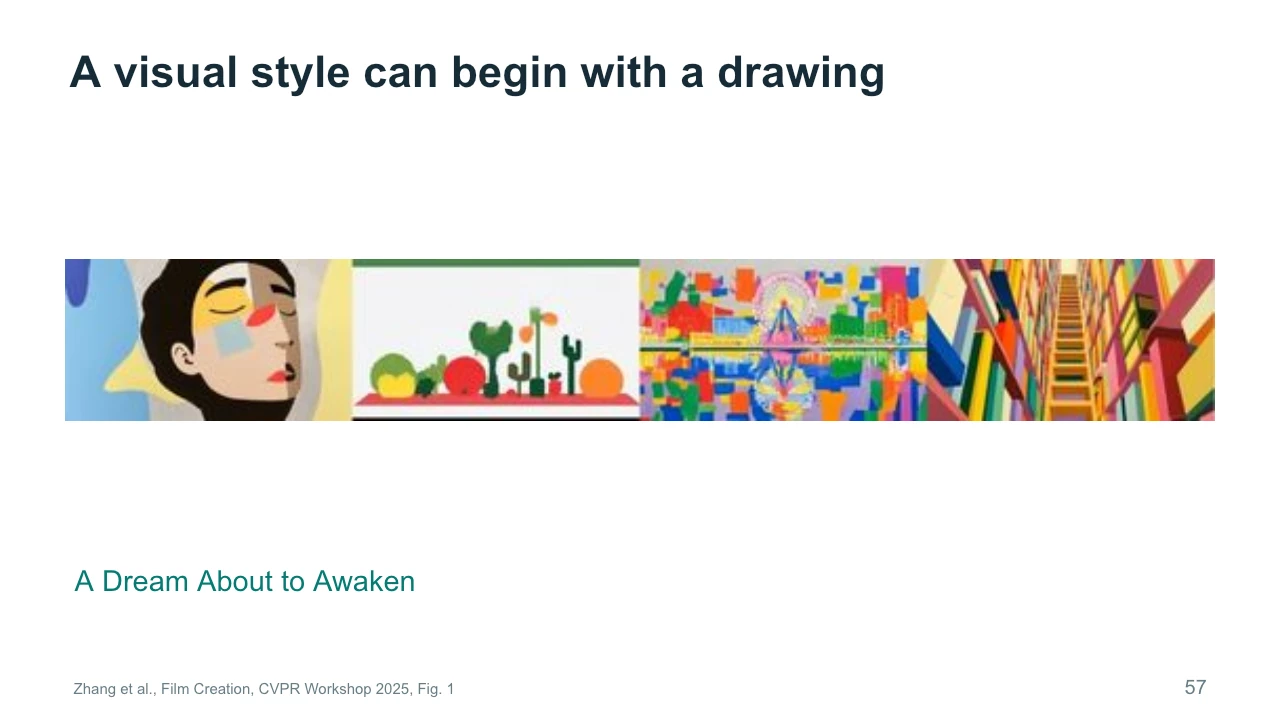
A Dream About to Awaken illustrates a workflow in which drawings help establish the visual language. The survey describes interpreting hand-drawn storyboards and remixing color and style. Look at the strong shapes and the repeated use of bright color in the examples. The drawings give the process a more specific starting point than a broad style label alone. They also preserve a place for the creator's composition decisions. When using a generator, you can begin with material you made yourself and ask it to develop selected aspects. The important question is which qualities of that starting material should survive through interpretation and animation.
《A Dream About to Awaken》用手绘故事板建立视觉语言,再解释和重混颜色与风格。观察强烈形状和重复的鲜艳色彩。绘画比宽泛的风格词更具体,也保留了创作者的构图选择。可以用自己制作的素材作为起点,让生成器发展某些属性,同时明确哪些特征必须在解释与动画过程中保留。
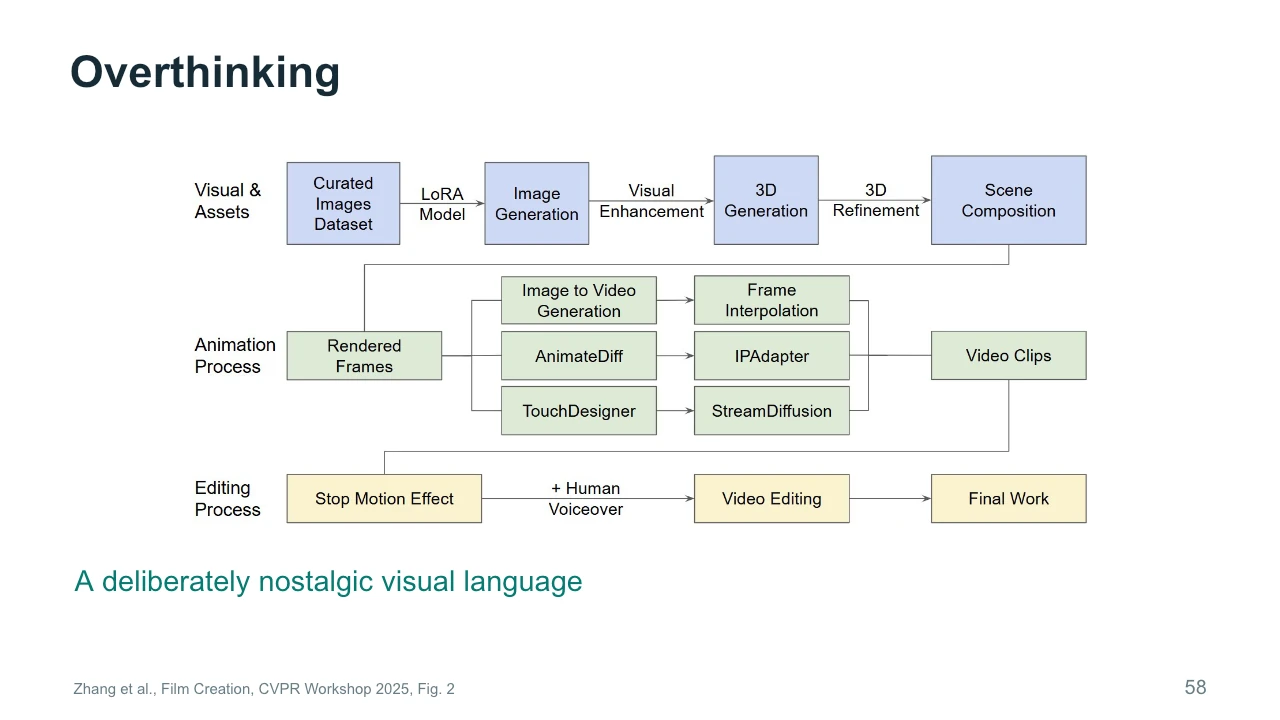
Overthinking uses a deliberately nostalgic visual language. The workflow diagram includes image adaptation, asset creation, animation, and editing. Read the branches as parts of this particular production, rather than a mandatory recipe. Several techniques contribute to the final style, and their contributions occur at different stages. This matters because viewers experience the finished sequence as a whole. They do not separate an image model's contribution from a timing decision in the edit. For our own work, we can still separate those contributions analytically. Doing so helps us decide where to intervene when the final sequence feels wrong, even though the individual images look suitable.
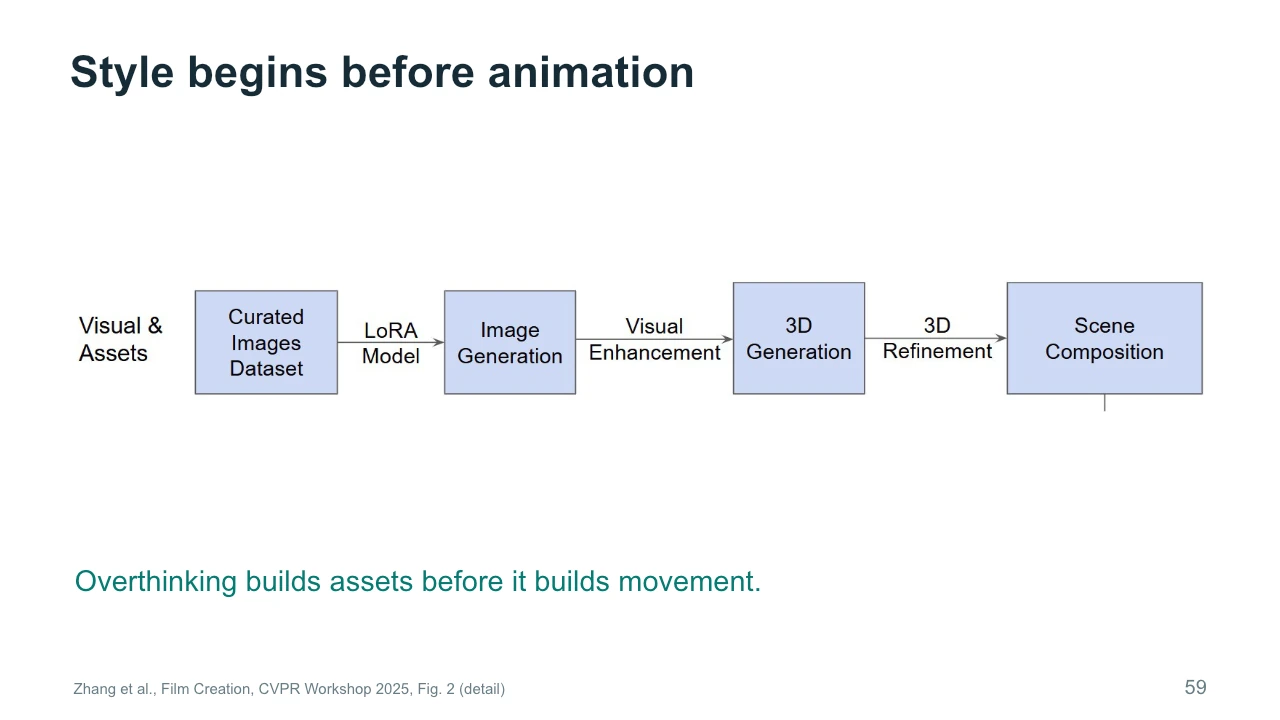
The upper branch of Overthinking begins with a curated image collection and adaptation of an image model. The paper discusses imagery associated with mid-century toys. A LoRA is a compact set of learned changes that can adapt a larger model to particular material. The later stages build and refine assets for the scene. The important creative decision happens before movement: the team chooses a visual world and prepares material that supports it. If you want a coherent art video, collecting references and deciding what belongs in that world can be more productive than generating unrelated shots and trying to make them match afterward.
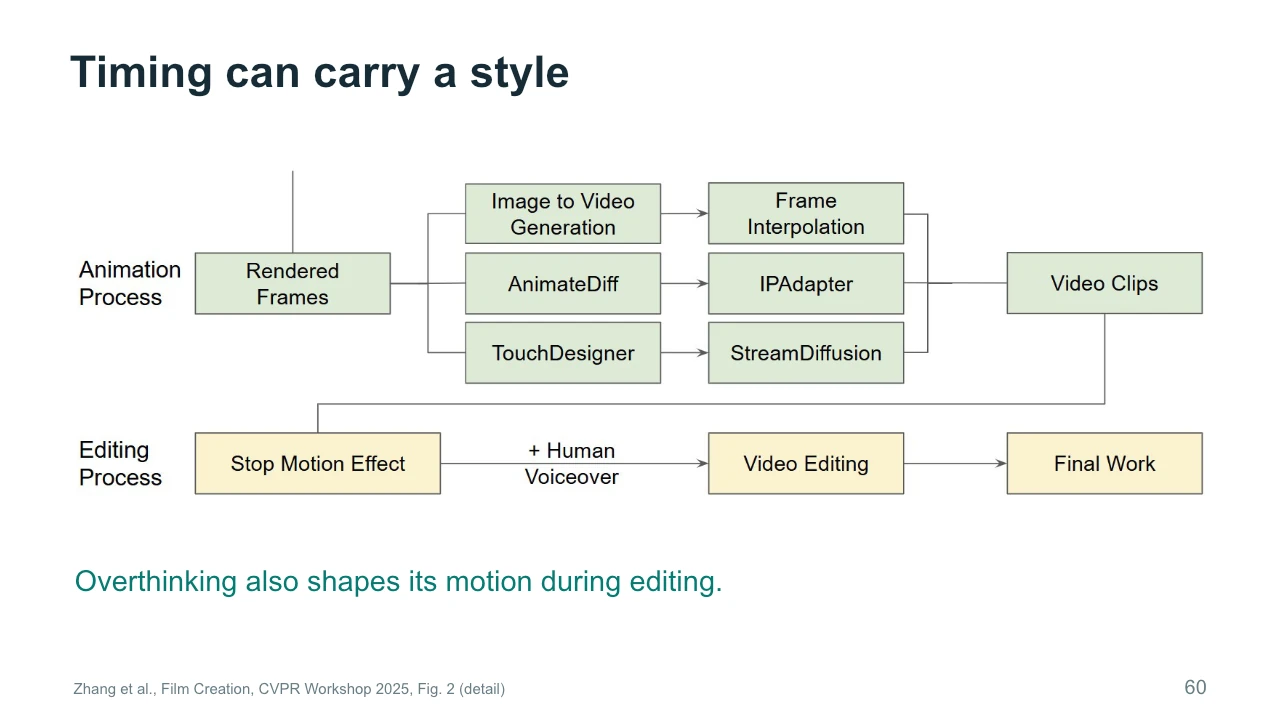
The lower branches of the workflow show animation and editing. The survey describes adjusting playback cadence to evoke a stop-motion quality. This is a reminder that style has a temporal dimension. Two sequences can use similar images and still feel different because of how movement is sampled or paced. Smooth motion is appropriate for some intentions, while a stepped rhythm may suit another. For the studio painting, ask whether its movement should flow continuously or arrive in small unsettling changes. That choice may involve editing as well as generation. It should be judged against the intended experience, rather than against smoothness as a universal goal.
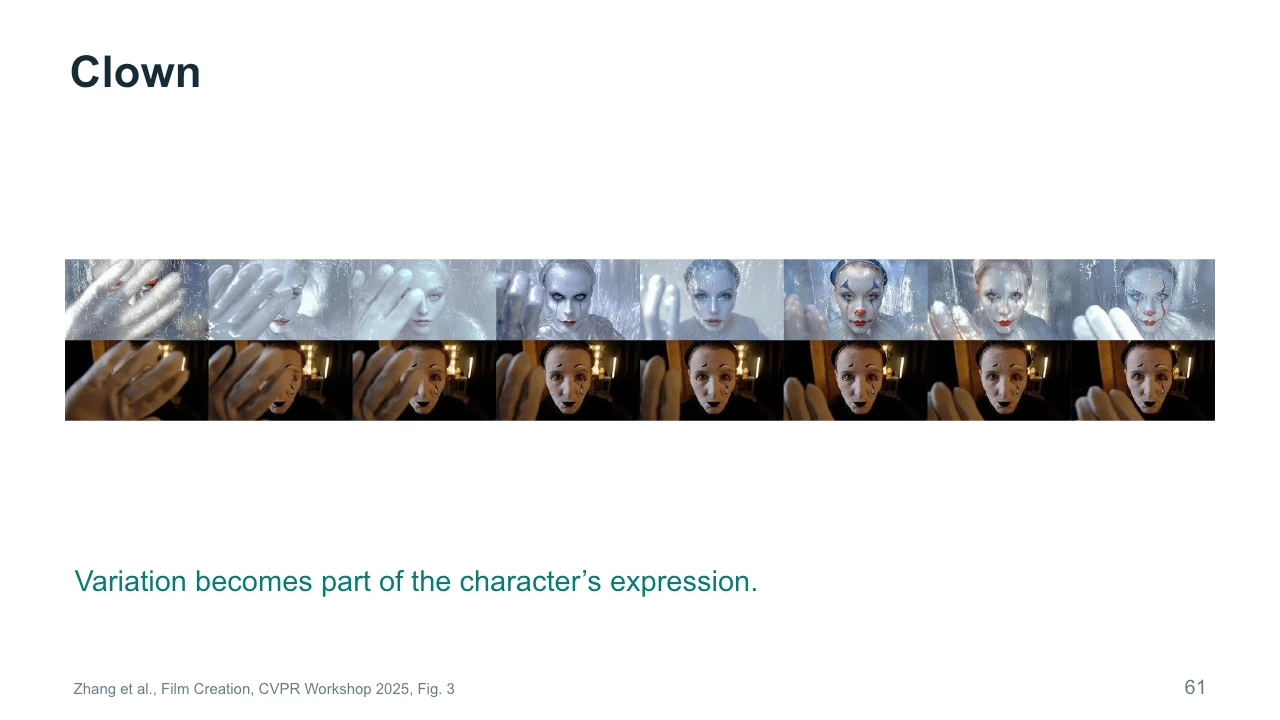
Clown provides a different relationship to consistency. The survey discusses frame-by-frame style transformation and interprets visual variation as supporting a fragmented identity. Look at how the character's appearance changes while the performance remains related across the sequence. An inconsistency can become expressive material, but that does not make every accidental change meaningful. We need an account of how it affects the viewer. This case is useful because it challenges a simple rule that all AI artifacts must be removed. Instead, ask whether a particular variation supports the work, distracts from it, or communicates something the creator did not intend.
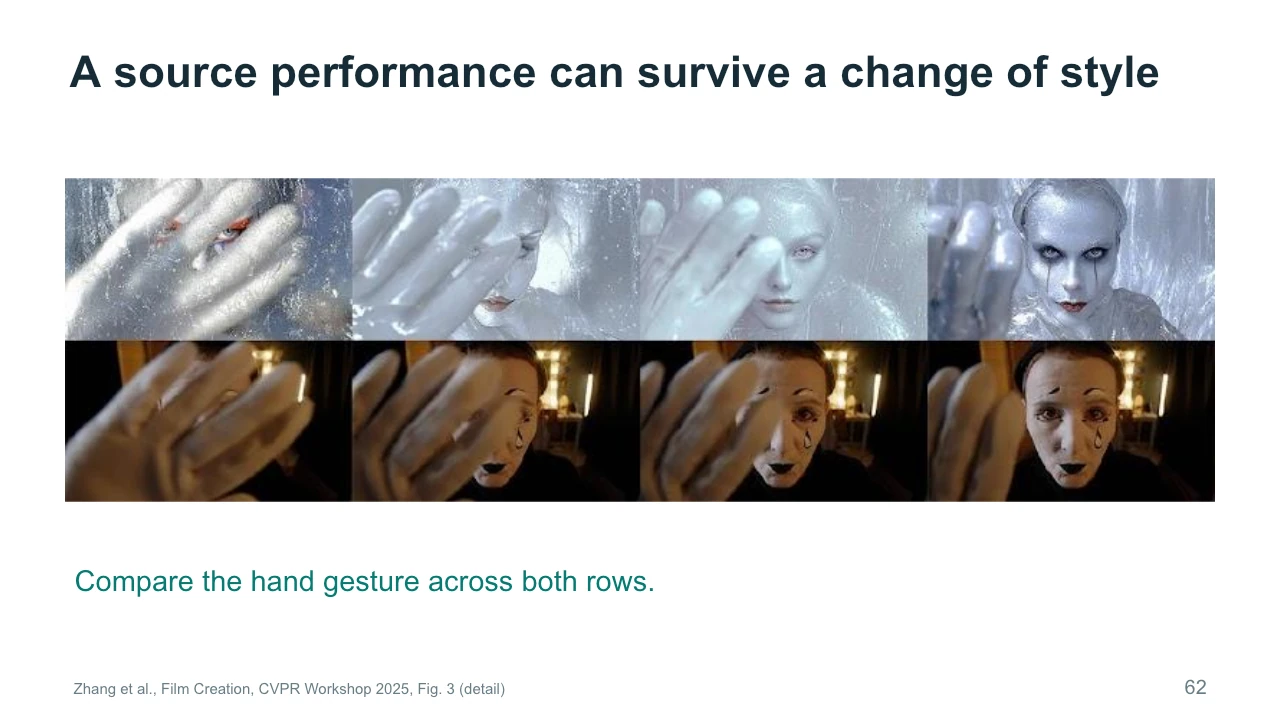
Here we enlarge part of the comparison so that the hand gesture is easier to follow. Compare corresponding moments across the two rows. Which features of the performance remain legible even when the appearance changes? The position of a hand or the direction of a gaze can carry an action through stylization. At the same time, small changes around the face may alter the character's expression. These stills help us examine correspondence, but they cannot establish how smooth the full sequence feels. For that, we need playback. In your own project, compare both individual frames and the moving result before deciding that a transformation preserves the performance.
Would a stable face or a changing face better serve this scene? There is no answer without an artistic intention. A conventional dialogue scene may depend on stable identity so that the audience follows the conversation. A work about unstable memory may use changing appearance as part of its meaning. Propose one intention for each version, and explain what the viewer should notice. Then identify a limit. Even a film about instability might need a consistent gesture, setting, or sound to hold the sequence together. Pause here if you want to discuss alternatives. The goal is to make continuity a considered choice rather than an automatic slogan.
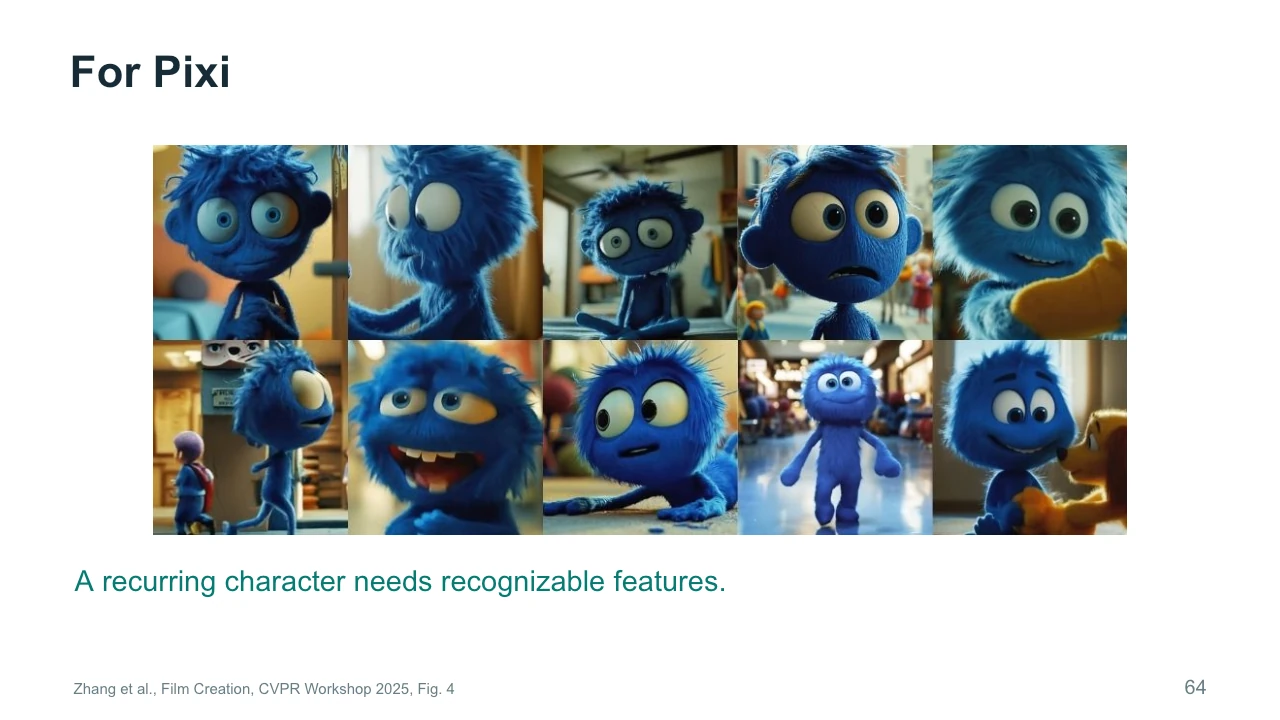
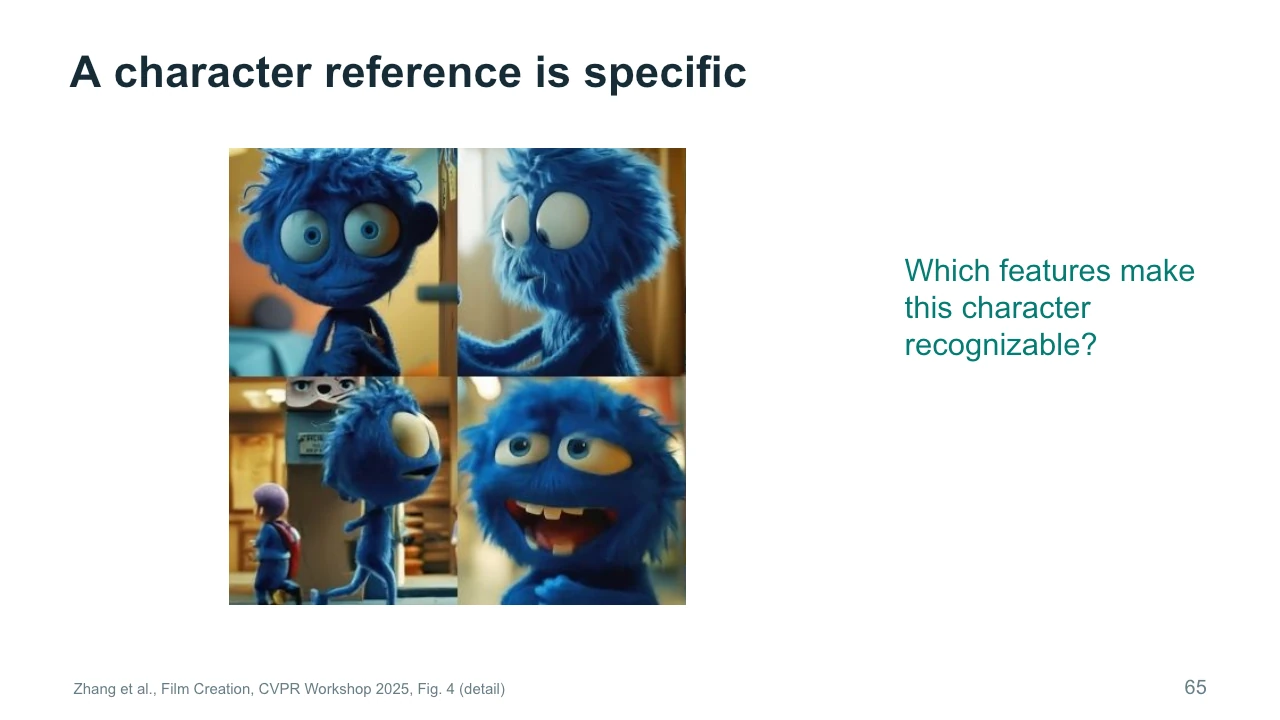
For Pixi illustrates a case where a recurring character needs recognizable features. Look across the selected images. The blue material, large eyes, proportions, and general silhouette help establish continuity, although the appearances are not identical. The survey describes iterative generation and region editing as parts of the workflow. This is a production process that includes selecting and correcting, rather than expecting one instruction to guarantee every shot. The stills show the kinds of identity cues the creators work with. They do not prove perfect consistency across the entire film. As a viewer or researcher, keep the difference between a selected example and a complete evaluation clear.
The enlarged examples let us be more specific about a character reference. A phrase such as blue puppet supplies a category, but it leaves the shape of the eyes, the head proportions, and the material open. A reference can communicate these details more directly. Identify two features that must survive changes in view and expression. Then decide which variations are acceptable. Lighting should be allowed to change, for example, without changing what the character is made of. This exercise turns a vague request for consistency into a set of visible criteria. Those criteria can guide reference selection, local editing, and the rejection of unsuitable shots.
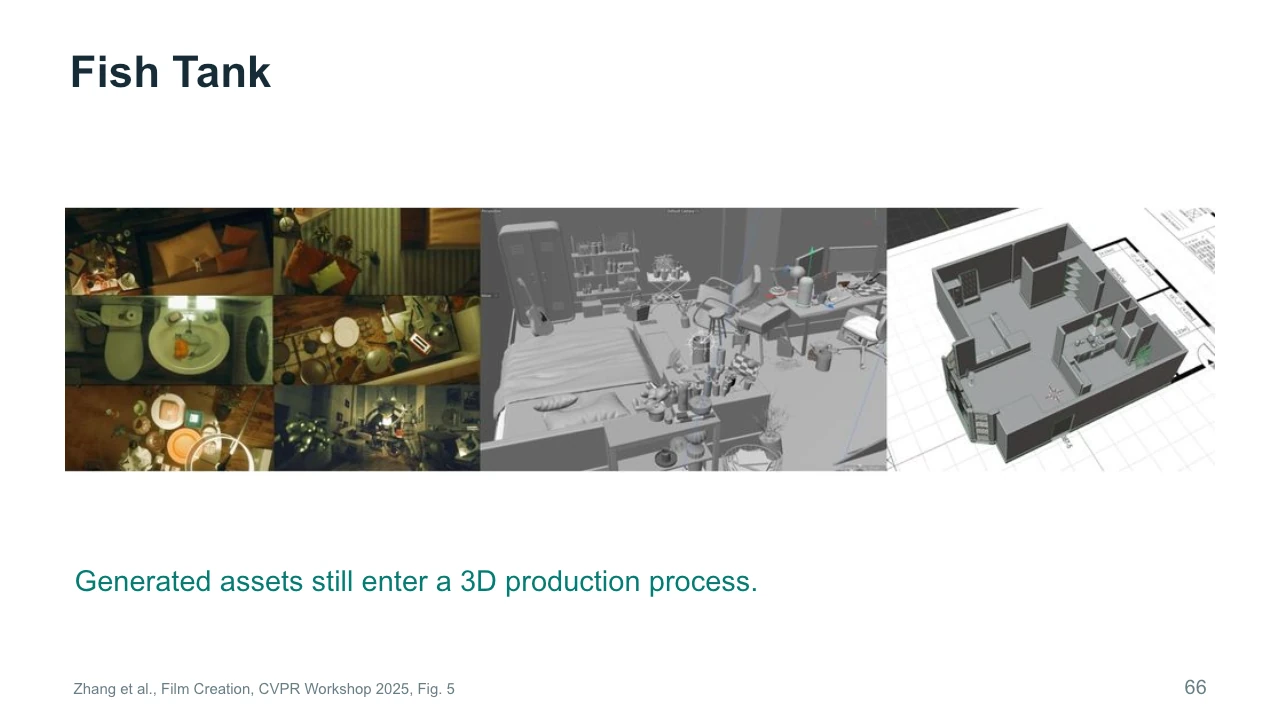
Fish Tank connects generated material to a three-dimensional production workflow. The figure places finished scenes beside assets and a scene model. Notice that the final image depends on how objects are arranged and rendered, rather than only on their individual appearance. The case study reports manual work on UV mapping and topology. Those are ordinary production requirements that do not disappear when generation supplies an initial asset. For a filmmaker, the useful output is something that can participate in the intended scene. A beautiful preview may still require substantial work before the object can be lit, placed, or animated as the production demands.
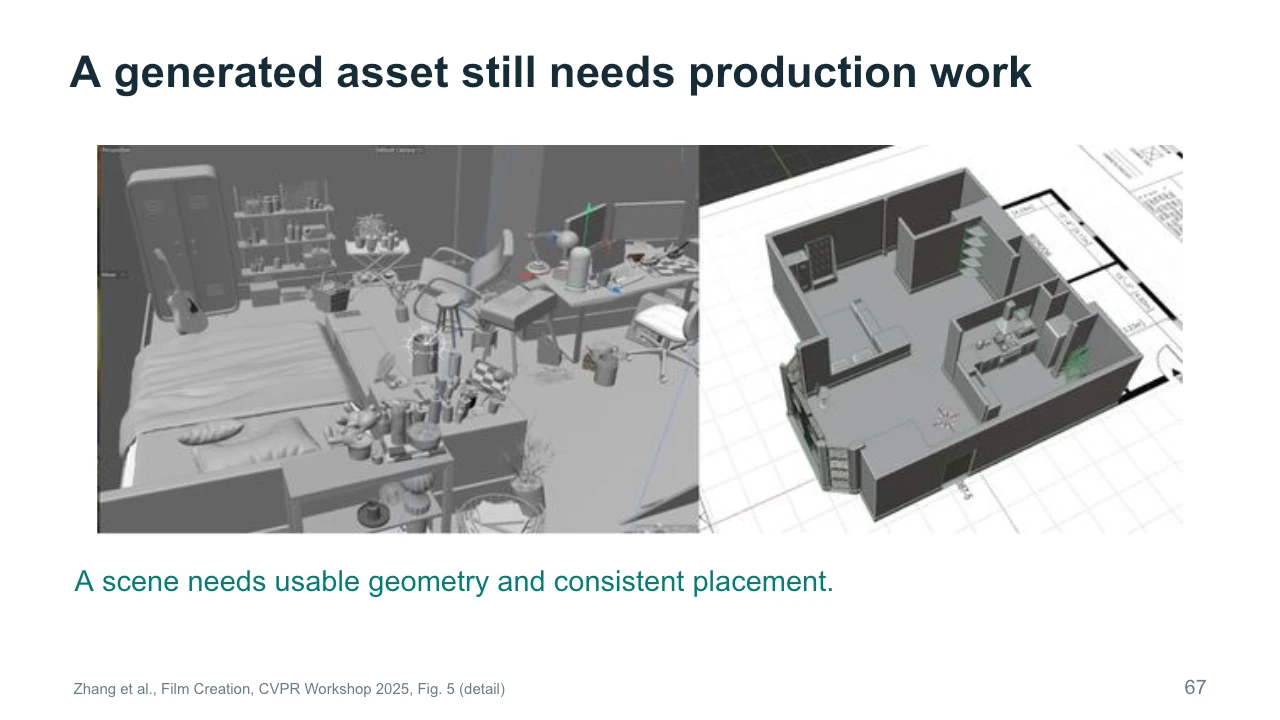
Look more closely at the scene construction. Geometry determines the shape and placement of surfaces. Topology describes how a mesh connects, which matters when it needs to deform. UV mapping associates locations on that surface with texture information. A generated asset may need correction in any of these areas. This is why it helps to decide how an asset will be used before judging it. A background object seen briefly from one angle has different requirements from a character that bends in a close-up. In the studio, a chair that the returning person sits on needs more dependable structure than a distant decorative object.
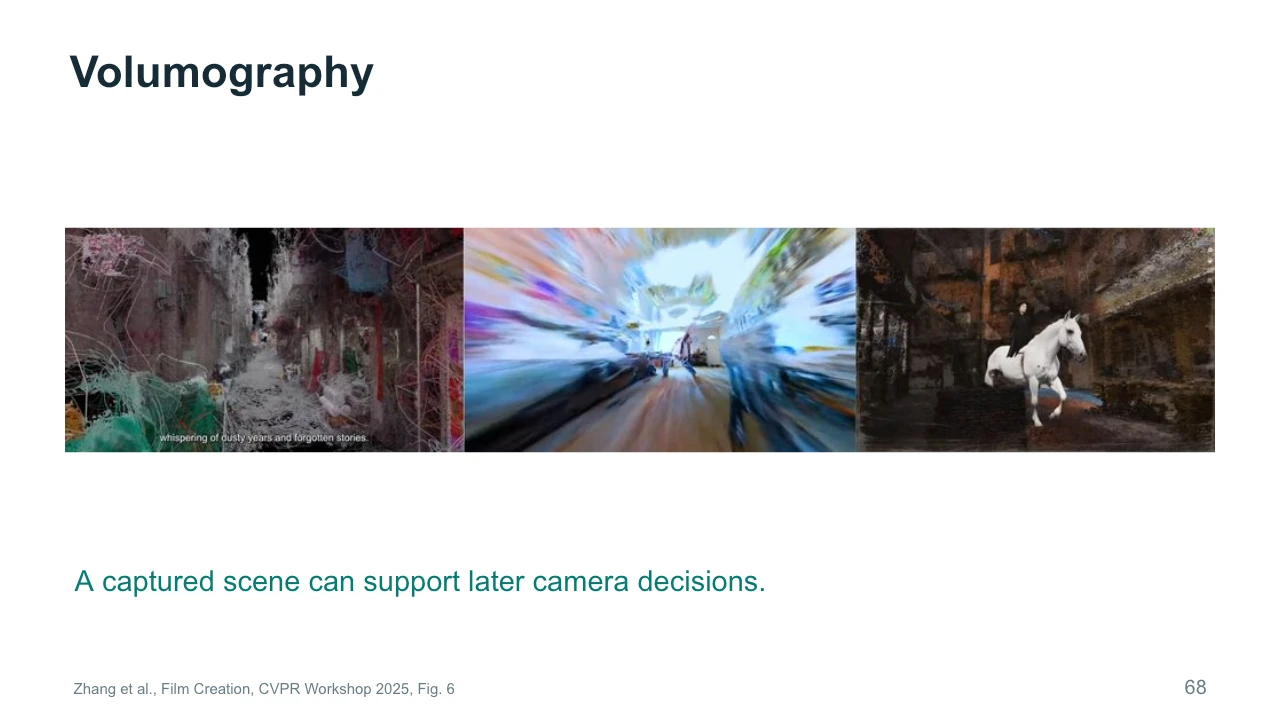
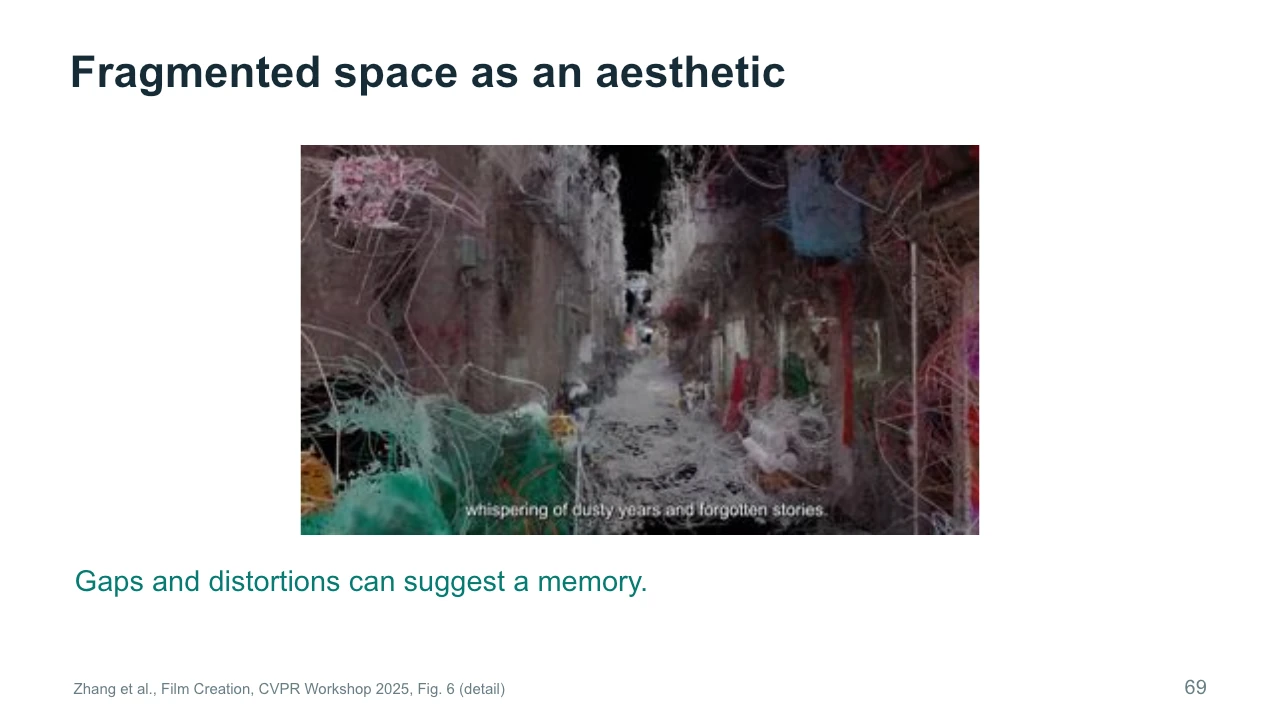
Volumography refers here to creating moving images through spatial capture and rendering. The survey presents examples including Former Garden, Metanoia, and Dressage: Marching Through Memories. Instead of recording only a fixed sequence of frames, a spatial representation can permit later decisions about the viewpoint. This opens a different kind of creative process. Camera movement can become something explored after capture. The freedom is still limited by what the representation contains and how accurately it reconstructs the scene. Missing surfaces, reflective materials, and insufficient observations may produce gaps or distortions. Such effects can be production problems or, in some cases, material for artistic interpretation.
这里的Volumography指通过空间捕捉和渲染创作动态图像。论文展示《Former Garden》《Metanoia》和《Dressage: Marching Through Memories》等案例。空间表示让视点选择能够发生在捕捉之后,运镜成为可继续探索的创作决定。但自由受到表示所含信息及重建质量限制,不能假定任何新视角都可靠。
This enlarged image shows a fragmentary spatial appearance. Parts of the scene seem incomplete, stretched, or loosely connected. In the cases discussed by the survey, such qualities can contribute to an experience of memory or uncertain space. We should avoid assuming that every visible gap was individually designed. The artistic decision may instead involve selecting and framing the behavior of a reconstruction process. Ask what the fragments direct your attention toward. Do they suggest loss, movement, or an unstable viewpoint? Then consider whether a more complete reconstruction would strengthen or weaken that reading. Technical fidelity and expressive effect can point toward different choices.
A short film still needs decisions about what changes, when it changes, and what the audience should feel. Return to the empty studio. Perhaps the painting moves only after the viewer has had time to notice its stillness. Perhaps the returning person never sees what happened. These choices shape the audience's knowledge and expectation. A generator can help produce the required material, but the relationship between moments still needs planning. This does not mean every art video must use conventional narrative. A work organized through repetition or rhythm also makes decisions about change and duration. Describe those decisions clearly enough that you can evaluate alternatives.
Here is one possible shot plan. The opening establishes the empty room. The next shot reveals movement inside the painting. The ending shows someone returning. Now make the plan more concrete. Is the first view wide enough to establish the door and painting together? Does the reveal use a camera move, an edit, or movement inside a fixed frame? Does the returning person's expression need to be readable? Each answer creates a technical requirement. You can then decide where to use an initial image, a motion reference, or local editing. The shot plan helps connect an artistic idea to manageable production tasks without determining every detail in advance.
The filmmaking cases show several ways to turn generated material into useful shots and sequences. Some creators establish style through adapted image models. Others preserve a source performance, construct three-dimensional assets, or use spatial capture. Editing connects these decisions through timing and order. A generated shot becomes useful when it serves that larger sequence. Before moving on, choose one case that relates to a project you might make. Name the production problem it addresses and one limitation you would test. We will now examine shared technical ideas behind these workflows, including conditioning, scene representations, and the difference between generating pixels and generating movement data.
Our fourth reading is State of the Art on Diffusion Models for Visual Computing by Po and colleagues, published in Computer Graphics Forum in 2024. It connects diffusion methods across images, video, geometry, and motion. We will use it to explain why related model ideas can support different kinds of output. The date matters here: these are foundational research examples, rather than a claim about the newest available products. Focus on the representation and the control signal. An image, a scene, and a motion sequence may all use learned generative knowledge, but they create different opportunities for later editing and rendering.
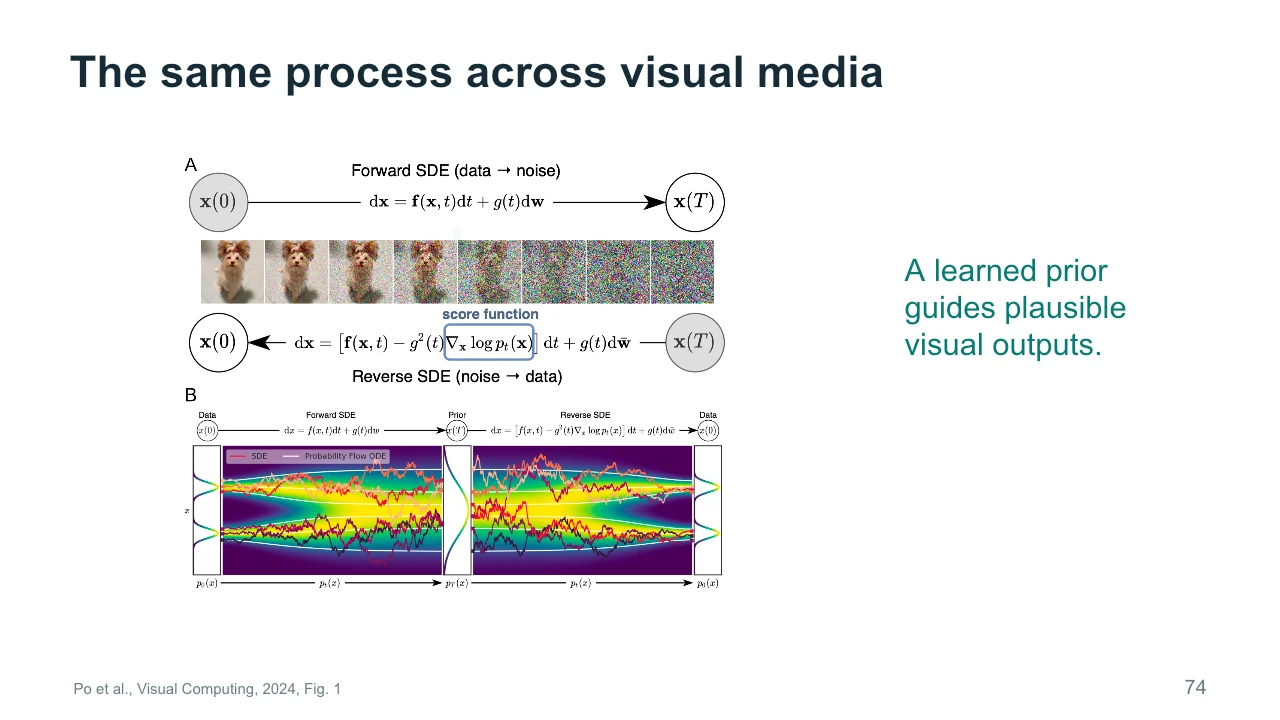
A learned prior captures regularities in the material a model has seen during training. In practical terms, it influences what kinds of outputs the model considers plausible. The figure shows a process that moves from data toward noise and a learned process that moves back toward data. It also includes different mathematical formulations of those paths. You do not need the equations to understand the creative implication. The prior helps supply details that your inputs leave unspecified. Those details can be useful, but they are not guaranteed to be true. Plausibility should therefore be distinguished from faithful reconstruction, factual accuracy, and artistic appropriateness.
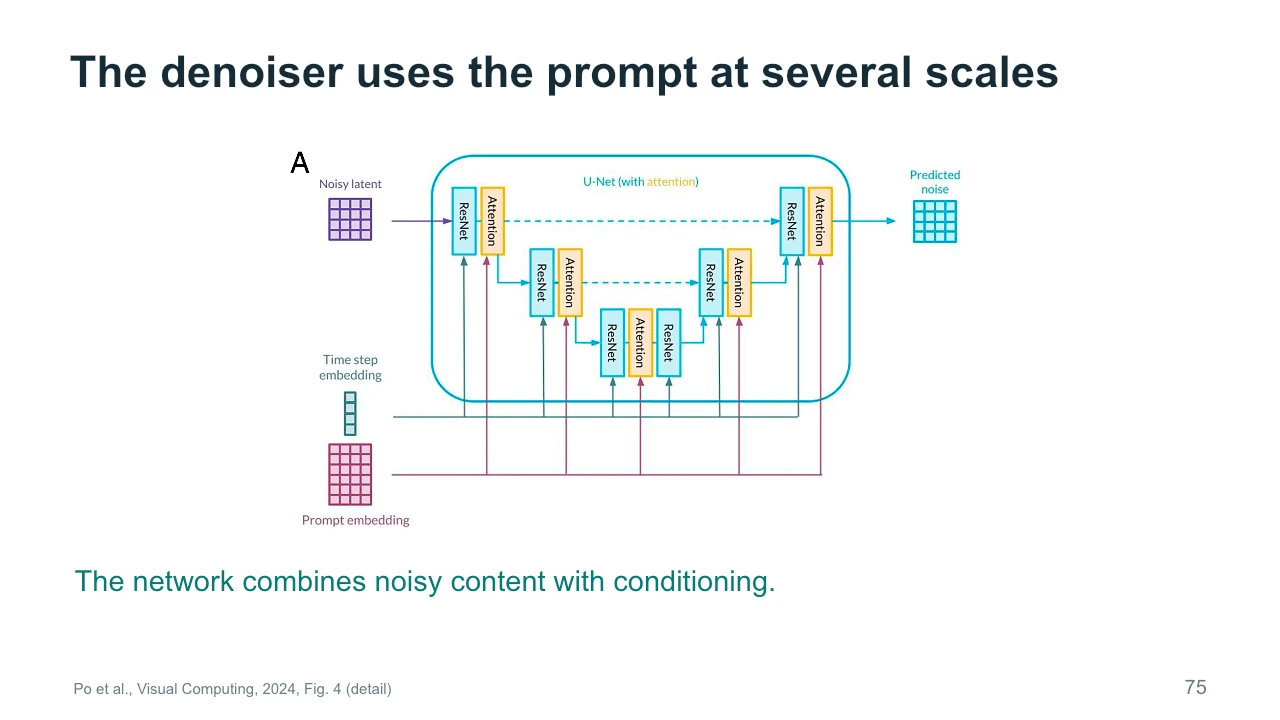
The upper diagram shows a denoising U-Net using information at several spatial scales. The U shape reflects a process that reduces and then rebuilds spatial detail, while connections carry information between stages. Prompt embeddings provide text conditioning. The time-step embedding tells the network about the current noise-removal stage. It does not indicate the moment of an action inside a video. As you trace the diagram, identify the noisy input, the conditions, and the predicted output. This reading strategy is more important than memorizing every block. It lets you connect a model's architecture to the information available when it makes each refinement.
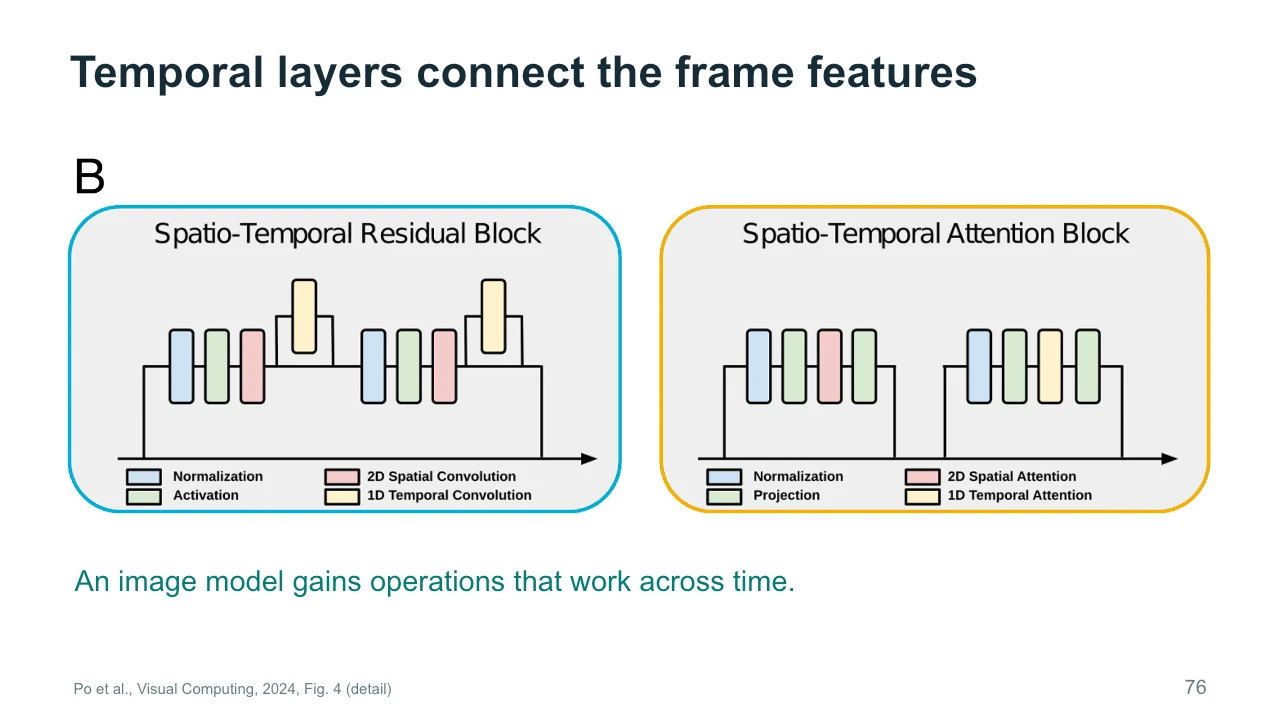
The lower diagram shows a common way to extend image-processing blocks across time. Spatial operations connect information within each frame. Temporal operations connect information across frames. The legend distinguishes these roles, and the inserted temporal components show where the sequence gains additional connections. This is one architectural family, rather than a description of every modern video model. The principle is that treating every frame independently leaves consistency to chance. Connecting frames gives the system a way to coordinate their features. For our moving painting, such coordination can help preserve structure while appearance changes. It still needs suitable training and conditioning to produce the particular change we want.
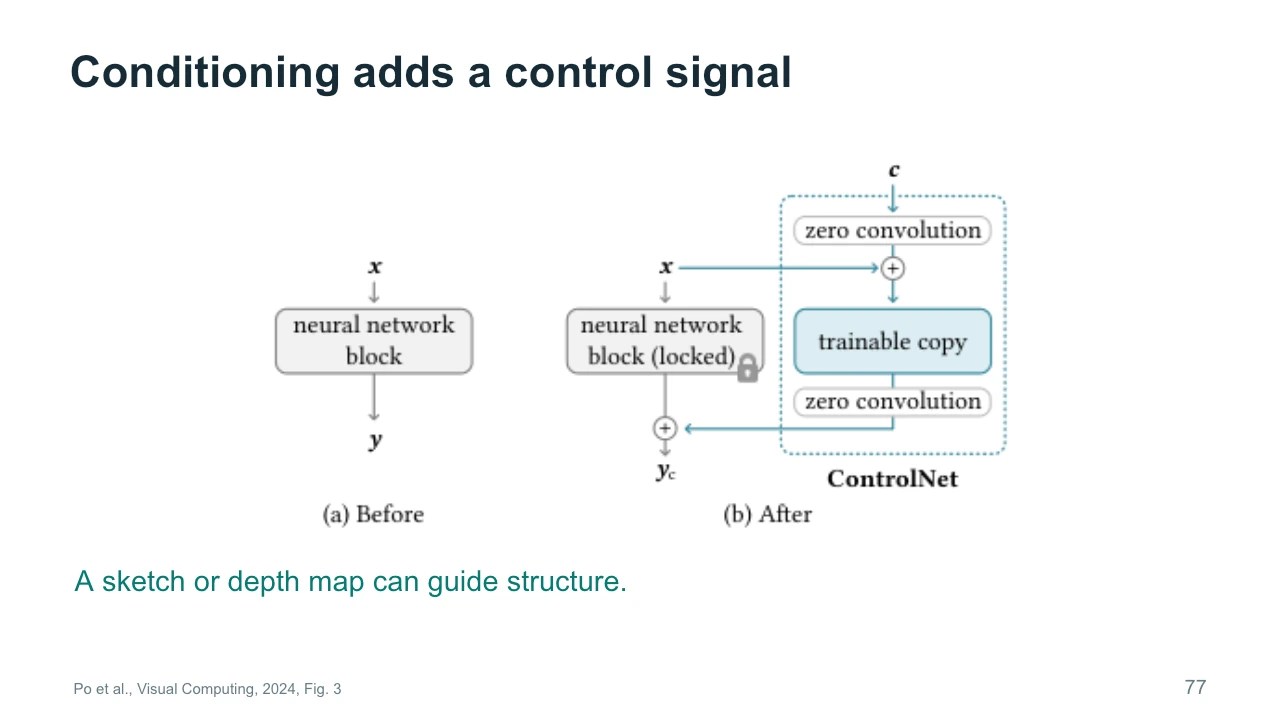
Conditioning adds information that guides generation. ControlNet is a well-known example of a method that incorporates structural signals such as edges or depth. The diagram shows a trainable branch alongside a fixed base network. At a high level, the added branch learns how to use the extra condition. Think of a sketch that places the painting on the left wall of the studio. The sketch provides a spatial constraint that a broad text prompt might not preserve reliably. Different conditions constrain different properties. An edge map says little about the intended material or mood, so you may still need text, references, and later selection to complete the result.
Inversion and personalization have different purposes. Inversion starts with an existing image and seeks a representation or generation path that can reproduce it, often approximately. That representation can then support edits. Personalization adapts a model or concept representation to a particular subject or style. A workflow may use both, but they answer different questions. If you want to edit one existing studio image, inversion may be relevant. If you want to generate many new views of a recurring character, personalization may be relevant. Neither label guarantees exact preservation. Check how well the method reconstructs the input or maintains the subject under the changes your project needs.
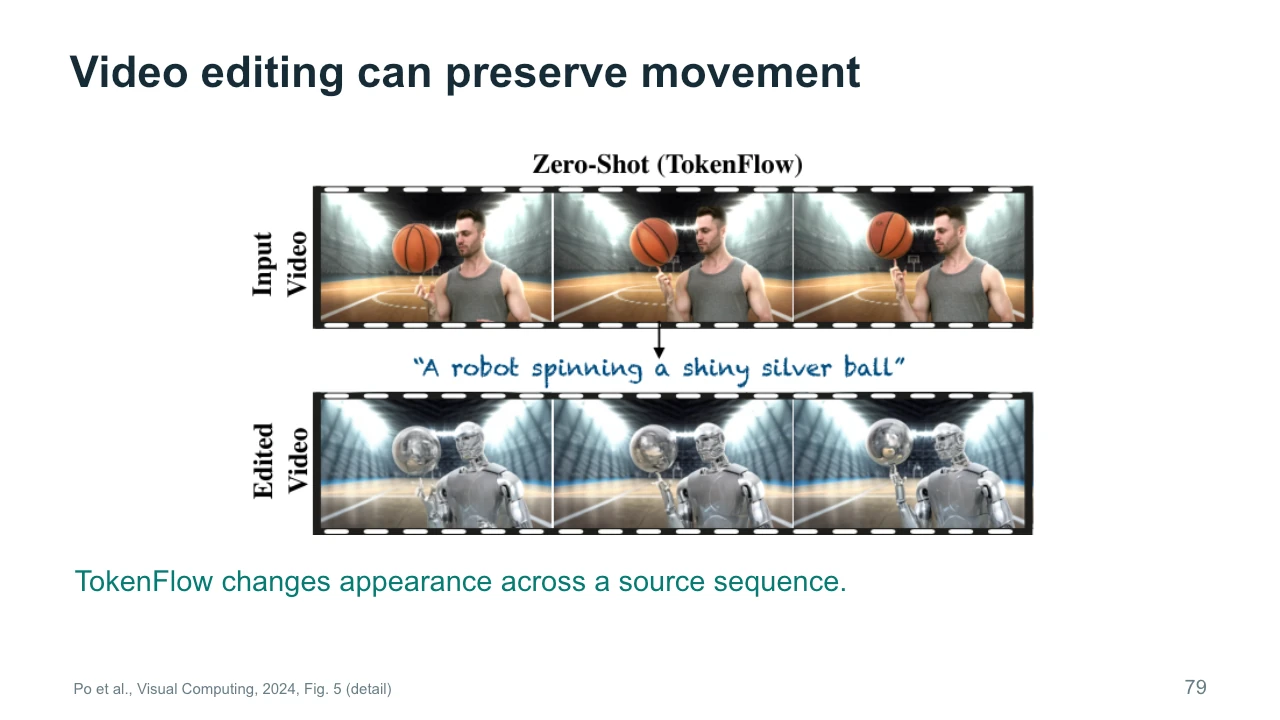
TokenFlow illustrates video editing that aims to preserve coherent movement while changing appearance. The top row shows the input performance. The lower row changes the subject and object while retaining a related sequence of poses and positions. The method uses correspondences between features to help keep the edit consistent. This differs from independently generating a new image for every frame. The example is useful for understanding the task, but selected frames cannot show every temporal issue. For a performance-based art video, inspect whether the intended gesture remains clear and whether changing the surface appearance has unintentionally changed the emotion or physical meaning of the action.
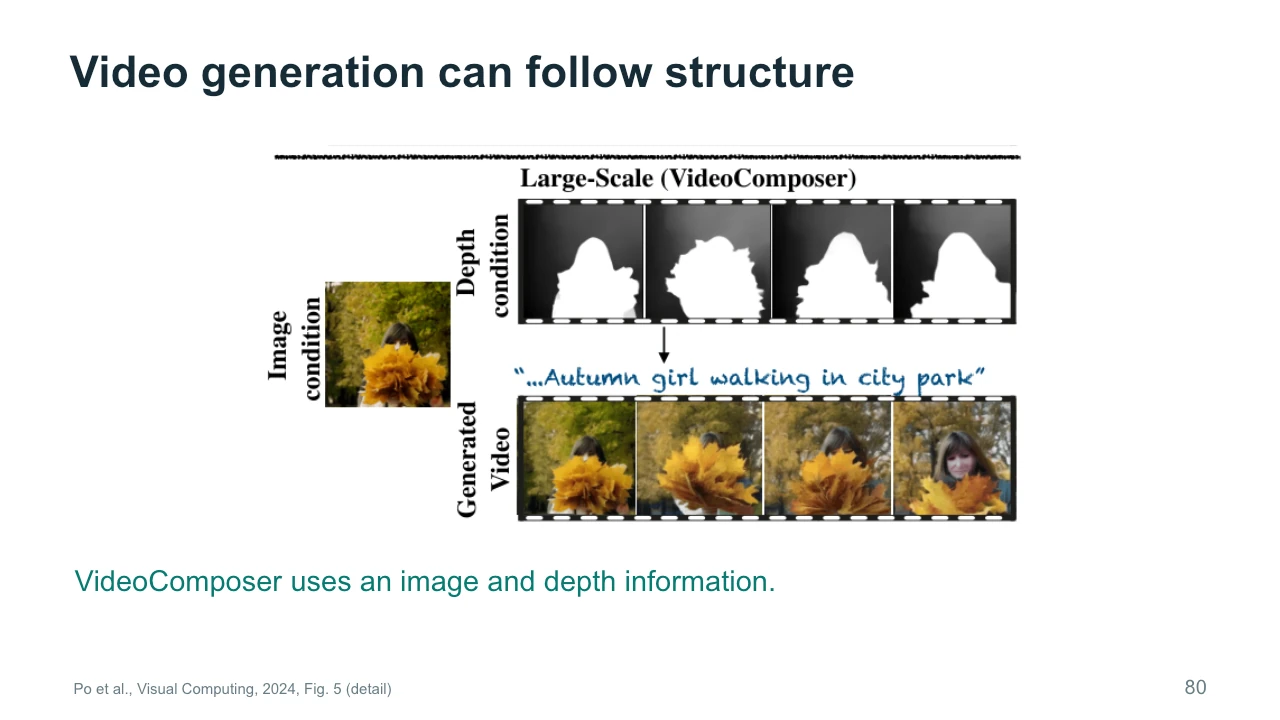
VideoComposer illustrates a different use of conditions. Here, an image supplies appearance information, while a depth sequence supplies structural guidance through time. The generated video combines those inputs with a text description. Look at how each condition answers a different question. The image helps specify what the subject looks like. Depth helps describe spatial structure and its progression. The text describes the desired content or action more broadly. This is a useful way to plan a controlled workflow: choose inputs according to the property each one constrains. More inputs do not automatically produce a better result, especially when their instructions or structures conflict.
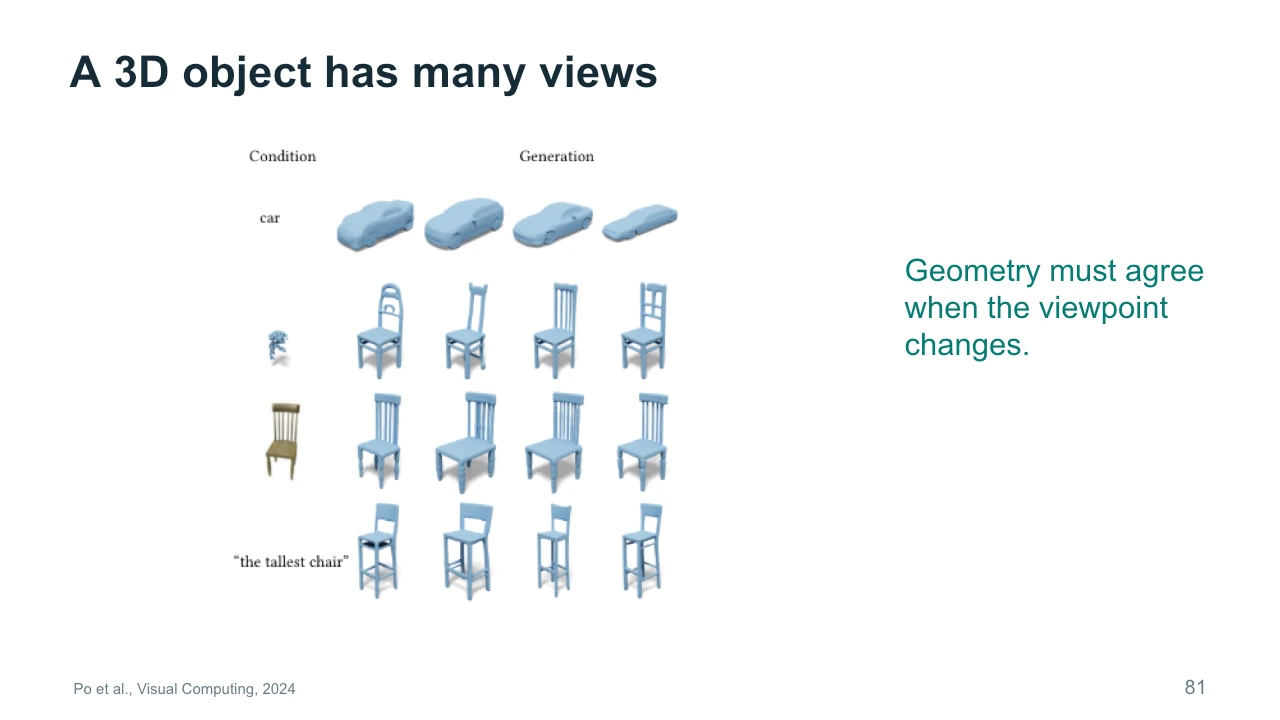
A three-dimensional object has many views, including surfaces that a single picture does not show. The examples display objects under different conditions and viewpoints. A front view can be attractive while the side or back contains implausible geometry. This is a distinctive requirement of reusable three-dimensional material. The representation needs enough consistency to support the views you intend to render. For our studio chair, consider whether it will appear only in the background or whether the camera will circle it. The second use demands more complete inspection. Evaluate generated geometry as an object with a purpose, rather than as a single favorable preview image.
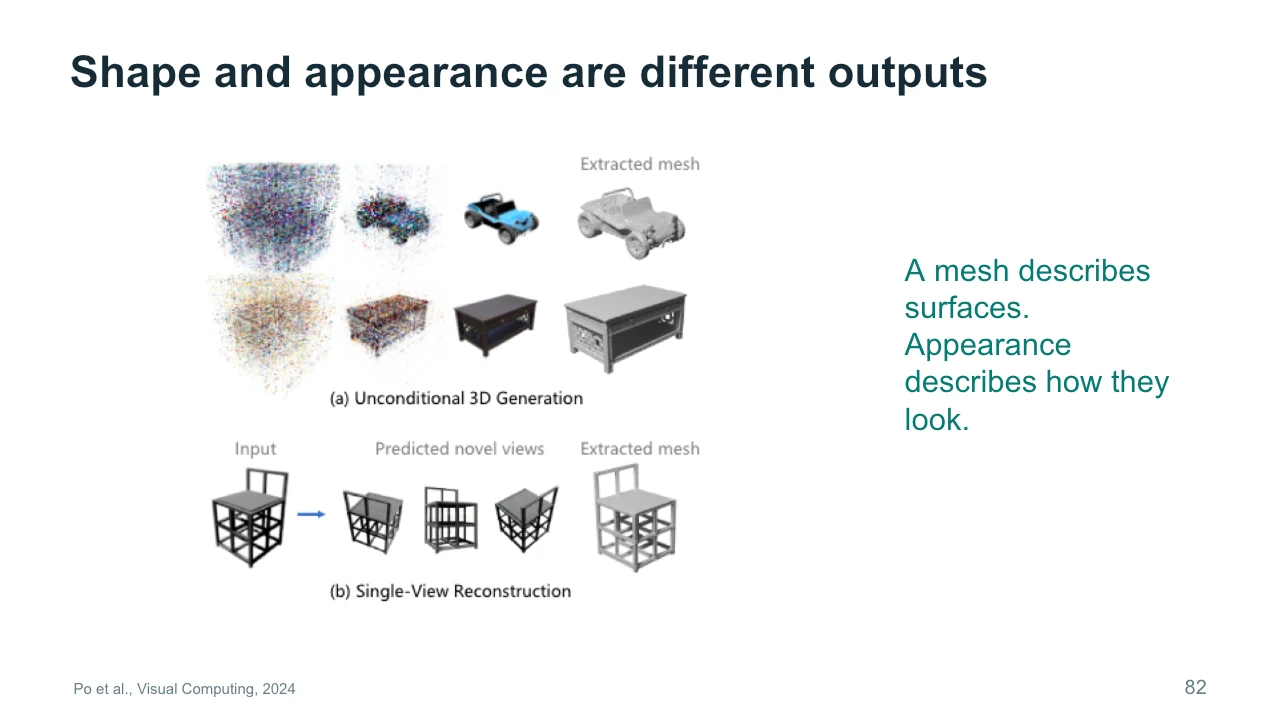
Shape and appearance are related but distinct outputs. A mesh describes surfaces through connected geometric elements. Materials and textures describe how those surfaces look when rendered. The figure separates visual examples from extracted meshes, making the distinction visible. A plausible texture can hide a structural problem from one angle. A clean mesh can also look unfinished until materials and lighting are added. If the object must animate, connectivity and deformation introduce further requirements. For production, inspect the representation that you will actually use. A rendered preview is useful evidence, but it does not replace checking whether the underlying asset supports the intended movement and camera views.
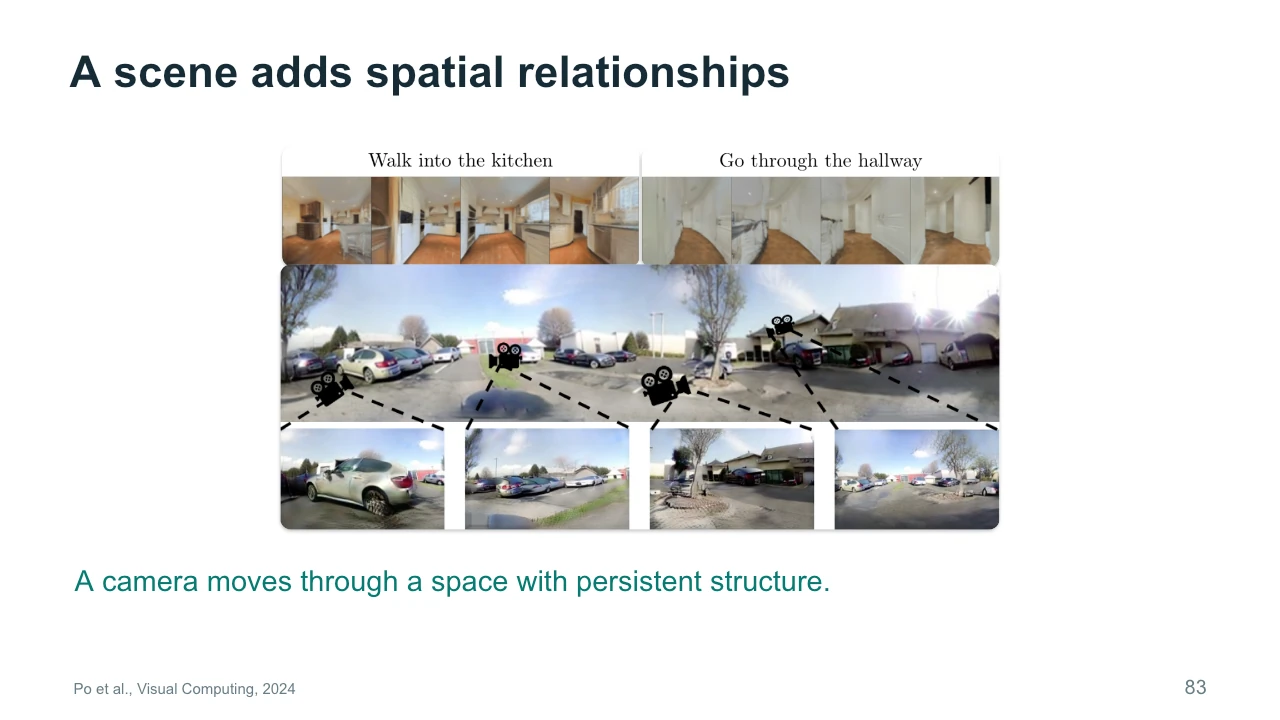
A scene adds relationships between objects and spaces. As a camera moves through a room, doorways, furniture, and walls should form a coherent arrangement. The figure illustrates scene-level generation and related views. This is more demanding than producing an isolated object against a simple background. It is also important to distinguish a video that looks like a camera move from an editable scene representation. The video may look convincing without providing geometry that you can manipulate. If your project needs to change the path later, determine whether the workflow actually supports that operation. The appearance of spatial movement alone does not establish control over three-dimensional space.
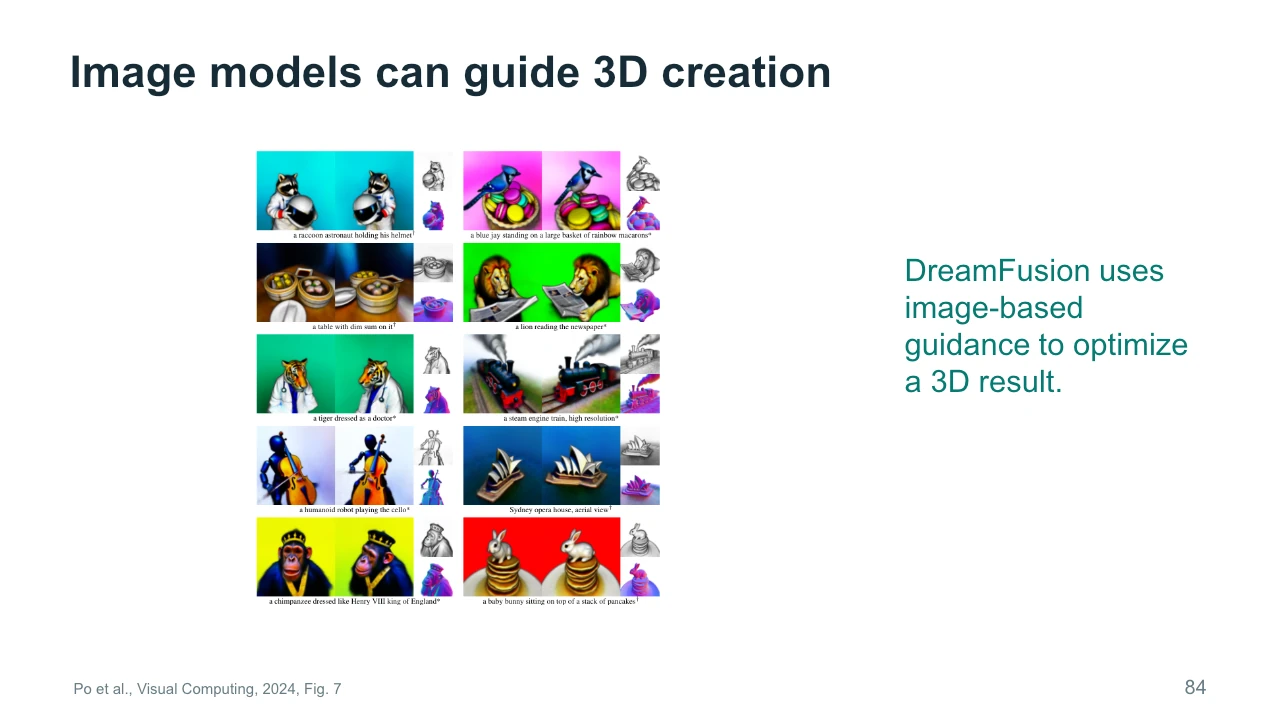
DreamFusion uses image-based generative guidance to optimize a three-dimensional result. The basic idea is to render views of a candidate scene and use a learned image prior to guide improvements. The figure shows outputs from multiple viewpoints, along with other visualizations of their structure. This connects the knowledge of an image model to a different representation. It is an influential idea because large image collections can provide information that is difficult to obtain directly for every three-dimensional object. However, an image prior does not automatically ensure agreement across all views. Look for repeated features, distorted geometry, or inconsistent appearances when evaluating a generated object.
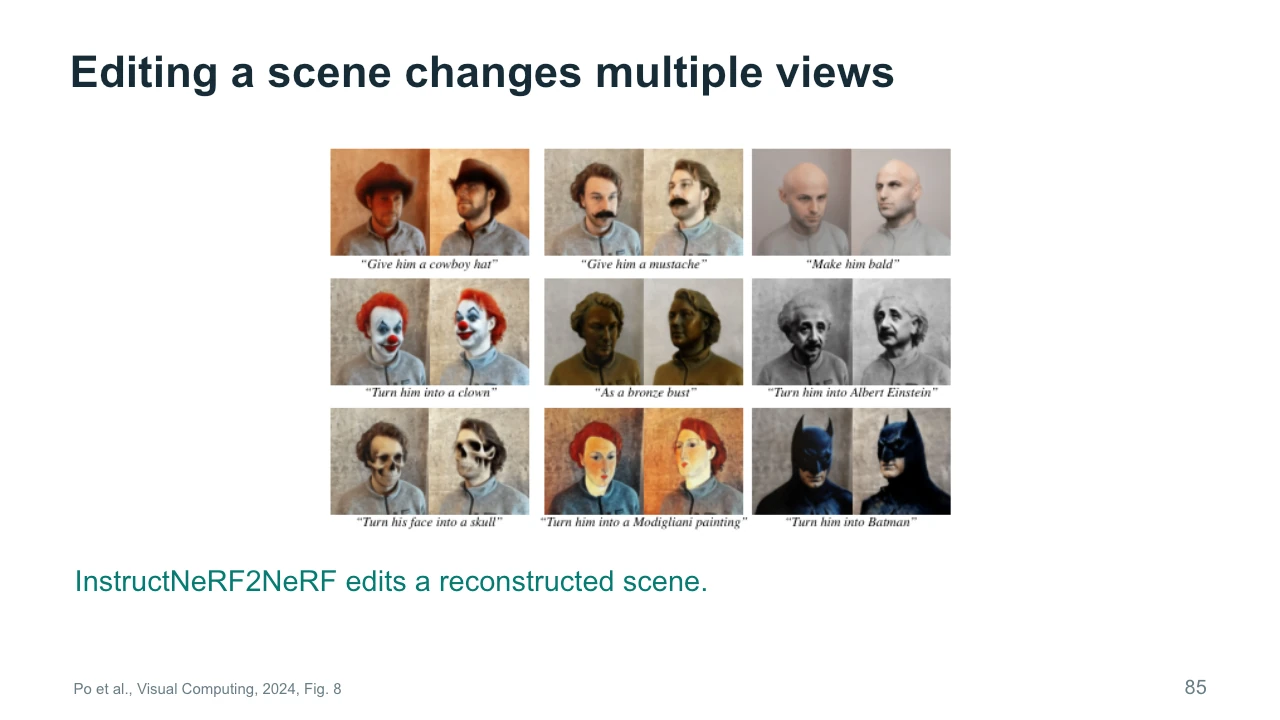
InstructNeRF2NeRF illustrates editing a reconstructed scene using language instructions. The examples alter features while showing the results from related viewpoints. A neural radiance field, or NeRF, represents a scene through a learned function used for rendering. Editing such a representation differs from repainting one isolated photograph. The goal is for the change to appear coherently across views. This can be useful when a creator wants to revise the appearance of an existing captured space. It does not imply that every edit creates physically complete or animation-ready geometry. Always connect the demonstration to the operations you require, such as new camera views or consistent appearance changes.
The output format changes what we can edit later. Pixels give us a finished image surface. A scene representation can support rendering from additional viewpoints. Movement data can separate an action from the character that eventually performs it. Consider two projects: a fixed-view poster and a camera orbit around a sculpture. The poster may need no three-dimensional representation at all. The orbit does. Choosing a more complex representation can add flexibility, but also adds preparation and evaluation work. Pause and name the most important later edit in your project. Then ask which output format makes that edit possible, and what limitations you would need to test before committing.
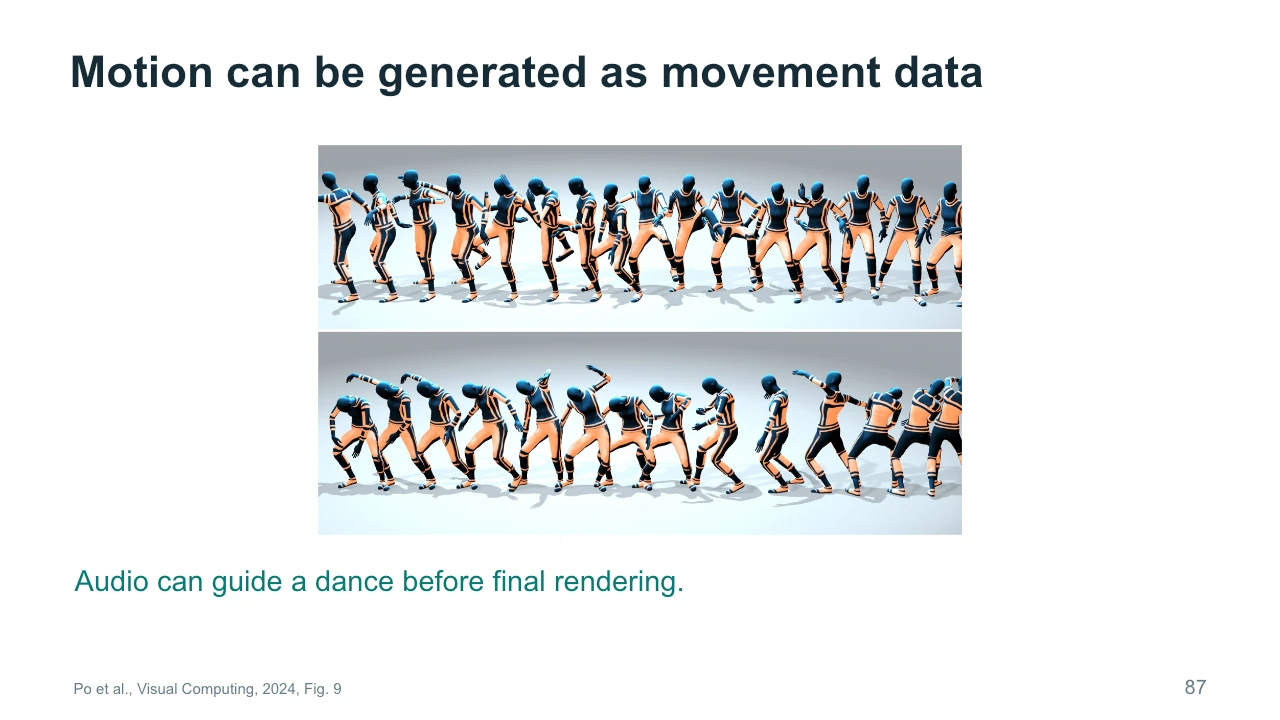
Motion generation can produce articulated movement rather than finished video pixels. The example shows audio-conditioned movement sequences that can later be rendered with a character. This separates what the body does from how the final image looks. The same movement might be applied to different character designs, subject to the capabilities of the rig and retargeting process. This is valuable when timing and performance matter more than a particular rendered appearance. It also introduces its own evaluation questions. Are contacts plausible? Does the body maintain balance? Does the movement relate to the music in a meaningful way? A visually attractive render can conceal problems in the underlying motion.
Our final reading is Advances in Artificial Intelligence: A Review for the Creative Industries by Anantrasirichai, Zhang, and Bull, published in Artificial Intelligence Review in 2026. Its scope extends beyond generation to analysis, enhancement, spatial reconstruction, and other parts of production. Some illustrated examples are older than the publication date, so we will keep those dates clear. This wider view helps explain why improving a generator may not solve the main problem in a project. The difficulty may involve selecting a region, preserving a performance, refining an asset, or judging a result. We now connect those supporting capabilities to the creative workflow as a whole.
Creation sits inside a larger process. Before generation, we establish an intention and gather material that helps communicate it. After generation, we select, revise, combine, and review the results. Sound and editing can change the experience substantially. Think about where time actually goes in your own work. If the problem is unclear pacing, generating a sharper image may not help. If the problem is identity drift, a new music track may not help. Identify the stage responsible for the mismatch between intention and result. This lets you choose a targeted intervention and evaluate whether it resolves the problem, instead of treating every issue as a reason to generate again.
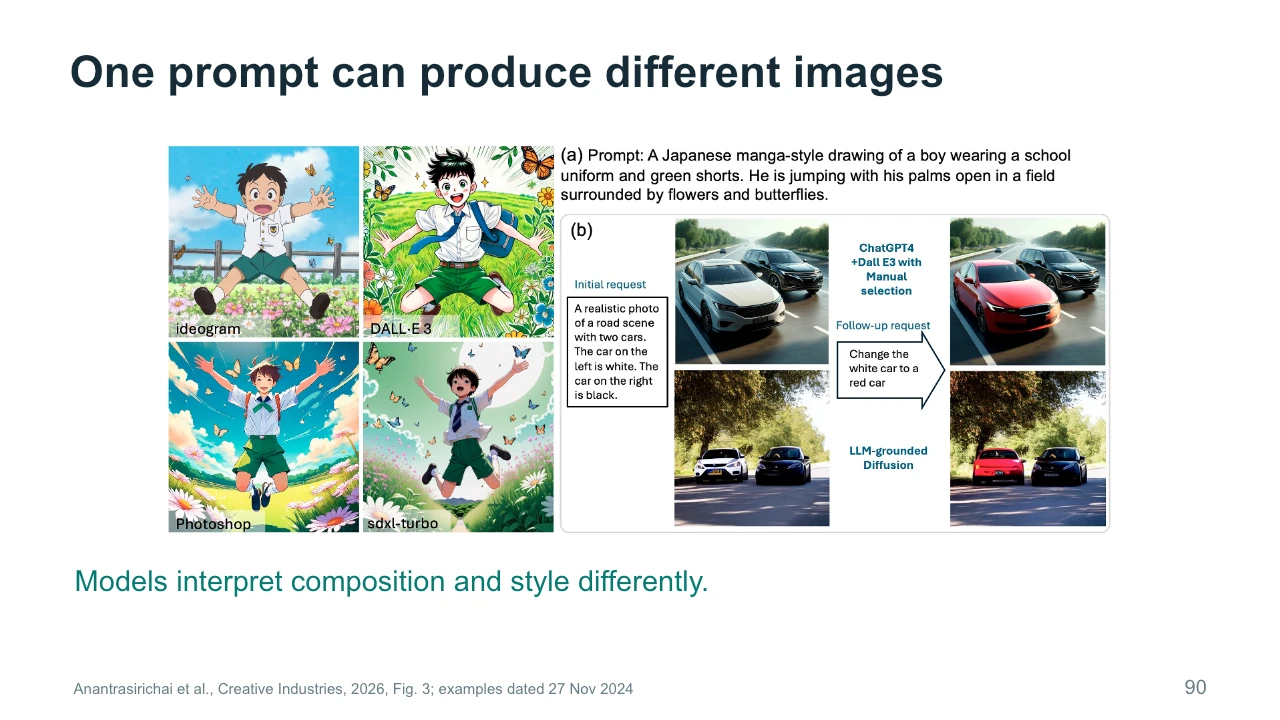
This figure compares image examples produced from a prompt and includes an editing comparison. The examples are dated November 27, 2024. They are historical illustrations, not a current product ranking. Look at composition, object relationships, and the interpretation of style. A shared prompt can leave room for noticeably different results because models and generation settings differ. Even one model can vary across samples. For a fair creative comparison, decide which visible properties matter and inspect more than one output. Declaring a winner from a single attractive picture tells us little about reliability or whether the system can produce the specific sequence our project requires.
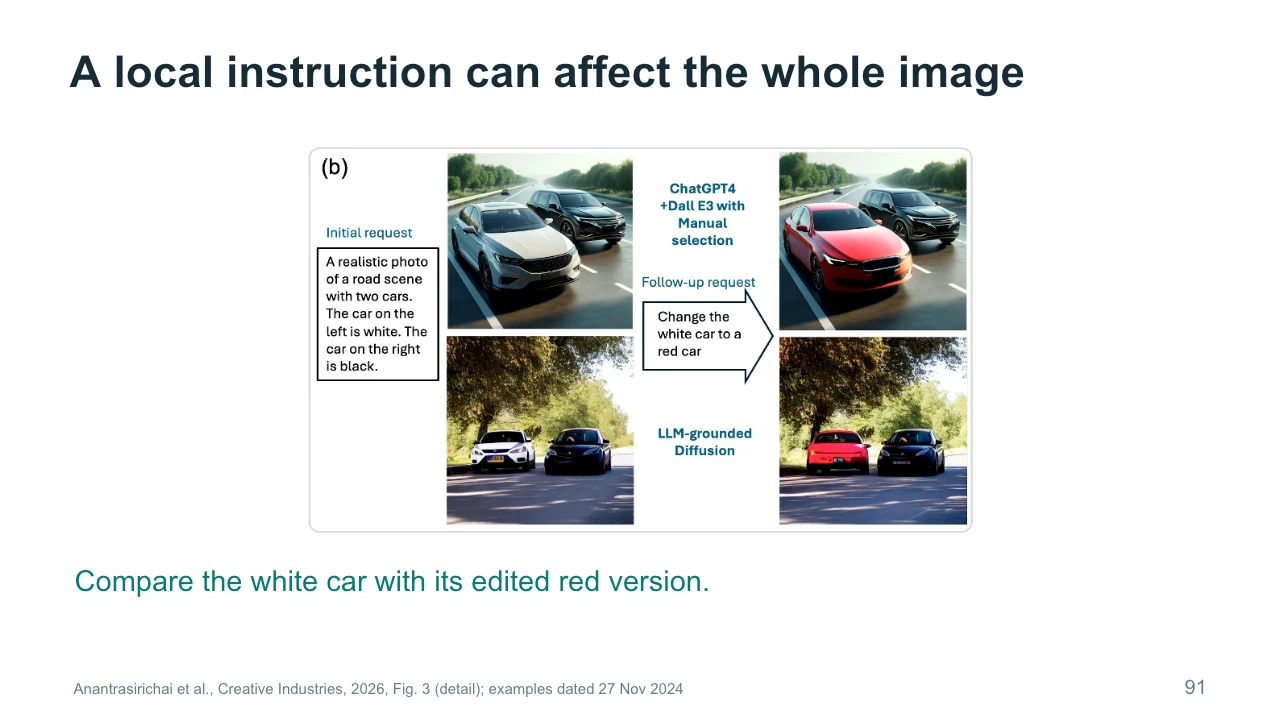
The enlarged editing example asks for a white car to become red. This sounds local, but we should inspect the whole image. Did the second car remain stable? Did the road, lighting, and viewpoint change? A method can satisfy the most obvious part of the request while introducing unwanted differences elsewhere. The figure presents selected historical examples, so it should not be used as a current benchmark. Its teaching value is the evaluation procedure. Define the intended change and the features to preserve, then inspect both. This is the same procedure we would use when editing the painting inside our otherwise stable studio scene.
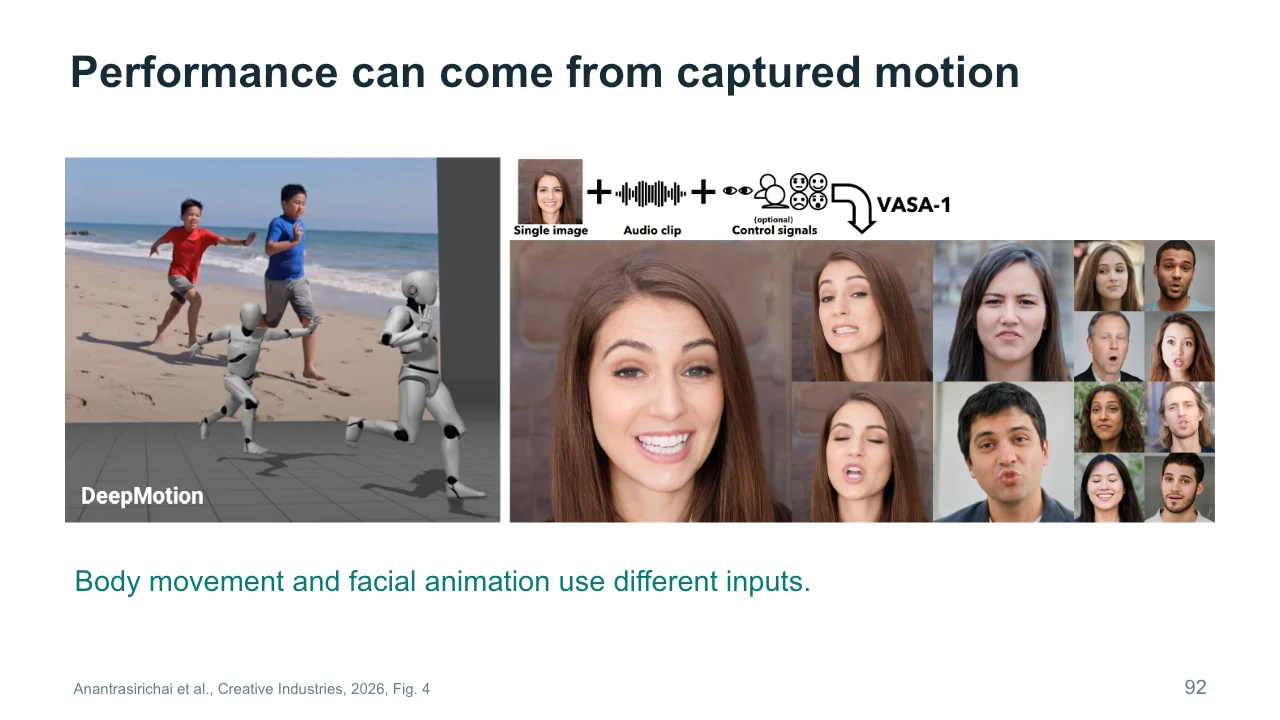
Performance can come from different kinds of source information. The left example involves captured body movement and its use with an animated figure. The right example combines an image with audio for facial animation. These are separate systems, and their inputs constrain different properties. A body-motion reference tells us something about pose and timing. Audio can guide speech-related facial movement. A portrait supplies appearance but does not itself specify a whole performance. When planning a character shot, identify what you already have: a voice recording, an acted movement, or only a design. The available material helps determine which workflow is appropriate and what the model must invent.
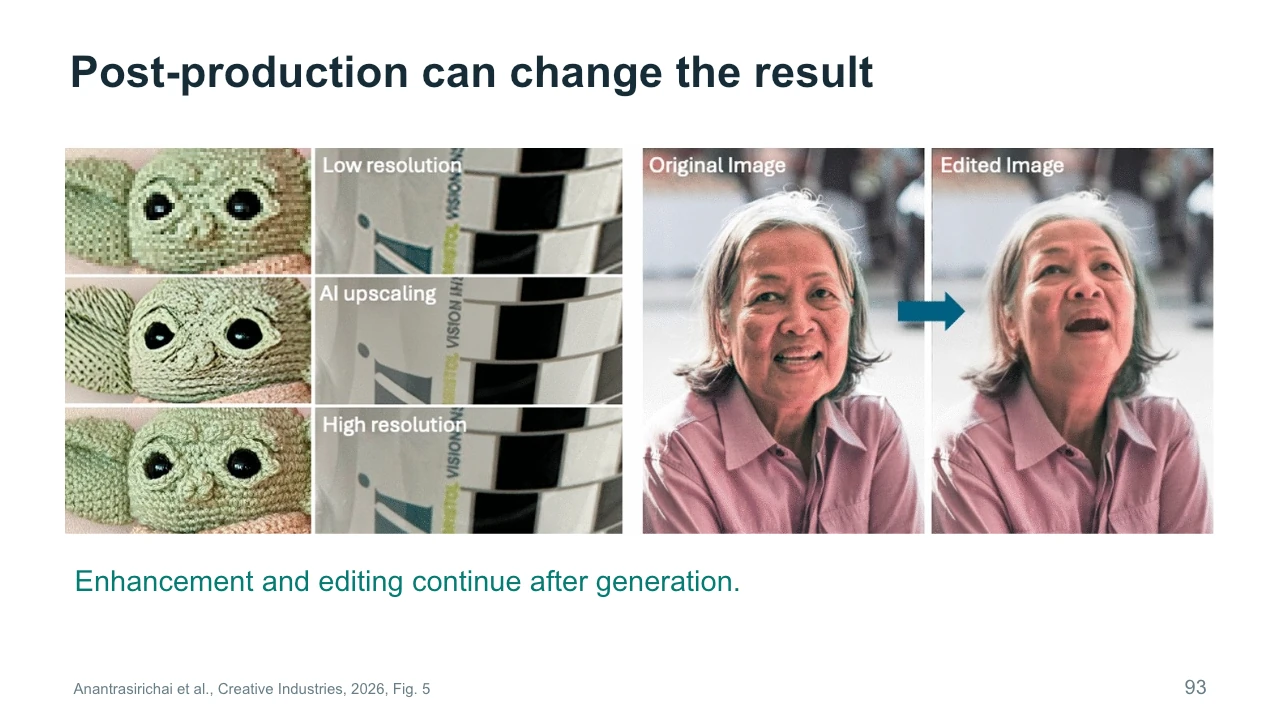
Post-production continues after generation. The figure places image enhancement beside portrait editing to show different kinds of intervention. Enhancement may improve apparent detail or resolution. Editing changes selected content or expression. Both can be useful, but they require evaluation according to the intended task. A sharper face is not necessarily a more faithful face, and an expressive alteration may affect identity. For an art video, you might welcome some changes while rejecting others. Keep an original version so that you can compare what happened. It is easier to judge a revision when the intended improvement is specific and the earlier state remains available for reference.
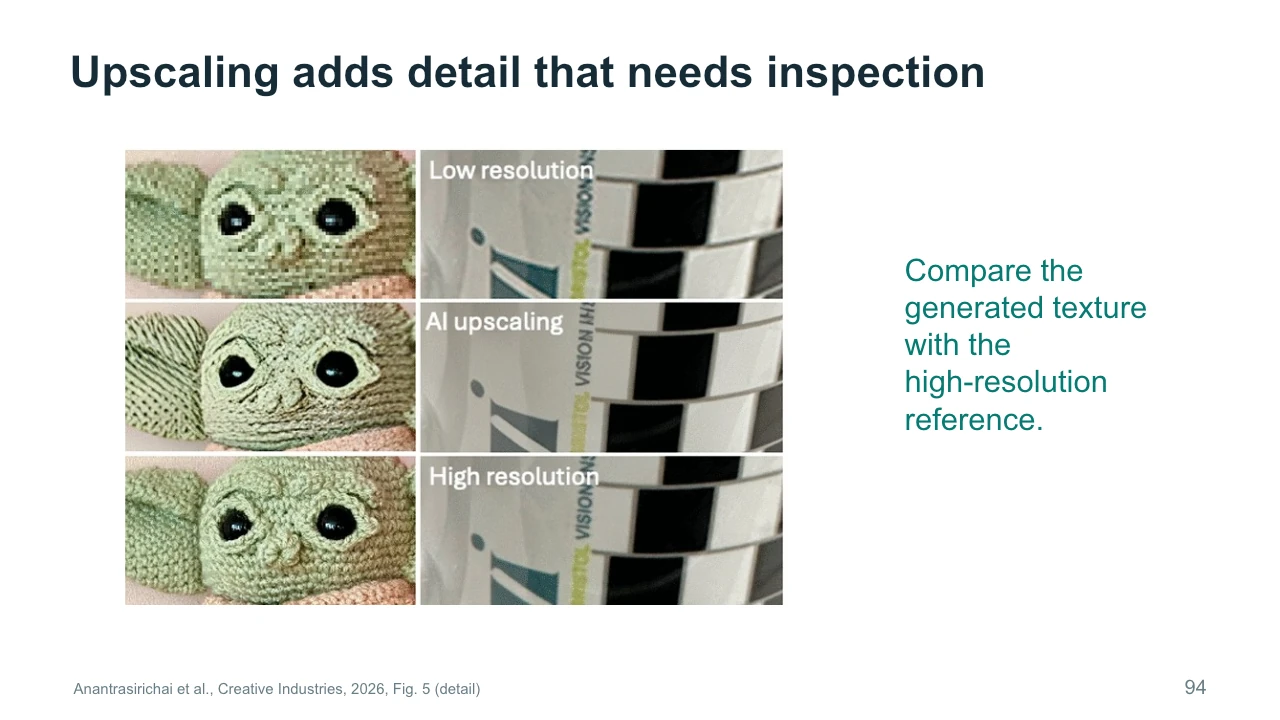
Compare the low-resolution input, the AI-upscaled image, and the high-resolution reference. Pay attention to texture rather than just overall sharpness. The upscaled version can create convincing detail that differs from the reference. This happens because a model uses learned regularities to fill in information that the input does not fully contain. In a new artwork, that contribution may be acceptable or desirable. In faithful restoration, it may be a problem. For video, repeat the comparison across time to check whether the added texture flickers. The evaluation should follow the purpose of the work, rather than assuming that more visible detail always means better quality.
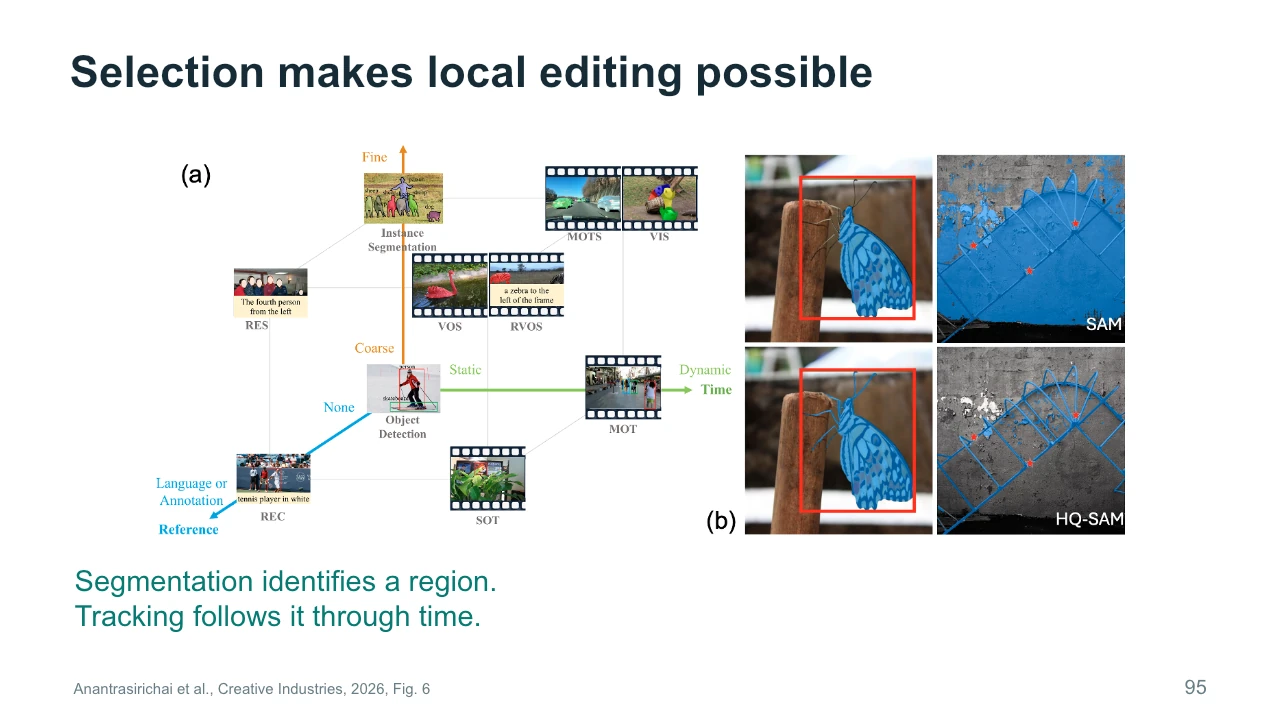
Segmentation identifies regions or objects in an image. Tracking follows an object through a sequence. Together, they can make local video editing more manageable. Suppose we want to alter the returning person's coat while leaving the room unchanged. We need to identify the coat and keep the selected region attached to it as the person moves. The figure organizes several object-understanding tasks and includes segmentation examples. These capabilities support generation and editing without necessarily generating the final content themselves. They are part of the larger workflow. Failures around occlusion or fast movement can cause an edit to jump, leak into the background, or disappear temporarily.
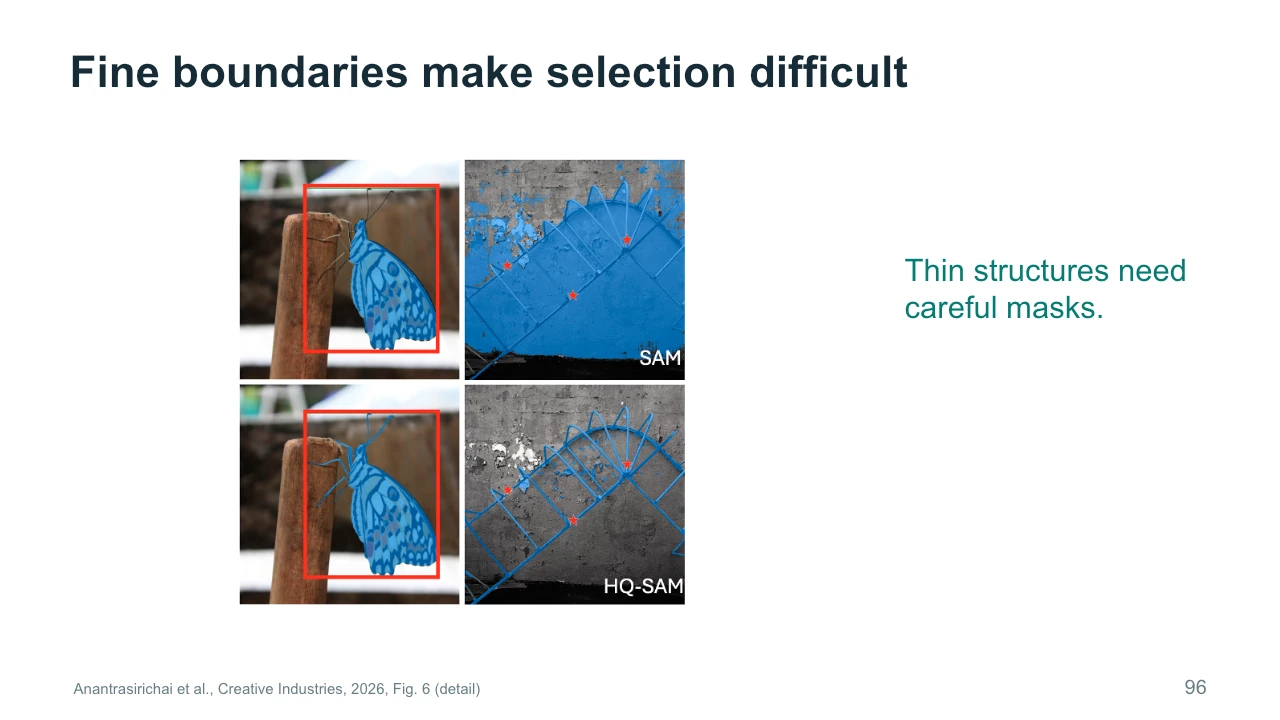
Fine boundaries are difficult because small selection errors can be highly visible. Look at the butterfly outline and the thin structure in the comparison. Hair, transparent material, and narrow gaps create similar challenges in creative work. The figure compares selected outputs from SAM and HQ-SAM. It illustrates the importance of boundary detail, rather than proving that one method always performs better. A mask that looks acceptable in a still frame may still change inconsistently during movement. For our studio, the edge of the painting is a useful inspection point. A clean interior transformation can be undermined by a shifting outline or an edit that spills onto the frame.
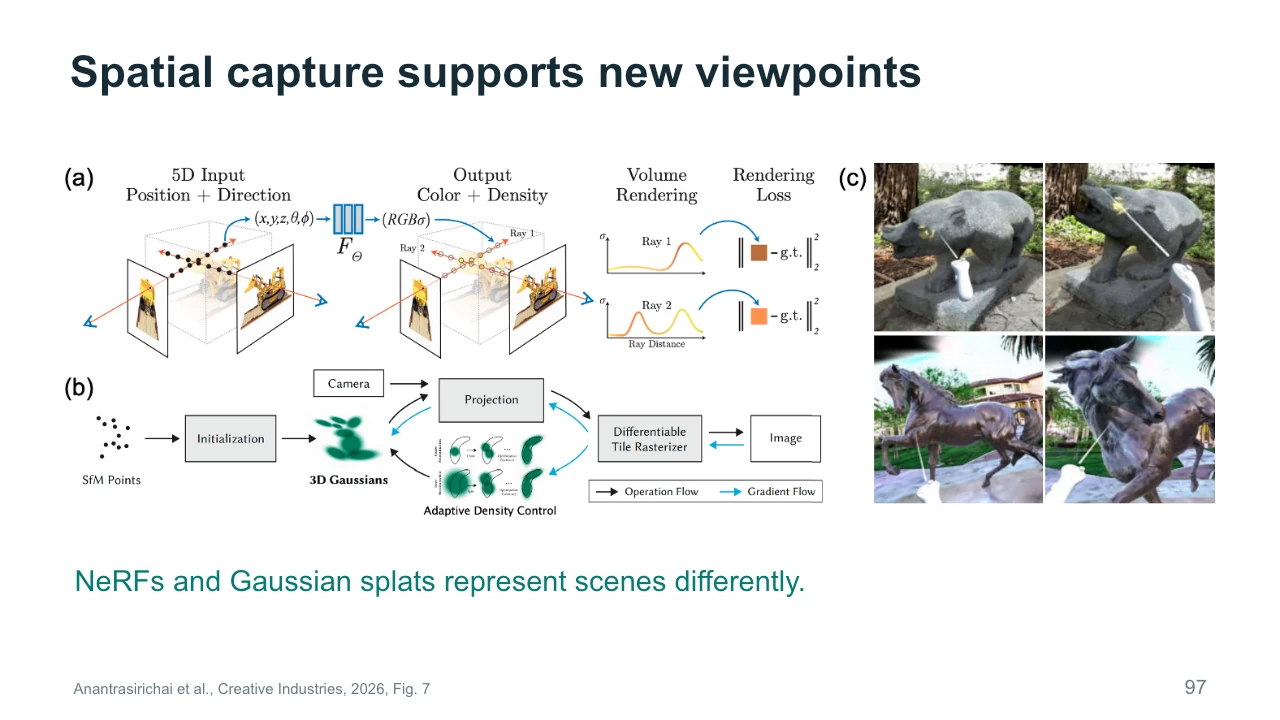
NeRFs and Gaussian splats are different ways to represent scenes for rendering. A NeRF uses a learned field that describes properties queried along viewing rays. Gaussian splatting uses many spatial primitives with properties such as position and appearance. The figure places their processes alongside examples of spatial interaction. You do not need to master their mathematics to understand the production question: what views can this representation render well, and what can I edit? Capture coverage and reconstruction quality still matter. A scene representation does not automatically contain reliable hidden surfaces. Test the intended viewpoint range before building a film or interactive experience around that freedom.
Quality has several meanings. An image can be sharp but fail to convey the intended action. A sequence can match a prompt yet feel emotionally wrong. A distorted image can also serve a deliberate artistic purpose. These observations call for separate judgments, rather than one vague claim that the output is good. For the studio, you could assess technical continuity, the clarity of the reveal, and the audience's interpretation. Different viewers may disagree about the last part, and that disagreement can be useful evidence. Explain the criteria you chose and why they suit the work. Automated measures can contribute, but they cannot settle every question about artistic experience.
A process record helps other people understand what you made and how you made it. Save important references and meaningful before-and-after versions. Record model names and versions when available, along with settings needed to repeat a comparison. Explain the decisions that changed the work, including choices made in editing or sound. This is more informative than presenting a final output with only a prompt. It also helps you diagnose your own workflow when a later result differs. For coursework, follow the assignment's actual requirements. The broader habit is to make your contribution and source material understandable without turning the record into an unstructured collection of every experiment.
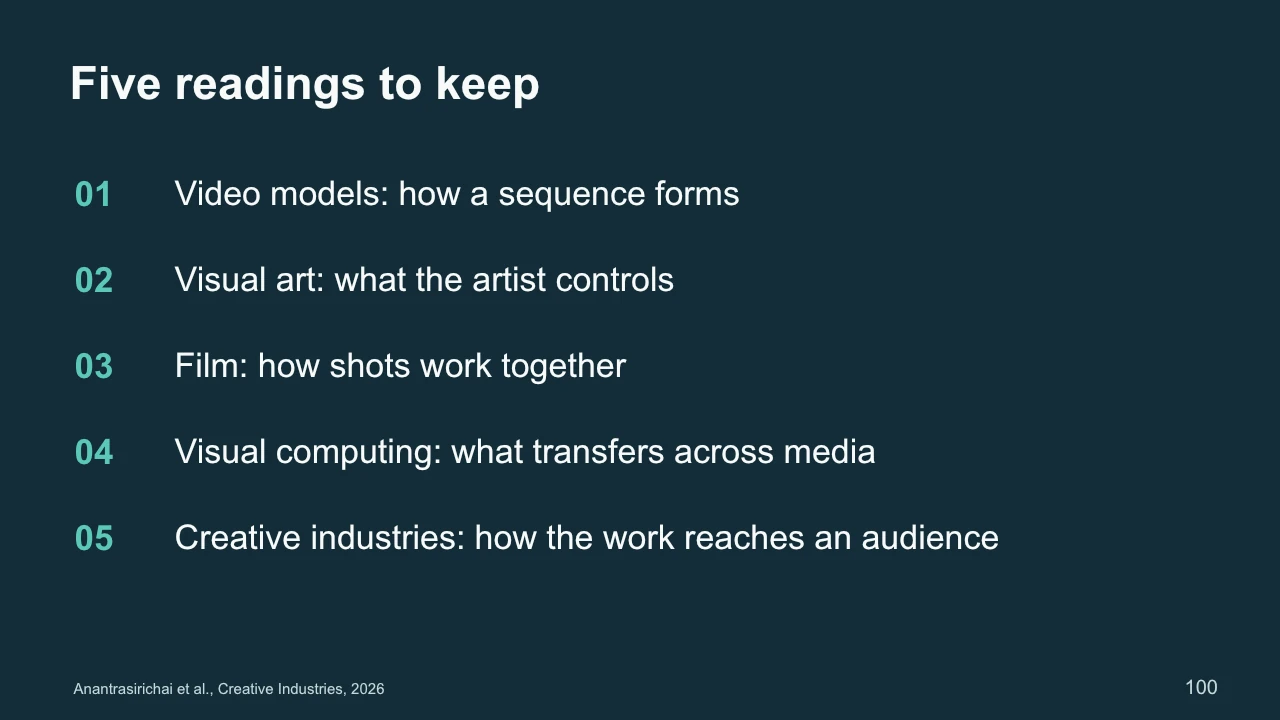
We have used five readings to follow a creative process from model behavior to finished work. The video survey explains how sequences form and how inputs constrain them. The visual-art survey connects methods to intention. The film survey shows creators combining tools and making production decisions. Visual computing explains how related ideas transfer across different representations. The creative-industries review places generation alongside supporting tools and evaluation. Choose one decision you would now change in your own project. Explain which reading informed it, what visible result you expect, and how you would test that expectation. That connection between a method, an intention, and evidence is the central skill to take from today's lecture.